
MSI Clutch GM41 Lightweight Wireless (S12-4300860-C54)
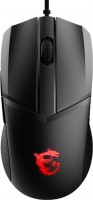
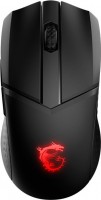 | Outdated Product Designed for gamers, the mouse combines an ultra-lightweight design with high-performance components. Weighing just 74g, the grips provide a smooth ride on any surface, the soft rubber side grips improve grip, and the symmetrical shape is equally comfortable for both right and left hands. At the same time, reliable OMRON mechanical switches respond to each click with high accuracy and are designed for a long service life of more than 60 million clicks. Also worth noting is RGB lighting with customizable effects. But the main strength of the MSI Clutch GM41 Lightweight Wireless is hidden inside. The PixArt PAW 3370 optical sensor has 20000 DPI sensitivity and 400 IPS motion tracking speed, and thanks to 2.4G RF wireless technology, the response time is only 1ms. The mouse works without wire...s, and the USB adapter can be stored while traveling right in the case. A single battery charge is enough for 80 hours of battery life, and if the energy runs out at the wrong time, you can use a detachable cord. The charging station takes up only one USB 2.0 port, as it can be used both for a wireless adapter and for charging the mouse itself. Just 10 minutes at the station provides up to 9 hours of operation, and a full charge will take an hour and a half. |


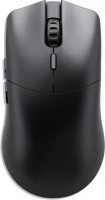


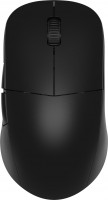
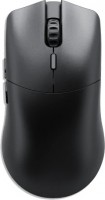
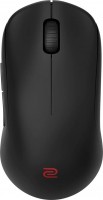
MSI Clutch GM41 Lightweight Wireless | |||||||||||||||||||||||||||||||||||||||||||||||||||||||||||||||||||||||||||||||||||||
|
| ||||||||||||||||||||||||||||||||||||||||||||||||||||||||||||||||||||||||||||||||||||


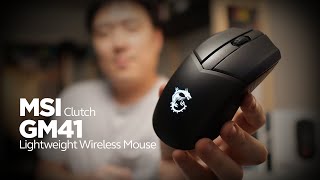
Designed for gamers, the mouse combines an ultra-lightweight design with high-performance components. Weighing just 74g, the grips provide a smooth ride on any surface, the soft rubber side grips improve grip, and the symmetrical shape is equally comfortable for both right and left hands. At the same time, reliable OMRON mechanical switches respond to each click with high accuracy and are designed for a long service life of more than 60 million clicks.
Also worth noting is RGB lighting with customizable effects. But the main strength of the MSI Clutch GM41 Lightweight Wireless is hidden inside. The PixArt PAW 3370 optical sensor has 20000 DPI sensitivity and 400 IPS motion tracking speed, and thanks to 2.4G RF wireless technology, the response time is only 1ms. The mouse works without wires, and the USB adapter can be stored while traveling right in the case.
A single battery charge is enough for 80 hours of battery life, and if the energy runs out at the wrong time, you can use a detachable cord. The charging station takes up only one USB 2.0 port, as it can be used both for a wireless adapter and for charging the mouse itself. Just 10 minutes at the station provides up to 9 hours of operation, and a full charge will take an hour and a half.
Always clarify the specifications and configuration of the product with the online store manager before purchasing.
Catalog MSI 2026 - new arrivals, bestsellers, and the most relevant models MSI.














0 0 2 2 |
Price Weight Hand comfort Charge and stand The cable that inserts into the stand is actually somewhat difficult to insert. However, since you'll need to do this only when you decide to reflash the mouse through it, I don't consider it a problem. Lack of a charge indicator. Because I really have no idea where to find it. Maybe there's something like it in MSI Center, but I haven't seen it. Again, it's not a problem considering it holds a charge for a long time and performs well. Still, it's uncomfortable to navigate blindly. use MSI Clutch GM41 Lightweight Wireless few months |
I've been using this mouse for about a year now. There haven't been any problems (except for the crappy software). The mouse itself feels nice to the touch and has good build quality. Assembly Weight (depends on preference) How it holds a charge Crooked software  Idpershin: use MSI Clutch GM41 Lightweight Wireless more than year Idpershin: use MSI Clutch GM41 Lightweight Wireless more than year |
Good, but such flaws after a week of regular use - it's terrible)) I described and showed it in more detail here - https://youtu. Sensors; size; charging station! The case (or paint) swam in a week!  Vovanu4 : use MSI Clutch GM41 Lightweight Wireless few months Vovanu4 : use MSI Clutch GM41 Lightweight Wireless few months |



Non-stop
Lightweight and practical mouse that does not cause fatigue during prolonged use. Its weight is only 74 g. The PixArt 3370 sensor is adapted for FPS games and allows you to adjust the sensitivity within the range of 400 - 6400 DPI, which is optimal for precise aiming. These settings are also good for working on a computer. The user can successfully combine professional activities and gaming. MSI Clutch GM41 operates in wired and wireless modes. The connection can be made using a radio link or a detachable MSI FriXionFree Micro USB cable with a gold-plated connector to minimize latency. It is worth noting that the package includes a docking station for charging the battery, as well as the possibility of emergency replenishment of energy (9 hours of autonomy in 10 minutes), so there is no chance of missing an important event.
Nothing extra
MSI Clutch GM41 Lightweight Wireless allows you to fully focus on the tasks at hand. The design provides the usual set of buttons (2 main and 2 side keys + wheel) for office work and shooters, so that additional elements do not interfere with the user. The DPI switch has moved to the bottom of the case, and the additional side keys are small in size and minimize the risk of accidental pressing. You can change the standard functionality using proprietary MSI Center software. There is no support for macros, so playing in more complex genres (MMO, MOBA) is problematic.
It's hard to say much about the shape, but I find it extremely comfortable. Before buying, I didn't have a chance to try out the "rodent." However, at DNS Belaya Dacha, I got to play around with the Logitech G503 and SteelSeries Rival 600. These are more expensive, heavier, and not as comfortable. I switched between them for about 20 minutes, and it was uncomfortable for my pinky finger. It's hard to explain.)
As for the build quality, there are no issues. Reviews mentioned that if you shake the mouse, the right button might rattle, but mine doesn't, which is nice. I haven't used the side buttons yet, and their convenience is subjective anyway. There is a feature where they might activate if you squeeze the mouse from the sides. But you'd really have to try, and in regular use, you won't encounter this problem. ;)