
Xerox Phaser 3020
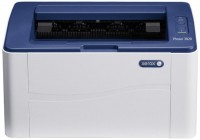 | Outdated Product A relatively inexpensive printer with LED monochrome printing and compact dimensions, making it a device that does not take up much space on the work surface. It can serve as a good choice for both personal use at home and for work in a small office. The main paper format is A4 with a maximum image resolution of 1200x1200 dpi and a fairly fast printing speed — at the level of 20 pages/min. The device supports paper of various densities, including printing on envelopes, transparent films, and stickers. The maximum allowable workload is no more than 15,000 pages per month, although the manufacturer recommends not exceeding 12,000 sheets. Data transfer can be carried out either via the USB 2.0 port or through the Wi-Fi module, which is very convenient...given the development of multimedia technologies. Additionally, it is worth noting that this printer has special modes: Toner Save, automatic image scaling depending on the selected sheet format (Fit-to-Page), printing posters (Posters), Watermarks printing, and the overlay printing mode (Overlays). |


A relatively inexpensive printer with LED monochrome printing and compact dimensions, making it a device that does not take up much space on the work surface. It can serve as a good choice for both personal use at home and for work in a small office. The main paper format is A4 with a maximum image resolution of 1200x1200 dpi and a fairly fast printing speed — at the level of 20 pages/min.
The device supports paper of various densities, including printing on envelopes, transparent films, and stickers. The maximum allowable workload is no more than 15,000 pages per month, although the manufacturer recommends not exceeding 12,000 sheets. Data transfer can be carried out either via the USB 2.0 port or through the Wi-Fi module, which is very convenient given the development of multimedia technologies. Additionally, it is worth noting that this printer has special modes: Toner Save, automatic image scaling depending on the selected sheet format (Fit-to-Page), printing posters (Posters), Watermarks printing, and the overlay printing mode (Overlays).
|
| ||||||||||||||||||||||||||||||||||||||||||||||||||||||||||||||||||||||||||


Always clarify the specifications and configuration of the product with the online store manager before purchasing.
Catalog Xerox 2026 - new arrivals, bestsellers, and the most relevant models Xerox.
1 3 2 7 |
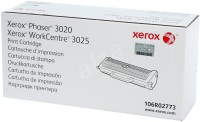
prints well, pleases with the ability to print via wi-fi Cartridge - problems with replacement, it's good only for those who live in one of the 11 cities of Ukraine)))) Why not immediately make a normal cartridge, and not the initial 700 copies - then change it to a standard 1500 copies, be sure when a good product - its something then you need to spoil it))) I like everything, but they got these replacements, took 4 pieces for the office - I got a hassle ... use Xerox Phaser 3020 month or more |
Low price Pleasant material Compact size Terrible software and internal interface. I'd like to look the developer in the eye and then spit in their face.  Andrey Shtapauk: use Xerox Phaser 3020 few months Andrey Shtapauk: use Xerox Phaser 3020 few months |


PS. It also works terribly through a cable.