
Acer OMR060
 |


We recommend products in stockMice Acer →

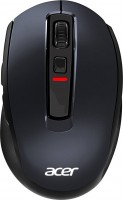
laptop (compact), radio, buttons: 5, + wheel, свитчи: up to 3 mln, sensor 1600 DPI, 2xAAA

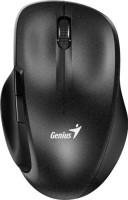
Acer OMR060 | |||||||||||||||||||||||||||||||||||||||||||||||||
|
| ||||||||||||||||||||||||||||||||||||||||||||||||


The information in the model description is for reference purposes.
Always clarify the specifications and configuration of the product with the online store manager before purchasing.
Catalog Acer 2026 - new arrivals, bestsellers, and the most relevant models Acer.
Always clarify the specifications and configuration of the product with the online store manager before purchasing.
Catalog Acer 2026 - new arrivals, bestsellers, and the most relevant models Acer.

How to choose a gaming mouseWe'll look at grip types, sensor sensitivity, pushbutton switches, and other important nuances

How to choose a mouse for games, office tasks and creative workLet's explore the nuances of the computer mouse market together and find the perfect options that match your requirements
AccessoriesAll accessories for Acer OMR060 →











Model overview based on user reviews
The Acer OMR060 mouse is praised for its ergonomic design and affordable price, making it a great value for money. Users appreciate its lightweight build and comfortable grip, enhanced by special side grips that prevent slipping. The mouse features a sensor resolution range of 800 to 1600 DPI, which can be adjusted on the fly using the DPI button. It is noted for its stable sensor performance and soft, quiet clicks. While some users mention the cursor occasionally jumps, the overall feedback is positive, highlighting its reliable wireless connection and long battery life. The mouse is primarily designed for right-handed users, and its simple design is complemented by a pleasant tactile experience. Despite minor issues with button placement for some, the Acer OMR060 is recommended for its high build quality and functionality.
Pros
Cons
0 0 4 4 |
I just got a rodent, for me it's good. Normally sits even in my large paw. True, at the first opening of the battery compartment, I almost broke my nail) Yes, here's another thing: in the photo it is blue, but in reality it is black. For me, this is even a plus: it looks better. Of the minuses - the side buttons are too shifted forward, even if you hold the mouse not with your fingers, as I usually do, but with the whole palm. You need to reach for the front button. Convenient form. The rest is a mouse like a mouse The front side button is far away  Leha Maslov: use Acer OMR060 less than month Leha Maslov: use Acer OMR060 less than month |
I haven't updated my home equipment in a while, and I've started doing it gradually. Thanks to this mouse, I found out that regular office mice now come with dpi buttons and side extras... A couple of years ago, I hadn't come across such affordable mice, and here there's a whole set. The sensor resolution ranges from 800 to 1600 dpi. Lightweight, does not slip out of hand due to special side grips, the dpi button helps change the sensor resolution on the fly Satisfied with the mouse, nothing negative to note. |
The only thing is that it goes to sleep after about a minute if not used, but it also quickly wakes from sleep mode as soon as you click it or move it slightly, so that's not really a problem. The weight is perfectly balanced. Long battery life, balanced weight, does not lose signal at a long distance, extremely convenient, pleasant to use. Noooo Pavel: use Acer OMR060 few months |
3 out of 8 user review(s) shown
5 more user review(s)
Ask Question