
Acer Predator XB273K 27 " black
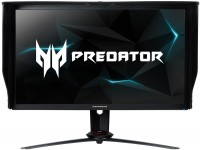 | Outdated Product The top gaming monitor of 2018 with a high-quality 27-inch UltraHD screen, increased frame rate up to 144 Hz, support for Nvidia G-Sync technology and a complete three-sided plastic screen to protect against glare. It is positioned as a premium product that can satisfy the needs of not only amateur gamers, but also true professionals of any esports disciplines. With 30-bit colour support, VESA DisplayHDR 400 certified can display more than a billion colours, greatly enhancing HDR image detail in shadows and highlights. The design of the Acer Predator XB273K monitor uses a 10-bit (8-bit + FRC) AHVA-IPS type matrix manufactured by AU Optronics with LED backlighting on LEDs with Quantum Dot technology. Thanks to the implementation of Visual Response Boost technology, the minimum response time...was reduced to 4 ms GtG, and the input lag does not exceed 5 ms. The correct operation of the Nvidia G-Sync system and the high refresh rate of the screen provide an impeccably clear picture, without blurring and artifacts, even in the most dynamic gaming scenes. Connection to a PC or other signal sources is carried out via HDMI 2.0 or Display Port 1.4 interfaces (cable included). The monitor is additionally equipped with a built-in stereo system with a power of 9 W (2x4 W) and a 4-port USB 3.0 hub. |


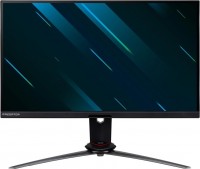
The top gaming monitor of 2018 with a high-quality 27-inch UltraHD screen, increased frame rate up to 144 Hz, support for Nvidia G-Sync technology and a complete three-sided plastic screen to protect against glare. It is positioned as a premium product that can satisfy the needs of not only amateur gamers, but also true professionals of any esports disciplines. With 30-bit colour support, VESA DisplayHDR 400 certified can display more than a billion colours, greatly enhancing HDR image detail in shadows and highlights.
The design of the Acer Predator XB273K monitor uses a 10-bit (8-bit + FRC) AHVA-IPS type matrix manufactured by AU Optronics with LED backlighting on LEDs with Quantum Dot technology. Thanks to the implementation of Visual Response Boost technology, the minimum response time was reduced to 4 ms GtG, and the input lag does not exceed 5 ms. The correct operation of the Nvidia G-Sync system and the high refresh rate of the screen provide an impeccably clear picture, without blurring and artifacts, even in the most dynamic gaming scenes. Connection to a PC or other signal sources is carried out via HDMI 2.0 or Display Port 1.4 interfaces (cable included). The monitor is additionally equipped with a built-in stereo system with a power of 9 W (2x4 W) and a 4-port USB 3.0 hub.
|
| ||||||||||||||||||||||||||||||||||||||||||||||||||||||||||||||||||||||||


Always clarify the specifications and configuration of the product with the online store manager before purchasing.
Catalog Acer 2026 - new arrivals, bestsellers, and the most relevant models Acer.



















By default, the 144 Hz mode on the monitor is turned off — it needs to be enabled separately in the on-screen menu. This is because the two DisplayPorts can function as two channels for a single source or different channels for different sources. An option in the on-screen menu switches between these modes. 10 bit price  Vladimir: Vladimir: |