
Aerocool Bolt black
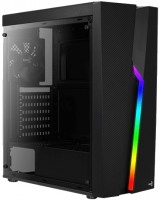 | Outdated Product Features: gaming; Form factor: Midi Tower; Mount: vertical; Motherboard support: ATX; PSU form factor: ATX (regular); Dimensions (mm): 444x194x410; Weight (kg): 3.38; Material: steel; 3.5" bays: 2; internal 2.5" compartments: 2; Expansion slots: 7; Installed fans: Fans total: 1; Fans (back): 1x120mm |


|
| ||||||||||||||||||||||||||||||||||||||||||||||||||||||||||||||||||||||||||||||||||||||||||||||||||||||||||||||||||||


Always clarify the specifications and configuration of the product with the online store manager before purchasing.
Catalog Aerocool 2026 - new arrivals, bestsellers, and the most relevant models Aerocool.





The case more than justified all my expectations, I did not think that for this price you can get a case of such a level. I took it out of the box, and the first impression is that the case obviously looks much more expensive than it really is. He really looks amazing and you can say rich. And all this is done very high quality. No backlash, squeaks, cracks. Everything is done neatly, nothing sticks out, all corners are smooth. There is not much space behind the motherboard for cable management, but I have a modular PSU, so that was enough for me. In general, the body is quite compact and light, the thickness of the chassis is small - only 0.5 mm. The maximum height for the cooler is 155 mm, so if you plan to put a super tower on a percent, you need something more. My Be Quiet! Pure Rock at a height of 155 mm became back to back, the distance to the glass is minimal. There are dust filters on the top and bottom. On top of the magnet for easy dismantling - a nice bonus, as a rule, this is found on more expensive cases. The backlight controller is powered by SATA. The bundle is simple: cable ties, a PCI slot cover, a set of screws and a 120 mm turntable at the back. Building a PC is quick and easy. In short, a solid, beautiful and most importantly inexpensive case, I am very pleased with the purchase. For an average assembly - behind the eyes. Stylish design, looks very impressive. Backlight with 13 modes of operation. Dust filters. And, of course, the price. Thin chassis walls. True, I note that at the same time the case itself is quite strong. There are no ventilation holes in the front, it can be a bit hot in it for a powerful iron.  Evgeniy: use Aerocool Bolt less than month Evgeniy: use Aerocool Bolt less than month |
I’ve had it for a week, yesterday I finished assembling a computer in it, a normal video card fit in and the cooler fit in length and width, that is, it didn’t rest against the wall of the case, which means that the width of the case is normal. The lighting looks beautiful, you can’t take that away, it really looks beautiful. Spacious. Normal air intake. spacious Nope, as far as I’m concerned there aren’t any, it’s clear that it’s not a mega hard case, but it’s still inexpensive use Aerocool Bolt less than month |
backlight, design connectors on the front panel, USB 3.0, space for cable management there are better airflow housings in this price category use Aerocool Bolt few months |




Unification
Thanks to the combination of quality materials, interesting design and bargain prices, Aerocool cases have become a sort of Xiaomi analogue in the gaming world. The trick of the company's engineers lies in the well-thought-out unification, which allows the use of similar frame schemes, changing only the front panel and small details. And if you saved on development, then the price can be set lower.
Lightweight and compact
The hero of this review, the Aerocool Bolt, is a fairly light and compact Mid Tower case. According to the specification listed on the manufacturer's website, its dimensions are 444x194x410 mm and the weight is 3.4 kg. One of the walls is made of transparent acrylic, and the other is made of steel with a 1 cm ledge for cable management. You can’t complain about the assembly: everything is neatly fitted, there are no cracks, no burrs, or other manufacturing defects. The metal is not too thick, but strong. It will be difficult to accidentally bend it or leave a dent.
Looks more expensive than it's worth
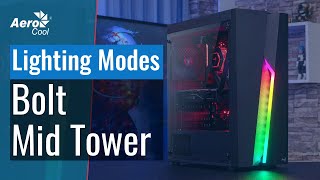
Bolt has an interesting design, it looks more expensive than it actually costs. The front acrylic panel is visually divided into 2 asymmetric halves: the right one is glossy, the left one has a carbon look texture. Between them, along the entire panel, there is a rather large cutout for air access to the fans, if they are installed in the front of the case. This decor looks great when the computer is turned on and the RGB strip along the cutout lights up. Another question is how practical it is — the gap is such that more than one fly will fly into it, and perhaps even a kitten will crawl through. Plus, there is no dust filter in front, so fluff from the street can corny fill the gap in summer.
Set and forget
The interior decoration is made according to the principle of assembled quickly and forgot. At the back of the case, space for a 120mm fan (fan included) and seven slots for expansion cards. The compartment for the power supply is located at the bottom, there is also a metal mesh from dust. I liked pcs more in the Aerocool Bolt device: a convenient separate pocket for SSD drives and the ability to place 8 coolers inside to cool top-end components.