
Havit MS1033
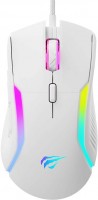 | Outdated Product Product type: mouse; Connection: wired; Sensor: optical; Type: for game; Sensor resolution (DPI): 800 – 8000; Buttons: 8; Sniper button; Side buttons; DPI-button; Lighting: RGB; Lighting effects; Cable: Interface: USB-A; |


We recommend products in stockMice Havit →
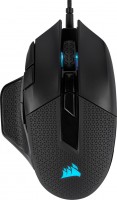
gaming mouse, wired, USB-A, with memory, buttons: 9, programmable, + wheel, свитчи: mechanical, Omron, up to 50 mln, weight adjustment, RGB backlight, sensor 18000 DPI
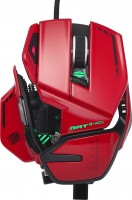
gaming mouse, wired, USB-A, buttons: 10, programmable, + wheel, свитчи: mechanical, Zippy, weight adjustment, RGB backlight, sensor 20000 DPI, in box: replaceable side panels
Havit MS1033 | |||||||||||||||||||||||||||||||||||||||||||||||||||||||||
|
| ||||||||||||||||||||||||||||||||||||||||||||||||||||||||


The information in the model description is for reference purposes.
Always clarify the specifications and configuration of the product with the online store manager before purchasing.
Catalog Havit 2026 - new arrivals, bestsellers, and the most relevant models Havit.
Always clarify the specifications and configuration of the product with the online store manager before purchasing.
Catalog Havit 2026 - new arrivals, bestsellers, and the most relevant models Havit.

How to choose a gaming mouseWe'll look at grip types, sensor sensitivity, pushbutton switches, and other important nuances

How to choose a mouse for games, office tasks and creative workLet's explore the nuances of the computer mouse market together and find the perfect options that match your requirements
AccessoriesAll accessories for Havit MS1033 →









The mouse is good, but some pros and cons need to be mentioned. 1. The comfortable body, I enjoy holding it, although it should be noted that it is not symmetrical, the RMB is below the LMB, though I didn’t notice at first. 2. The material feels nice in hand, not cheap plastic but quite quality material. 3. There are a lot of DPIs, of course, there are no values indicating the current DPI, but from my experience, I can say that you'll get used to it and understand which one it is now. 4. The mouse wheel is very soft and pleasant, it's enjoyable to scroll. 5. The sniper button is convenient, the finger also lands below G2, meaning LMB doesn't need to be used. 6. There is what I call an "anti-interference barrel" on the wire, which is good because my old mice paused moving for a millisecond (it's not the sensor). 7. Pleasant lighting and its adjustment. 8. Very smooth, old mice were abrupt and bold, whereas this one is smooth, the mouse goes where I want or where I move it. 1. There is a small compartment on the mouse with magnets, and I thought the weight could be adjusted. I tried to pick it open but then thought it was unlikely they would make it so cumbersome to remove the magnets and left it. (If anyone knows what this is for, please write.) 2. The two buttons beneath the forward and back buttons are already bound. The G1 button changes the color of the mouse, and the G2 button serves as an auto key (in shooters, this button automates single-shot weapons). G1 likely cannot be re-bound to something else, as it does not appear in mouse software, but G2 possibly can, although I haven’t tried to change the binding. 3. As far as I understand, there is currently no driver for it (perhaps by the time you read this, it will be available), and no software for adjustment; I assumed it was available and thought I could rebind the buttons through it, but alas. |

Add Review
Ask Question