
Comparison Epson EcoTank L1250 vs Epson EcoTank L132
Add to comparison | 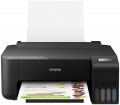 | 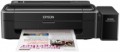 |
|---|---|---|
| Epson EcoTank L1250 | Epson EcoTank L132 | |
from £150.48 | from $144.76 up to $165.24 | |
| User reviews | ||
| TOP sellers | ||
| Print formats | A4 | A4 |
| Print type | inkjet | inkjet |
| Output type | colour | colour |
| Number of colors | 4 | 4 |
Print | ||
| Max. resolution | 5760х1440 dpi | 5760х1440 dpi |
| Mono print | 33 ppm | 27 ppm |
| Colour print | 15 ppm | 15 ppm |
| Photo print | 69 s/p | 69 s/p |
Printing supplies | ||
| Mono cartridge resource | 4500 page | 4000 page |
| Colour cartridge resource | 7500 page | 5700 page |
| Built-in CISS |  | |
| Ink type | water soluble | water soluble |
Features | ||
| Data transfer | PC connection (USB-B) Wi-Fi 4 (802.11n) Wi-Fi Direct | PC connection (USB-B) |
| Screen | no display | no display |
Hardware | ||
| Grammage (min) | 64 g/m² | 64 g/m² |
| Grammage (max) | 300 g/m² | 255 g/m² |
General | ||
| Feed tray | 100 sheets | 100 sheets |
| Output tray | 30 sheets | |
| Power consumption | 12 W | 10 W |
| Dimensions (WxDxH) | 375x347x169 mm | 482x222x130 mm |
| Weight | 2.9 kg | 2.7 kg |
| Color | ||
| Added to E-Catalog | december 2021 | july 2015 |


Compare Epson EcoTank L1250 and L132
You may be interested in
Epson EcoTank L1250 often compared


Epson EcoTank L132 often compared


Glossary
Mono print
The black and white print speed provided by the printer. It should be noted that this parameter is often indicated for low quality when the device is running at maximum performance; at a higher quality (even at standard), the actual speed can be noticeably lower, so you should choose with a certain margin. Also note that high speed significantly affects the price, power consumption and noise level. Therefore, it does not always make sense to chase maximum performance — for simple applications (for example, at home or in a small office), a relatively slow and inexpensive device may be the best choice.
As for specific values, speeds up to 20 ppm are considered relatively low, 20 – 30 ppm — average, 31 – 40 ppm — decent, and the fastest models are capable of delivering more than 40 pages per minute.
As for specific values, speeds up to 20 ppm are considered relatively low, 20 – 30 ppm — average, 31 – 40 ppm — decent, and the fastest models are capable of delivering more than 40 pages per minute.
Mono cartridge resource
The maximum number of pages that the printer's ink (toner) can print. The value is rather conditional, in reality the deviations from the norm are very large (up or down). In inkjet printers, the cartridge life is relatively small and amounts to several hundred prints. In laser and LED devices, the bill is already in the thousands.
Colour cartridge resource
The maximum number of pages that the printer's ink (toner) can print. The value is rather conditional, in reality the deviations from the norm are very large (up or down). In inkjet printers, the cartridge life is relatively small and amounts to several hundred prints. In laser and LED devices, the bill is already in the thousands.
Data transfer
— Connection to PC (USB-B). Connecting to a PC via USB-B in printers means using the standard USB type B port found on the device body, which is used for data transfer from the computer. This port is usually used in wired printer models and connects to the PC with a USB-A to USB-B cable, where side A is inserted into the computer, and B into the printer. This type of connection provides stable communication, high data transfer speeds, and easy connectivity without network setup.
— Network Connection (LAN). The ability to connect to a local computer network via a standard LAN port (using an Ethernet cable). With such a connection, the printer becomes accessible to all computers on the network, which is very convenient for offices, coworking spaces, and other places where printing is used by different people from different computers. Note that the network connection can be accomplished either through one of the computers on the network or through a common router; in the latter case, the printer remains operational regardless of which computers on the network are currently on. Compared to another connection option — Wi-Fi — wired connection is less convenient due to the need to lay a cable; however, it is cheaper and the connection is maximally reliable.
— Wi-Fi. Wireless technology initially intended for working with computer networks, but nowadays also used for...direct communication between devices (Wi-Fi Direct see below). Typically, printers with Wi-Fi can work as network devices — when communication is via a local network, and all computers on the network have access to the printer; however, the ability for direct gadget connection is less common. Nevertheless, the specific functionality of Wi-Fi should be clarified separately in any case.
— Card Reader. A slot for reading memory cards, usually with a direct printing function (see above). In this case, this function is especially convenient because memory cards are widely used in modern photo and video cameras; thus, the card reader allows for quick and easy printing of captured materials — just remove the card from the camera and insert it into the printer. However, this function can also be useful for exchanging data with other devices — for instance, laptops; and on some printer models, it is even possible to work in an external card reader mode for a PC.
— USB-A. A full-size USB port that allows connecting various external peripherals to the printer. Most often used for direct printing from flash drives and other storage devices, but can also be used for other purposes — such as firmware updates, troubleshooting, etc. Do not confuse this function with connecting to a PC via USB-B, where the printer itself acts as a peripheral device.
— USB-C. A modern interface that replaces the classic USB-B port and provides a more compact, symmetrical, and reliable connection. This port allows quick document transfer from a PC or laptop, often without additional drivers, and is compatible with new devices including MacBook and ultrabooks. USB-C can also be used for connecting flash drives, phones, tablets.
— Bluetooth. A technology for direct wireless communication between various devices. In printers, it is mainly used for the traditional purpose — for receiving materials sent for printing from external devices. One of the advantages of such a connection is that it allows working not only with computers but also with portable gadgets like smartphones and tablets: built-in Bluetooth modules for such gadgets are almost mandatory, whereas wired connection methods are often not available at all. And it can even be more convenient to connect to a PC or laptop this way: Bluetooth requires no wires and confidently works at a distance of about 10 meters.
— NFC. A short-range wireless communication technology — up to 10 cm. In printers, it is usually used as an auxiliary function, to simplify Wi-Fi and Bluetooth connections: instead of manually setting up the connection, simply bring an NFC-enabled gadget close to the printer and confirm the connection. And in some models, materials can even be sent for printing immediately this way (by bringing the device to the printer); for this, usually, a branded application must be installed on the external gadget.
— Wi-Fi Direct. A feature found in models with built-in Wi-Fi modules (see above). Direct support allows other Wi-Fi devices (laptops, smartphones, cameras, etc.) to connect directly to such a printer without using a router and local network. This is especially convenient in the absence of network equipment, or if additional setup is required. The functionality of Wi-Fi Direct connection is generally similar to Bluetooth (see above); the main difference is that Wi-Fi provides faster and more reliable communication with greater range. This is particularly relevant for transferring large volumes of data — for example, sending large-format documents for printing. Additionally, this connection is better suited for direct printing from cameras — in such equipment, Wi-Fi is traditionally used for wireless connection.
— AirPrint. A similar feature to the one described above (Wi-Fi Direct). Allows connection to the device without involving a router. However, in this case, it refers to connecting Apple devices — iPhones, iPads, Mac laptops.
— Network Connection (LAN). The ability to connect to a local computer network via a standard LAN port (using an Ethernet cable). With such a connection, the printer becomes accessible to all computers on the network, which is very convenient for offices, coworking spaces, and other places where printing is used by different people from different computers. Note that the network connection can be accomplished either through one of the computers on the network or through a common router; in the latter case, the printer remains operational regardless of which computers on the network are currently on. Compared to another connection option — Wi-Fi — wired connection is less convenient due to the need to lay a cable; however, it is cheaper and the connection is maximally reliable.
— Wi-Fi. Wireless technology initially intended for working with computer networks, but nowadays also used for...direct communication between devices (Wi-Fi Direct see below). Typically, printers with Wi-Fi can work as network devices — when communication is via a local network, and all computers on the network have access to the printer; however, the ability for direct gadget connection is less common. Nevertheless, the specific functionality of Wi-Fi should be clarified separately in any case.
— Card Reader. A slot for reading memory cards, usually with a direct printing function (see above). In this case, this function is especially convenient because memory cards are widely used in modern photo and video cameras; thus, the card reader allows for quick and easy printing of captured materials — just remove the card from the camera and insert it into the printer. However, this function can also be useful for exchanging data with other devices — for instance, laptops; and on some printer models, it is even possible to work in an external card reader mode for a PC.
— USB-A. A full-size USB port that allows connecting various external peripherals to the printer. Most often used for direct printing from flash drives and other storage devices, but can also be used for other purposes — such as firmware updates, troubleshooting, etc. Do not confuse this function with connecting to a PC via USB-B, where the printer itself acts as a peripheral device.
— USB-C. A modern interface that replaces the classic USB-B port and provides a more compact, symmetrical, and reliable connection. This port allows quick document transfer from a PC or laptop, often without additional drivers, and is compatible with new devices including MacBook and ultrabooks. USB-C can also be used for connecting flash drives, phones, tablets.
— Bluetooth. A technology for direct wireless communication between various devices. In printers, it is mainly used for the traditional purpose — for receiving materials sent for printing from external devices. One of the advantages of such a connection is that it allows working not only with computers but also with portable gadgets like smartphones and tablets: built-in Bluetooth modules for such gadgets are almost mandatory, whereas wired connection methods are often not available at all. And it can even be more convenient to connect to a PC or laptop this way: Bluetooth requires no wires and confidently works at a distance of about 10 meters.
— NFC. A short-range wireless communication technology — up to 10 cm. In printers, it is usually used as an auxiliary function, to simplify Wi-Fi and Bluetooth connections: instead of manually setting up the connection, simply bring an NFC-enabled gadget close to the printer and confirm the connection. And in some models, materials can even be sent for printing immediately this way (by bringing the device to the printer); for this, usually, a branded application must be installed on the external gadget.
— Wi-Fi Direct. A feature found in models with built-in Wi-Fi modules (see above). Direct support allows other Wi-Fi devices (laptops, smartphones, cameras, etc.) to connect directly to such a printer without using a router and local network. This is especially convenient in the absence of network equipment, or if additional setup is required. The functionality of Wi-Fi Direct connection is generally similar to Bluetooth (see above); the main difference is that Wi-Fi provides faster and more reliable communication with greater range. This is particularly relevant for transferring large volumes of data — for example, sending large-format documents for printing. Additionally, this connection is better suited for direct printing from cameras — in such equipment, Wi-Fi is traditionally used for wireless connection.
— AirPrint. A similar feature to the one described above (Wi-Fi Direct). Allows connection to the device without involving a router. However, in this case, it refers to connecting Apple devices — iPhones, iPads, Mac laptops.
Grammage (max)
The maximum grammage on which the printer can produce normal print quality. For details about the weight, see "Paper Weight (Min)". An attempt to print on paper of a greater density than the maximum for this printer will, at best, end in nothing (the printer simply cannot capture the sheet), at worst, it can lead to a sheet jam in the printer, followed by the hassle of removing it.
Output tray
The number of sheets of paper that the output tray can hold — the tray where the finished media is delivered. Usually, this amount is specified for standard office paper with a density of 80 g/m²; if you use thicker sheets, the actual capacity of the tray will be less (conversely, thinner sheets may fit more).
Power consumption
The maximum power consumed by the printer during operation. The lower the power consumption, the less energy the printer consumes, the more economical it is. On the other hand, devices with lower power consumption are often less performant than their more high consumption counterparts. And for the same performance, a more economical printer is likely to cost more, but with heavy use, it can pay off in energy savings.