
Comparison Kodak Scanza vs Reflecta X66
Add to comparison | 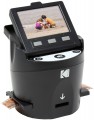 | 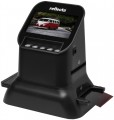 |
|---|---|---|
| Kodak Scanza | Reflecta X66 | |
| Compare prices 4 | Compare prices 1 | |
| TOP sellers | ||
| Product type | slide scanner | slide scanner |
| Max. resolution | 3200x4000 dpi | |
Technical specs | ||
| Optical element | CMOS | CMOS |
| Slide module | built-in | built-in |
| Data transfer | USB | USB |
General | ||
| LCD screen |  | |
| Card reader | | |
| Power source | power through mount | power through mount |
| Dimensions | 120x120x127 mm | 177x118x192 mm |
| Weight | 0.46 kg | 0.58 kg |
| Added to E-Catalog | august 2022 | june 2022 |



Compare Kodak Scanza and Reflecta X66
Price comparison
You may be interested in
My comparisons
Kodak Scanza often compared


Glossary
Max. resolution
The highest resolution of the digital image generated by the scanner during operation. Specified in dots per inch — dpi (dots per inch).
The higher the scan resolution, the higher the resolution of the resulting image will be (with the same size of the source material) and the more accurately small details will be transmitted on it. On the other hand, high resolution noticeably affects the price of the scanner, increases the processing time and the size of the resulting file — despite the fact that the real need for high detail is not always present, and in some cases it is even unnecessary (for example, when processing an image with small artifacts, not visible at low detail). Therefore, when choosing by this parameter, you should not chase high resolution values — you should proceed from the real need and the specifics of the intended use of the scanner.
The simplest modern scanners have a resolution of about 300x300 dpi — this is quite enough for text recognition with an average font size. And in high-end professional models, this figure can exceed 7000x7000 dpi.
The higher the scan resolution, the higher the resolution of the resulting image will be (with the same size of the source material) and the more accurately small details will be transmitted on it. On the other hand, high resolution noticeably affects the price of the scanner, increases the processing time and the size of the resulting file — despite the fact that the real need for high detail is not always present, and in some cases it is even unnecessary (for example, when processing an image with small artifacts, not visible at low detail). Therefore, when choosing by this parameter, you should not chase high resolution values — you should proceed from the real need and the specifics of the intended use of the scanner.
The simplest modern scanners have a resolution of about 300x300 dpi — this is quite enough for text recognition with an average font size. And in high-end professional models, this figure can exceed 7000x7000 dpi.