
Comparison Vinga CS316B black vs Vinga Ghost black
Add to comparison | 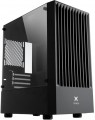 | 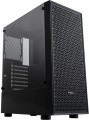 |
|---|---|---|
| Vinga CS316B black | Vinga Ghost black | |
| Outdated Product | Outdated Product | |
| User reviews | ||
| TOP sellers | ||
| Features | gaming | gaming |
| Form factor | Mini Tower | Midi Tower |
| Mount | vertical | vertical |
| Motherboard support | micro-ATX | ATX |
| Board placement | vertical | vertical |
| PSU form factor | ATX (regular) | ATX (regular) |
Computer case | ||
| Dimensions (HxWxD) | 426x200x365 mm | 455x200x365 mm |
| PSU max lenght | 160 mm | |
| Graphics card max lenght | 310 mm | 310 mm |
| Fan max height | 159 mm | 159 mm |
| Material | steel | steel |
| Sidewall thickness | 0.5 mm | 0.45 mm |
| Rubber feet |  | |
| Side panel | removable | removable |
Storage | ||
| PSU |  | |
| PSU mount | bottom | bottom |
| 3.5" bays | 2 | 2 |
| internal 2.5" compartments | 3 | 3 |
| Expansion slots | 4 | 7 |
Cooling | ||
| Fans (back) | 1x120mm | 1x120mm |
| Fans (front) | 2x140mm | 2x140mm |
| Fans (top) | 2x120mm | 2x120mm |
| Fan mounts total | 6 | |
| Dust filter | bottom | + |
| Liquid cooling system support | | |
Liquid cooling system | ||
| Liquid cooling (rear) | 120 mm | |
| Liquid cooling (top) | 240mm | |
| Liquid cooling mounts | 2 | |
Connectors and functions | ||
| Placement | on top of the case | on top of the case |
| USB-A 2.0 | 2 pcs | 2 pcs |
| USB-A 5Gbps | 1 pcs | 1 pcs |
| Audio (microphone/headphones) | | |
More features | ||
| Front panel | lattice | |
| Side panel window | tempered glass | tempered glass |
| More features | hidden wiring CPU cooling mount window | |
| Color | ||
| Added to E-Catalog | august 2023 | october 2021 |


Compare Vinga CS316B and Ghost
You may be interested in
Glossary
Form factor
The form factor determines, first of all, the internal volume of the case (as a result, the motherboard used for it, see "Type of motherboard"), as well as installation features. To date, PC cases are available in the following main form factors:
— Full Tower. The tower case is one of the largest form factors for PCs today: 15-20 cm wide, 50-60 cm high, with up to 10 externally accessible bays. Most often in this form factor running advanced high performance PCs.
— Ultra Tower. Further development and expansion of Full Tower cases (see above), offering even more space for hardware: the width of such a case is about 25 cm, the height can reach 70 cm, which allows you to install powerful configurations inside and provides enough free space for effective cooling .
— Midi Tower. A representative of the tower family (tower cases) of medium size — about 45 cm in height with a width of 15-20 cm, with the number of external bays from 2 to 4. Most popular for middle-class home PCs.
— Mini Tower. The most compact "vertical" case type, with a width of 15-20 cm, has a height of about 35 cm and (usually) less than 2 compartments with external access. It is mainly used for assembling office PCs that do not require high performance.
— Desktop. Enclosures designed for i...nstallation directly on the desktop. They often have the possibility of horizontal installation — in such a way that a monitor can be placed on top of the case — although there are also models that are installed strictly vertically. The size of such cases can be almost anything — from miniature solutions for thin mini ITX motherboards to large-sized cases for E-ATX (see "Motherboard type"). However, most "desktops" are relatively small.
— Cube Case. Cases having a cubic or close to it shape. They can have different sizes and are intended for different types of motherboards, this point in each case should be clarified separately. Anyway, such cases have a rather original appearance, different from traditional "towers" and "desktops".
— Dual Tower. Quite a rare option — cases, in size and proportions resembling two "towers", made up side by side. Dual Tower solutions are large in size and are intended mainly for powerful high-performance PCs (in particular, top gaming stations).
Note that there are models that allow both vertical and horizontal installation and can, in fact, turn from a "tower" to a "desktop" and vice versa. For such cases, the form factor is indicated by the form factor named in the manufacturer's documentation, or by the main installation method described there.
— Full Tower. The tower case is one of the largest form factors for PCs today: 15-20 cm wide, 50-60 cm high, with up to 10 externally accessible bays. Most often in this form factor running advanced high performance PCs.
— Ultra Tower. Further development and expansion of Full Tower cases (see above), offering even more space for hardware: the width of such a case is about 25 cm, the height can reach 70 cm, which allows you to install powerful configurations inside and provides enough free space for effective cooling .
— Midi Tower. A representative of the tower family (tower cases) of medium size — about 45 cm in height with a width of 15-20 cm, with the number of external bays from 2 to 4. Most popular for middle-class home PCs.
— Mini Tower. The most compact "vertical" case type, with a width of 15-20 cm, has a height of about 35 cm and (usually) less than 2 compartments with external access. It is mainly used for assembling office PCs that do not require high performance.
— Desktop. Enclosures designed for i...nstallation directly on the desktop. They often have the possibility of horizontal installation — in such a way that a monitor can be placed on top of the case — although there are also models that are installed strictly vertically. The size of such cases can be almost anything — from miniature solutions for thin mini ITX motherboards to large-sized cases for E-ATX (see "Motherboard type"). However, most "desktops" are relatively small.
— Cube Case. Cases having a cubic or close to it shape. They can have different sizes and are intended for different types of motherboards, this point in each case should be clarified separately. Anyway, such cases have a rather original appearance, different from traditional "towers" and "desktops".
— Dual Tower. Quite a rare option — cases, in size and proportions resembling two "towers", made up side by side. Dual Tower solutions are large in size and are intended mainly for powerful high-performance PCs (in particular, top gaming stations).
Note that there are models that allow both vertical and horizontal installation and can, in fact, turn from a "tower" to a "desktop" and vice versa. For such cases, the form factor is indicated by the form factor named in the manufacturer's documentation, or by the main installation method described there.
Motherboard support
The type of motherboard for which the design is designed. This parameter is indicated by the form factor of the "motherboard", under which the case is designed. The options might be:
— ATX. One of the most common types of motherboards today, the standard ATX size is 30.5x24.4 cm. It is used in both home and middle-class office PCs.
— XL-ATX. The general name for several standards of motherboards, united, as the name implies, by rather large sizes and corresponding equipment. Specific values for these dimensions can vary from 324 to 345 mm long and 244 to 264 mm wide, depending on the manufacturer and model. Accordingly, when choosing such a case, it is worthwhile to separately clarify its compatibility with a specific motherboard.
— E-ATX(Extended ATX). The largest type of motherboards, under which modern cases are made, has dimensions of 30.5x33 cm. It is usually used in high-performance systems that require numerous expansion slots.
— micro-ATX (m-ATX). The compact version of the ATX board has dimensions of 24.4x24.4 cm. The main scope of such boards is office systems that do not require high performance.
— mini-ITX. One of the further reductions in the form factor of motherboards after m-ATX assumes a board size of about 17x17 cm and one (most often) e...xpansion slot. Also designed for compact systems that do not differ in performance.
— Thin mini-ITX. A modification of the mini-ITX described above, designed to reduce the thickness of the case (up to 25 mm), and the RAM sticks do not protrude upwards and lie on the "motherboard" parallel to the board itself (for more details, see "Form factor"). Like most compact designs, thin mini-ITX boards do not have high processing power.
Note that most cases allow the installation of smaller motherboards — for example, many E-ATX cases can be used with ATX motherboards. However, specific compatibility anyway should be clarified separately.
— ATX. One of the most common types of motherboards today, the standard ATX size is 30.5x24.4 cm. It is used in both home and middle-class office PCs.
— XL-ATX. The general name for several standards of motherboards, united, as the name implies, by rather large sizes and corresponding equipment. Specific values for these dimensions can vary from 324 to 345 mm long and 244 to 264 mm wide, depending on the manufacturer and model. Accordingly, when choosing such a case, it is worthwhile to separately clarify its compatibility with a specific motherboard.
— E-ATX(Extended ATX). The largest type of motherboards, under which modern cases are made, has dimensions of 30.5x33 cm. It is usually used in high-performance systems that require numerous expansion slots.
— micro-ATX (m-ATX). The compact version of the ATX board has dimensions of 24.4x24.4 cm. The main scope of such boards is office systems that do not require high performance.
— mini-ITX. One of the further reductions in the form factor of motherboards after m-ATX assumes a board size of about 17x17 cm and one (most often) e...xpansion slot. Also designed for compact systems that do not differ in performance.
— Thin mini-ITX. A modification of the mini-ITX described above, designed to reduce the thickness of the case (up to 25 mm), and the RAM sticks do not protrude upwards and lie on the "motherboard" parallel to the board itself (for more details, see "Form factor"). Like most compact designs, thin mini-ITX boards do not have high processing power.
Note that most cases allow the installation of smaller motherboards — for example, many E-ATX cases can be used with ATX motherboards. However, specific compatibility anyway should be clarified separately.
PSU max lenght
Possible length of the PSU that can be installed in the case.
Sidewall thickness
The thickness of the side walls used in the case. When choosing a thickness, manufacturers have to compromise between several points at once. On the one hand, thin walls are inexpensive and heat dissipates faster through them, which has a positive effect on cooling efficiency. On the other hand, powerful systems inevitably require thick walls, otherwise the case may simply not withstand the weight of advanced high-performance components. Thirdly, steel is a fairly durable material even with a relatively small thickness. In light of all this, in most models this indicator does not exceed 0.7 — 0.8 mm, and more often it is about 0.5 – 0.6 mm.
Expansion slots
The number of slots for expansion cards located on the rear panel of the case.
The expansion card itself (graphics card, sound card, TV tuner, etc.) is installed in a slot on the motherboard, and an external panel of such a card with inputs and outputs is attached to the hole on the back of the case. The more holes are provided in the case, the more expansion cards can be installed in it. Note that some boards can occupy two or even three holes at once; this is especially common in powerful video cards. On the other hand, you have to pay attention to the number of holes mainly if you are building a powerful high-performance system. For an ordinary household PC, in most cases, one opening is enough for a graphics card; and in many configurations, the openings on the rear panel are not used at all.
The expansion card itself (graphics card, sound card, TV tuner, etc.) is installed in a slot on the motherboard, and an external panel of such a card with inputs and outputs is attached to the hole on the back of the case. The more holes are provided in the case, the more expansion cards can be installed in it. Note that some boards can occupy two or even three holes at once; this is especially common in powerful video cards. On the other hand, you have to pay attention to the number of holes mainly if you are building a powerful high-performance system. For an ordinary household PC, in most cases, one opening is enough for a graphics card; and in many configurations, the openings on the rear panel are not used at all.
Fan mounts total
The total number of places for installing fans provided in the chassis design.
The more performant the system, the more components it includes — the more powerful cooling it will need; therefore, the number of places for fans, usually, is directly related to the size and purpose of the case. It is also worth considering that with the same number, the installation location of individual fans may be different — behind, on the side, on top, etc.
The more performant the system, the more components it includes — the more powerful cooling it will need; therefore, the number of places for fans, usually, is directly related to the size and purpose of the case. It is also worth considering that with the same number, the installation location of individual fans may be different — behind, on the side, on top, etc.
Dust filter
The presence of a special filter in the housing to prevent dust from entering. Without such a filter, dust settles on the system elements; Radiators are especially susceptible to this; they also lose their efficiency by becoming clogged with dust. If you have a dust filter, you have to clean not the “filling” of the PC, but the filter element itself, which is much simpler and more convenient.
Compartments for dust filters can be located on the front panel of the case, back, bottom, top, or in the side walls. There are also case models with several technological niches for installing dust filters - the combined version assumes the presence of such compartments on several sides of the case at once.
Compartments for dust filters can be located on the front panel of the case, back, bottom, top, or in the side walls. There are also case models with several technological niches for installing dust filters - the combined version assumes the presence of such compartments on several sides of the case at once.
Liquid cooling (rear)
Size of the mounting space for the liquid cooling system provided on the back of the case.
In cases supporting liquid cooling systems, water cooling radiators are installed in the same slots as traditional fans. In other words, either a fan (or fans) or a liquid cooling radiator can be fitted into the same space. The size of the mounting space for a liquid cooling system is indicated by a single digit — the length (on the larger side); the width can be determined based on this information. The point is that modern liquid cooling radiators typically use fans of one of the standard sizes — 120 mm or 140 mm; and if there are several of such fans, they are arranged in a row. As a result, the length of the radiator becomes a multiple, and the width is equal to one of these numbers: for example, 280 mm is 2x140 mm with a width of 140 mm, and 360 mm is 3x120 mm with a width of 120 mm.
Note that the same nuances are relevant here as for air cooling: a larger fan occupies more space and is more expensive, but it is considered more advanced as it can operate efficiently at lower speeds — which reduces noise levels and vibrations.
In cases supporting liquid cooling systems, water cooling radiators are installed in the same slots as traditional fans. In other words, either a fan (or fans) or a liquid cooling radiator can be fitted into the same space. The size of the mounting space for a liquid cooling system is indicated by a single digit — the length (on the larger side); the width can be determined based on this information. The point is that modern liquid cooling radiators typically use fans of one of the standard sizes — 120 mm or 140 mm; and if there are several of such fans, they are arranged in a row. As a result, the length of the radiator becomes a multiple, and the width is equal to one of these numbers: for example, 280 mm is 2x140 mm with a width of 140 mm, and 360 mm is 3x120 mm with a width of 120 mm.
Note that the same nuances are relevant here as for air cooling: a larger fan occupies more space and is more expensive, but it is considered more advanced as it can operate efficiently at lower speeds — which reduces noise levels and vibrations.
Liquid cooling (top)
The size of the mounting space for the liquid cooling system provided on the top side of the case.
In cases supporting LCS, water cooling radiators are installed in the same slots as traditional fans. In other words, a fan (or fans) or an LCS radiator can be installed in the same mounting space. The size of the mounting space for LCS is specified by a single number — the length (on the longer side); the width can be determined based on this information. The fact is, modern LCS radiators typically use fans of one of the standard sizes — 120 mm or 140 mm; and if there are several such fans, they are arranged in a row. As a result, the length of the radiator is a multiple, and the width is equal to one of these numbers: for example, 280 mm means 2x140 mm with a width of 140 mm, and 360 mm means 3x120 mm with a width of 120 mm. Overall, an upper radiator size of 240 mm and below is considered relatively small, 280 mm is medium, 360 mm is large, and in some models, it reaches 420 mm and even 480 mm.
Note that the same nuances apply here as for air cooling: a larger fan takes up more space and costs more, but is considered more advanced since it can work effectively at a lower speed — which reduces noise and vibrations.
In cases supporting LCS, water cooling radiators are installed in the same slots as traditional fans. In other words, a fan (or fans) or an LCS radiator can be installed in the same mounting space. The size of the mounting space for LCS is specified by a single number — the length (on the longer side); the width can be determined based on this information. The fact is, modern LCS radiators typically use fans of one of the standard sizes — 120 mm or 140 mm; and if there are several such fans, they are arranged in a row. As a result, the length of the radiator is a multiple, and the width is equal to one of these numbers: for example, 280 mm means 2x140 mm with a width of 140 mm, and 360 mm means 3x120 mm with a width of 120 mm. Overall, an upper radiator size of 240 mm and below is considered relatively small, 280 mm is medium, 360 mm is large, and in some models, it reaches 420 mm and even 480 mm.
Note that the same nuances apply here as for air cooling: a larger fan takes up more space and costs more, but is considered more advanced since it can work effectively at a lower speed — which reduces noise and vibrations.