
Comparison Acasis H716 vs Vinga VHA3A7SP
Add to comparison | 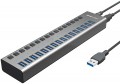 | 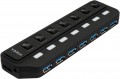 |
|---|---|---|
| Acasis H716 | Vinga VHA3A7SP | |
| Outdated Product | Outdated Product | |
| User reviews | ||
| TOP sellers | ||
| Product type | USB hub | USB hub |
| Placement | external | external |
| PC connectivity | USB-A 5Gbps | USB-A 5Gbps |
HUB connectors | ||
| USB-A | 16 pcs 5Gbps | 7 pcs 5Gbps |
More features | ||
| Switch | per port | per port |
| External power supply |  | |
| Removable USB cable | | |
| Activity indicator | | |
| Body material | metal | plastic |
| Color | ||
| Added to E-Catalog | june 2023 | january 2022 |


Compare Acasis H716 and Vinga VHA3A7SP
You may be interested in
Acasis H716 often compared

Vinga VHA3A7SP often compared


Glossary
USB-A
The number of USB ports located on the body of the card reader or hub (see "Type"). This parameter determines the number of USB ports you will have at your disposal after connecting the device. "Pure" card readers and combined models generally have 1, 2, and even 3 USB ports, while hubs typically feature 4 or more ports.
And the USB connection interface affects the speed. It is worth noting that the speed of the input port does not necessarily indicate overall throughput, as simultaneous connection of USB drives, phones, and memory cards can slow down data transmission, which is in any case limited by the connection interface of the device itself to the PC or laptop (refer to "Connection Interface").
— USB-A 2.0. The outdated version 2.0 provides a data transfer speed of up to 480 Mbps.
— USB-A 5Gbps. Previously known as the standards USB 3.2 gen1 and USB 3.0 (they sure know how to confuse). This version provides a maximum speed 10 times greater (4.8 Gbps) and higher power supply, allowing for energy-demanding devices and extensive splitters to be connected.
— USB-A 10Gbps. Further enhancement of the USB-A 5Gbps standard (and as expected, with multiple previous names like USB 3.2 gen2 and simply USB 3.1), achieving a maximum speed of 10 Gbps and...an even higher power supply for external devices.
And the USB connection interface affects the speed. It is worth noting that the speed of the input port does not necessarily indicate overall throughput, as simultaneous connection of USB drives, phones, and memory cards can slow down data transmission, which is in any case limited by the connection interface of the device itself to the PC or laptop (refer to "Connection Interface").
— USB-A 2.0. The outdated version 2.0 provides a data transfer speed of up to 480 Mbps.
— USB-A 5Gbps. Previously known as the standards USB 3.2 gen1 and USB 3.0 (they sure know how to confuse). This version provides a maximum speed 10 times greater (4.8 Gbps) and higher power supply, allowing for energy-demanding devices and extensive splitters to be connected.
— USB-A 10Gbps. Further enhancement of the USB-A 5Gbps standard (and as expected, with multiple previous names like USB 3.2 gen2 and simply USB 3.1), achieving a maximum speed of 10 Gbps and...an even higher power supply for external devices.
Body material
The main material used for the body of the device.
— Plastic. Plastic is light, cheap, quite practical, incl. has good strength properties. In addition, it allows you to create cases of complex shape and almost any color.
— Metal. As a rule, aluminium-based alloys are used for metal cases. Such cases are much stronger than plastic ones, and also have a stylish appearance. On the other hand, in terms of impact protection, this material has no advantages over plastic, but it costs more, and it can weigh much more.
— Plastic. Plastic is light, cheap, quite practical, incl. has good strength properties. In addition, it allows you to create cases of complex shape and almost any color.
— Metal. As a rule, aluminium-based alloys are used for metal cases. Such cases are much stronger than plastic ones, and also have a stylish appearance. On the other hand, in terms of impact protection, this material has no advantages over plastic, but it costs more, and it can weigh much more.