
Comparison Glorious Model O vs Glorious Model O Minus
Add to comparison | 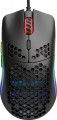 | 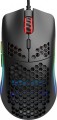 |
|---|---|---|
| Glorious Model O | Glorious Model O Minus | |
| Compare prices 6 | Compare prices 9 | |
| User reviews | ||
| TOP sellers | ||
Record light weight of 58 grams. PixArt PMW-3360 sensor at 12000 DPI. Omron microswitches for 20 million clicks. RGB backlight. | ||
| Product type | mouse | mouse |
| Connection | wired | wired |
| Sensor | optical | optical |
| Type | for game | for game |
Sensor and control | ||
| Sensor | PixArt 3360 | PixArt 3360 |
| Sensor resolution | 400 – 12000 DPI | 400 – 12000 DPI |
| Max. acceleration | 50 G | 50 G |
| Max. speed | 250 ips | 250 ips |
| Number of buttons | 5 | 5 |
| Side buttons |  | |
| DPI-button | | |
| Switch type | mechanical | mechanical |
| Switches | Omron | Omron |
| Switch resource | 20 mln | |
| Scroll wheels | 1 | 1 |
Additional features | ||
| Programmable buttons | | |
| Lighting | RGB | RGB |
| Lighting effects | + | + |
Connection and power supply | ||
| Cable | USB-A braided | USB-A braided |
| Cable length | 2 m | 2 m |
General | ||
| Suitable for left-handers | | |
| Perforated body | | |
| Size (LxWxH) | 128x66x38 mm | 120x58x36 mm |
| Weight | 67 g | 59 g |
| Color | ||
| Added to E-Catalog | august 2020 | august 2020 |




Compare Glorious Model O and Model O Minus
Mice Glorious Model O and Glorious Model O Minus have similar features, such as wired connection, PixArt 3360 optical sensor with up to 12000 DPI, and 5 buttons. However, the main difference lies in size and weight: Model O is larger (128x66x38 mm, 67 g), while Model O Minus is more compact (120x58x36 mm, 59 g). Both devices feature a honeycomb shell and RGB lighting, making them attractive for gamers.
Price comparison
You may be interested in
My comparisons
Glorious Model O often compared

Glossary
Switch resource
The durability of mouse switches is measured by the number of clicks the keys can withstand before they begin to show signs of wear or malfunction. Switches can have a lifespan of several million to tens of millions of clicks. In laboratory conditions, this parameter is checked using special testing machines, which diligently press the keys the required number of times, on the basis of which a verdict is made regarding the approximate service life of the switches.
Weight
The total weight of the mouse. For models with a wired connection, usually, it is indicated without cable, and for devices with weight adjustment (see above) — without weights.
This parameter is important primarily for professional gaming applications, although it is often relevant for ordinary users. Theoretically, less weight promotes speed and reduces fatigue. At the same time, in fact, much depends on the personal habits and preferences of the user: a mouse that is too light may “not be felt in the hands” and not give familiar feedback. Therefore, although most mice have a lower weight limit of 60 – 80 g, however, even among professional gaming models there are much more massive devices — 120 – 140 g or more. The lightest variety of "rodents" is laptop (see "In the direction"), among them devices come across and less than 60 g.
Also note that the weight to some extent depends on the size and “tricked out” of the device, but there is no unambiguous dependence here: models similar in size and functionality can differ markedly in weight.
This parameter is important primarily for professional gaming applications, although it is often relevant for ordinary users. Theoretically, less weight promotes speed and reduces fatigue. At the same time, in fact, much depends on the personal habits and preferences of the user: a mouse that is too light may “not be felt in the hands” and not give familiar feedback. Therefore, although most mice have a lower weight limit of 60 – 80 g, however, even among professional gaming models there are much more massive devices — 120 – 140 g or more. The lightest variety of "rodents" is laptop (see "In the direction"), among them devices come across and less than 60 g.
Also note that the weight to some extent depends on the size and “tricked out” of the device, but there is no unambiguous dependence here: models similar in size and functionality can differ markedly in weight.