
Comparison HyperX Pulsefire Haste Wireless vs Glorious Model O Wireless
Add to comparison | 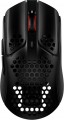 | 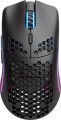 |
|---|---|---|
| HyperX Pulsefire Haste Wireless | Glorious Model O Wireless | |
| Compare prices 2 | Compare prices 6 | |
| User reviews | ||
| TOP sellers | ||
Waterproof | ||
| Product type | mouse | mouse |
| Connection | radio / wired | radio / wired |
| Sensor | optical | optical |
| Type | for game | for game |
Sensor and control | ||
| Sensor | PixArt 3335 | BAMF Sensor |
| Sensor resolution | 400 – 16000 DPI | 100 – 19000 DPI |
| Max. acceleration | 40 G | 50 G |
| Max. speed | 450 ips | 400 ips |
| Max. polling rate | 1000 Hz (1 ms) | 1000 Hz (1 ms) |
| Number of buttons | 5 | 5 |
| Side buttons |  | |
| DPI-button | | |
| Switches | TTC Gold | Omron |
| Switch resource | 60 million clicks | 20 million clicks |
| Scroll wheels | 1 | 1 |
Additional features | ||
| Suitable for left-handers | | |
| Perforated body | | |
| Programmable buttons | | |
| Built-in memory | | |
| Lighting | RGB | RGB |
| Lighting effects | + | + |
| Feet material | teflon (PTFE) | teflon (PTFE) |
| Waterproof | + | |
Connection and power supply | ||
| Cable | USB-A removable braided | USB-A removable braided |
| Cable length | 1.8 m | 2 m |
| Power source | battery | battery |
| Battery life | 100 h | 210 h |
| Port on the device | USB-C | |
General | ||
| In box | USB-A dongle | USB-A dongle |
| Size (LxWxH) | 124x67x38 mm | 128x66x38 mm |
| Weight | 60 g | 69 g |
| Color | ||
| Added to E-Catalog | june 2022 | april 2021 |





Compare HyperX Pulsefire Haste Wireless and Glorious Model O Wireless
HyperX Pulsefire Haste Wireless and Glorious Model O Wireless are lightweight gaming mice with wireless connectivity, but they have some key differences. Pulsefire Haste Wireless weighs 60 g and offers a sensor resolution of up to 16000 DPI, while the Model O Wireless weighs 69 g and has a maximum resolution of 19000 DPI. Pulsefire uses TTC Gold switches with a lifespan of 60 million clicks, whereas Model O features Omron switches with a lifespan of 20 million clicks. The battery life for Pulsefire is up to 100 hours, while Model O can operate for up to 210 hours without backlight. The choice between them depends on the user's preferences regarding weight, resolution, and battery life.
Price comparison
You may be interested in
My comparisons
HyperX Pulsefire Haste Wireless often compared


Glorious Model O Wireless often compared


Glossary
Sensor
The model of the sensor installed in the mouse. This information is indicated mainly for models equipped with high-end sensors, which are significantly superior in their capabilities to simpler solutions. Such characteristics are important primarily for gaming mice, so most of the devices for which the sensor model is specified belong to this category.
Knowing the name, you can find detailed data on the sensor and evaluate its capabilities. Note that one of the most popular brands nowadays, under which advanced sensors are produced, is PixArt ; on the market are often found, in particular, sensors PixArt 3212, PixArt 3325, PixArt 3327, PixArt 3335, PixArt 3360, PixArt 3389, PixArt 3395, PixArt 3950.
Knowing the name, you can find detailed data on the sensor and evaluate its capabilities. Note that one of the most popular brands nowadays, under which advanced sensors are produced, is PixArt ; on the market are often found, in particular, sensors PixArt 3212, PixArt 3325, PixArt 3327, PixArt 3335, PixArt 3360, PixArt 3389, PixArt 3395, PixArt 3950.
Sensor resolution
Resolution of the sensor responsible for tracking mouse movements on the work surface. Specified in DPI — dots per inch.
The physical meaning of DPI as a whole is as follows. The sensor of a modern mouse works on the same principle as the camera matrix, and consists of pixels. And DPI is the number of pixels that fall on 1 inch of the underlying surface (length or width), "visible" by the sensor.
It is believed that more DPI means a more advanced sensor and mouse in general; nowadays, models for 3500 – 5000 DPI, 12000 DPI, 16000 DPI even more are not uncommon. In a way, it is — high resolution contributes to accuracy. However, the only thing that is directly determined by this indicator is the speed at which the cursor moves across the screen: the higher the resolution of the sensor, the greater the number of pixels that the cursor will move when the mouse itself moves a certain distance. At the same time, it is worth recalling that too high a speed is even more undesirable than too low. So the real need for high DPI ( 1000 and above) arises mainly when working on large screens (4K resolution and more); for more modest displays (HD and Full HD), smaller values are often enough.
The physical meaning of DPI as a whole is as follows. The sensor of a modern mouse works on the same principle as the camera matrix, and consists of pixels. And DPI is the number of pixels that fall on 1 inch of the underlying surface (length or width), "visible" by the sensor.
It is believed that more DPI means a more advanced sensor and mouse in general; nowadays, models for 3500 – 5000 DPI, 12000 DPI, 16000 DPI even more are not uncommon. In a way, it is — high resolution contributes to accuracy. However, the only thing that is directly determined by this indicator is the speed at which the cursor moves across the screen: the higher the resolution of the sensor, the greater the number of pixels that the cursor will move when the mouse itself moves a certain distance. At the same time, it is worth recalling that too high a speed is even more undesirable than too low. So the real need for high DPI ( 1000 and above) arises mainly when working on large screens (4K resolution and more); for more modest displays (HD and Full HD), smaller values are often enough.
Max. acceleration
The greatest acceleration during movement, at which the mouse maintains normal performance; if this indicator is exceeded, the cursor may “break down” (moving to an unexpected place due to incorrect processing of data from the sensor).
The faster the mouse moves, the greater the acceleration acting on it. Accordingly, this parameter determines the sensitivity to sudden movements, the extent to which this model is able to normally perceive and process such movements. High values of maximum acceleration ( 40 G, 50 G) are important first of all in dynamic games, especially for professional e-sportsmen and advanced enthusiasts. If the mouse is bought for relatively simple tasks (working with documents, surfing the web, etc.), you can ignore this indicator.
The faster the mouse moves, the greater the acceleration acting on it. Accordingly, this parameter determines the sensitivity to sudden movements, the extent to which this model is able to normally perceive and process such movements. High values of maximum acceleration ( 40 G, 50 G) are important first of all in dynamic games, especially for professional e-sportsmen and advanced enthusiasts. If the mouse is bought for relatively simple tasks (working with documents, surfing the web, etc.), you can ignore this indicator.
Max. speed
The ips (inches per second) parameter is the linear speed of mouse movement, expressed in inches per second, at which the manipulator's sensor is able to read the surface. In top models, the maximum mouse movement speed often reaches 400-600 ips, but devices with ips in the region of 200 are more common.
Switches
The brand of switches (switches) installed in the mouse. Also, these parts are often called "mikriki" — from the term "microswitches". Usually, the characteristics indicate the brand of switches used in the main buttons (left and right); additional buttons, usually, are equipped with other switches, often simpler and cheaper.
The mics are directly responsible for the operation of the keys when pressed. Accordingly, the quality of the mouse, as well as the feel and comfort of the user, depend on the quality of these parts: different switches can vary in stiffness, ease of operation and the sound of pressing. And the brand of switches is not specified for all mice, but only for models equipped with advanced elements. In other words, this parameter is indicated in cases where the brand of the microswitch is a sign of the high quality of the "rodent". Typical examples include mics under the brands Omron(considered premium) and Huano(Chinese counterparts of quite comparable quality). Light Strike and Razer switches are also pulled up to them.
We emphasize that in this case, not a specific model is indicated, but a general brand under which mikriks are released (sometimes also their type, opto-mechanical or mechanical). At the same time, the same brand may include different models of switche...s that differ in features: some are “quiet”, others with a normal sound, some with increased accuracy, others with an extended service life, etc. So the features of these parts should be clarified separately. However, the detailed characteristics of mikriks are important mainly for demanding users, in particular professional cybersportsmen.
The mics are directly responsible for the operation of the keys when pressed. Accordingly, the quality of the mouse, as well as the feel and comfort of the user, depend on the quality of these parts: different switches can vary in stiffness, ease of operation and the sound of pressing. And the brand of switches is not specified for all mice, but only for models equipped with advanced elements. In other words, this parameter is indicated in cases where the brand of the microswitch is a sign of the high quality of the "rodent". Typical examples include mics under the brands Omron(considered premium) and Huano(Chinese counterparts of quite comparable quality). Light Strike and Razer switches are also pulled up to them.
We emphasize that in this case, not a specific model is indicated, but a general brand under which mikriks are released (sometimes also their type, opto-mechanical or mechanical). At the same time, the same brand may include different models of switche...s that differ in features: some are “quiet”, others with a normal sound, some with increased accuracy, others with an extended service life, etc. So the features of these parts should be clarified separately. However, the detailed characteristics of mikriks are important mainly for demanding users, in particular professional cybersportsmen.
Switch resource
The durability of mouse switches is measured by the number of clicks the keys can withstand before they begin to show signs of wear or malfunction. Switches can have a lifespan of several million to tens of millions of clicks. In laboratory conditions, this parameter is checked using special testing machines, which diligently press the keys the required number of times, on the basis of which a verdict is made regarding the approximate service life of the switches.
Waterproof
Moisture protection helps reduce the risk of damage when in contact with water droplets, sweat, wet hands, or accidentally spilled drinks. Such protection is especially useful for desktops, gaming areas, travel, and other situations where the device may encounter moisture in everyday use. Also, mice with high levels of moisture protection may be in demand in medical facilities and laboratories.
The level of moisture protection can also be indicated by the IP rating: the higher the second digit in the marking, the better the protection against water. For example, IPX4 indicates protection from water splashes from different directions — such a mouse should withstand drops, wet hands, or accidental splashes, but is not designed for water jets or immersion. IPX5 already suggests protection from water jets, but in practice, this is more about durability in case of accidental contact with water rather than permission to wash the mouse under the tap.
The level of moisture protection can also be indicated by the IP rating: the higher the second digit in the marking, the better the protection against water. For example, IPX4 indicates protection from water splashes from different directions — such a mouse should withstand drops, wet hands, or accidental splashes, but is not designed for water jets or immersion. IPX5 already suggests protection from water jets, but in practice, this is more about durability in case of accidental contact with water rather than permission to wash the mouse under the tap.
Cable length
The length of the cable that is equipped with a mouse with the possibility of a wired connection (see "Type of connection").
When choosing this parameter, you should first of all take into account the distance from the manipulator to the connection port: a cable that is too short may simply not reach the connector, and a cable that is too long may get tangled at hand and create inconvenience. As for specific values, the most modest wire length in modern mice is 1 m or less ; such devices are intended mainly for laptops. Most desktop manipulators come with cables that are 1.1-1.5m or 1.6-2m long, with some models running longer than 2m.
When choosing this parameter, you should first of all take into account the distance from the manipulator to the connection port: a cable that is too short may simply not reach the connector, and a cable that is too long may get tangled at hand and create inconvenience. As for specific values, the most modest wire length in modern mice is 1 m or less ; such devices are intended mainly for laptops. Most desktop manipulators come with cables that are 1.1-1.5m or 1.6-2m long, with some models running longer than 2m.
Battery life
Battery life of the mouse (see “Power”) on a single charge.
The battery life in this case is rather approximate: it is given for an average usage scenario, and the actual autonomy may turn out to be less or more than stated, depending on the usage patterns. Nevertheless, it is a fairly reliable indicator, allowing different battery models to be evaluated and compared with each other: the difference in the stated battery life usually correlates well with the actual autonomy difference.
The battery life in this case is rather approximate: it is given for an average usage scenario, and the actual autonomy may turn out to be less or more than stated, depending on the usage patterns. Nevertheless, it is a fairly reliable indicator, allowing different battery models to be evaluated and compared with each other: the difference in the stated battery life usually correlates well with the actual autonomy difference.