
Comparison OfficePro MA422S vs OfficePro MA412B
Add to comparison | 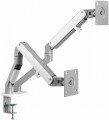 | 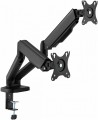 |
|---|---|---|
| OfficePro MA422S | OfficePro MA412B | |
| Outdated Product | Outdated Product | |
| TOP sellers | ||
| Type | desktop mount | desktop mount |
| Number of mounts | for 2 panels | for 2 panels |
| Installation | universal | universal |
Specs | ||
| Minimum size | 17 " | 17 " |
| Max. size | 32 " | 32 " |
| Max. weight | 9 kg | 9 kg |
| Adjustments | tilt turn depth adjustment slide rotation height adjustment | tilt turn depth adjustment slide rotation height adjustment |
Angles and dimensions | ||
| Upward tilt angle | 80 ° | 90 ° |
| Downward tilt angle | 45 ° | 90 ° |
| Turn angle | 180 ° | 180 ° |
| Rotation angle | 180 ° | 180 ° |
| VESA | 75x75mm 100x100 mm | 75x75mm 100x100 mm |
| Removable VESA plate |  |  |
General | ||
| Cable management | | |
| Color | ||
| Added to E-Catalog | february 2024 | february 2024 |


Compare OfficePro MA422S and MA412B
You may be interested in
My comparisons
OfficePro MA422S often compared


OfficePro MA412B often compared


Glossary
Upward tilt angle
The maximum upwards tilt angle from the vertical of the installed screen. The larger the tilt angle, the wider the adjustment possibilities, however, in fact, an angle of more than 5° is rarely required.
Downward tilt angle
The maximum downward tilt angle from the vertical for the installed screen. As with the upward tilt angle, the larger this angle, the wider the adjustment possibilities; however, downward tilt is usually required more frequently (the TV may be installed under the ceiling), and its angle can be as high as 15-20°.
Removable VESA plate
"Quick-release" interface between TV/monitor and bracket: a thin plate is screwed to the screen according to the VESA standard (usually 75×75, 100×100, 200×200, and larger), then clicks into the base on the bracket with one motion and is fixed with a locking screw or latch. This solution speeds up installation and maintenance: you can hang a heavy monitor solo, quickly remove the TV for cable management or cleaning, and easily move the screen from wall mounting to a desktop arm. Compared to a fixed plate, it's more convenient and there's less risk of missing the holes; the downsides are a slight increase in extension and possible play in cheap mechanisms. Typical scenarios include an office with frequent monitor rotation, a digital menu and display service, and a home setup where the screen is periodically removed for port access.