
Comparison Gigabyte G7 MF [G7MF-E2EE213SD] vs Gigabyte G5 MF [G5MF-E2EE313SD]
Add to comparison | 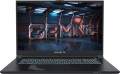 | 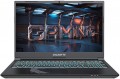 |
|---|---|---|
| Gigabyte G7 MF [G7MF-E2EE213SD] | Gigabyte G5 MF [G5MF-E2EE313SD] | |
| Outdated Product | Outdated Product | |
| User reviews | ||
| TOP sellers | ||
| Type | laptop | laptop |
Screen | ||
| Screen size | 17.3 " | 15.6 " |
| Screen type | IPS | IPS |
| Surface treatment | matte | matte |
| Screen resolution | 1920x1080 (16:9) | 1920x1080 (16:9) |
| Refresh rate | 144 Hz | 144 Hz |
CPU | ||
| Series | Core i5 | Core i5 |
| Model | 12500H | 12500H |
| Processor code name | Alder Lake (12th Gen) | Alder Lake (12th Gen) |
| Processor cores | 12 (4P+8E) | 12 (4P+8E) |
| Total threads | 16 | 16 |
| CPU speed | 1.8 GHz | 1.8 GHz |
| TurboBoost / TurboCore frequency | 4.5 GHz | 4.5 GHz |
| CPU TDP | 45 W | 45 W |
| Test 3DMark06 | 13461 points | 13461 points |
| Test Passmark CPU Mark | 21566 points | 21566 points |
RAM | ||
| RAM | 16 GB | 16 GB |
| Maximum installed RAM capacity | 64 GB | 64 GB |
| RAM type | DDR4 | DDR4 |
| RAM memory frequency | 3200 MHz | 3200 MHz |
| Amount of RAM slots | 2 | 2 |
Graphics card | ||
| Graphics card type | dedicated | dedicated |
| Graphics card series | NVIDIA GeForce | NVIDIA GeForce |
| Graphics card model | RTX 4050 | RTX 4050 |
| Video memory | 6 GB | 6 GB |
| Video card memory type | GDDR6 | GDDR6 |
| GPU TDP | 75 W | 75 W |
| VR |  | |
| Test 3DMark06 | 51372 points | 51372 points |
| Test 3DMark Vantage P | 85660 points | 85660 points |
Storage | ||
| Drive type | SSD M.2 NVMe | SSD M.2 NVMe |
| Drive capacity | 512 GB | 512 GB |
| M.2 drive interface | PCIe 3.0 4x | PCIe 3.0 4x |
| M.2 drive size | 22x80 mm | 22x80 mm |
| Additional M.2 connector | 1 | 1 |
| Addittional M.2 connectors interface | PCI-E 4.0 4x | PCI-E 4.0 4x |
| Additional M.2 drive size | 22x80 mm | 22x80 mm |
Connections | ||
| Connection ports | HDMI miniDisplayPort v1.4 | HDMI miniDisplayPort v1.4 |
| Card reader | | |
| USB-A 2.0 | 1 pcs | 1 pcs |
| USB-A 5Gbps | 1 pcs | 1 pcs |
| USB-C 10Gbps | 2 pcs | 2 pcs |
| Alternate Mode |  | |
| Monitors connection | 2 | 3 |
| LAN (RJ-45) | 1 Gbps | 1 Gbps |
| Wi-Fi | Wi-Fi 6E (802.11ax) | Wi-Fi 6 (802.11ax) |
| Bluetooth | v5.2 | v5.2 |
Multimedia | ||
| Webcam | 1280x720 (HD) | 1280x720 (HD) |
| Camera shutter | | |
| Speakers | 2 pcs | 2 pcs |
| Audio decoders | DTS X Ultra | DTS X Ultra |
| Security | kensington / Noble lock | kensington / Noble lock |
Keyboard | ||
| Backlight | RGB | RGB |
| Key design | island type | island type |
| Num block | | |
| Input device | touchpad | touchpad |
Battery | ||
| Battery capacity | 54 W*h | 54 W*h |
| Power Delivery via USB-C | | |
| Fast charge | | |
| Power supply Included | 150 W | 150 W |
General | ||
| Preinstalled OS | DOS | DOS |
| Material | matte plastic | matte plastic |
| Dimensions (WxDxT) | 397x262x25 mm | 360x238x23 mm |
| Weight | 2.53 kg | 1.9 kg |
| Color | ||
| Added to E-Catalog | december 2023 | june 2023 |


Compare Gigabyte G7 MF and G5 MF
You may be interested in
Gigabyte G7 MF often compared


Gigabyte G5 MF often compared


Glossary
Screen size
Diagonal size of laptop display.
The larger the screen, the more convenient the laptop for watching high-definition movies, modern games, working with large-format graphic materials, etc. Large screens are especially important for multimedia and gaming models. On the other hand, the diagonal of the display directly affects the size and cost of the entire device. So if portability is key, it makes sense to pay attention to relatively small solutions; especially since most modern laptops have video outputs like HDMI or DisplayPort and allow connection of large-format external monitors.
In light of all this, the actual maximum for laptops these days is 17"(17.3"); however larger devices (18") reappeared at the beginning of 2023. The standard option for general purpose laptops is 15"(15.6"), less often 16", a diagonal of 13"(13.3") or 14" is considered small by the standards of such And smaller screens can be found mainly in specific compact varieties of laptops — ultrabooks, 2 in 1, transformers, netbooks; among such devices there are solutions for 12 ", 11" and even 10" or less.
The larger the screen, the more convenient the laptop for watching high-definition movies, modern games, working with large-format graphic materials, etc. Large screens are especially important for multimedia and gaming models. On the other hand, the diagonal of the display directly affects the size and cost of the entire device. So if portability is key, it makes sense to pay attention to relatively small solutions; especially since most modern laptops have video outputs like HDMI or DisplayPort and allow connection of large-format external monitors.
In light of all this, the actual maximum for laptops these days is 17"(17.3"); however larger devices (18") reappeared at the beginning of 2023. The standard option for general purpose laptops is 15"(15.6"), less often 16", a diagonal of 13"(13.3") or 14" is considered small by the standards of such And smaller screens can be found mainly in specific compact varieties of laptops — ultrabooks, 2 in 1, transformers, netbooks; among such devices there are solutions for 12 ", 11" and even 10" or less.
Alternate Mode
The presence in the laptop of at least one USB-C connector with support for Alternate Mode.
In accordance with the name, Alternate Mode is an alternative mode of operation of the Type C connector, when not USB, but other connection interfaces are implemented through it. The specific set of such interfaces may be different, it should be specified for each model separately. The most typical example is Thunderbolt v3 (see above), such a connection, by definition, works through a USB-C hardware connector. The Thunderbolt specification also includes DisplayPort support, but this video output can be implemented via USB-C and independently, without Thunderbolt functionality. Also, the list of the most popular Alternate Mode options includes HDMI — both in its classic form and in the "mobile" version of MHL (the latter, however, is more typical for smartphones and other handheld equipment than for laptops).
In accordance with the name, Alternate Mode is an alternative mode of operation of the Type C connector, when not USB, but other connection interfaces are implemented through it. The specific set of such interfaces may be different, it should be specified for each model separately. The most typical example is Thunderbolt v3 (see above), such a connection, by definition, works through a USB-C hardware connector. The Thunderbolt specification also includes DisplayPort support, but this video output can be implemented via USB-C and independently, without Thunderbolt functionality. Also, the list of the most popular Alternate Mode options includes HDMI — both in its classic form and in the "mobile" version of MHL (the latter, however, is more typical for smartphones and other handheld equipment than for laptops).
Monitors connection
The maximum number of monitors that can be connected to a laptop at the same time and shared.
Simultaneous connection of several screens allows you to expand the visual space available to the user. For example, it can be useful for designers and layout designers when working with large-format materials, for programmers to separate tasks (one monitor for writing code, the second for searching for the necessary information and other auxiliary purposes), and for gamers-enthusiasts — to ensure the maximum immersion effect.
Simultaneous connection of several screens allows you to expand the visual space available to the user. For example, it can be useful for designers and layout designers when working with large-format materials, for programmers to separate tasks (one monitor for writing code, the second for searching for the necessary information and other auxiliary purposes), and for gamers-enthusiasts — to ensure the maximum immersion effect.
Wi-Fi
Wi-Fi standards supported by the laptop.
In modern laptops, most often there are wireless communication modules that support Wi-Fi 5 (802.11ac), Wi-Fi 6 (802.11ax), Wi-Fi 6E (802.11ax), Wi-Fi 7 (802.11be). Earlier standards appear infrequently; First of all, this is Wi-Fi 4 (802.11n), which ensures compatibility of the laptop with legacy wireless equipment. Here are the features of each of these standards:
- Wi-Fi 5 (802.11ac). Standard introduced in 2013. It operates exclusively on the 5 GHz frequency, which is why it is only compatible with Wi-Fi 4 and newer versions. Provides a theoretical maximum speed of up to 1 Gbps with a single-channel connection and up to 6 Gbps with multiple channels in MIMO format, while consuming significantly less power than its predecessor.
- Wi-Fi 6 (802.11ax). A standard developed as a direct development and improvement of Wi-Fi 5. A priori, it operates at standard frequencies of 2.4 GHz and 5 GHz (including equipment of earlier standards), but if necessary, it can connect additional bands in the range from 1 to 7 GHz. The maximum data transfer speed has increased to 10 Gbps, but the main advantage of Wi-Fi 6 is not even this, but the further optimization of the simultaneous operation of several devices on the same channel. Wi-Fi 6 provides a minimal drop in speed under conditions...of high channel load.
- Wi-Fi 6E (802.11ax). The Wi-Fi 6E standard is technically called 802.11ax. But unlike basic Wi-Fi 6, which is named similarly, it provides for operation in an additional unused 6 GHz band. In total, the standard uses 14 different frequency bands, offering high throughput in the most crowded places with many active connections. And it's backwards compatible with previous versions of Wi-Fi.
— Wi-Fi 7 (802.11be). The technology, like the previous Wi-Fi 6E, is capable of operating in three frequency ranges: 2.4 GHz, 5 GHz and 6 GHz. At the same time, the maximum bandwidth in Wi-Fi 7 was increased from 160 MHz to 320 MHz - the wider the channel, the more data it can transmit. The IEEE 802.11be standard uses 4096-QAM modulation, which also allows more symbols to be accommodated in a data transmission unit. From Wi-Fi 7 you can squeeze out a maximum theoretical information exchange speed of up to 46 Gbps. In the context of using wireless connections for streaming and video games, the implemented MLO (Multi-Link Operation) development seems very interesting. With its help, you can aggregate several channels in different ranges, which significantly reduces delays in data transmission and ensures low and stable ping. And Multi-RU (Multiple Resource Unit) technology is designed to minimize communication delays when there are many connected client devices.
In modern laptops, most often there are wireless communication modules that support Wi-Fi 5 (802.11ac), Wi-Fi 6 (802.11ax), Wi-Fi 6E (802.11ax), Wi-Fi 7 (802.11be). Earlier standards appear infrequently; First of all, this is Wi-Fi 4 (802.11n), which ensures compatibility of the laptop with legacy wireless equipment. Here are the features of each of these standards:
- Wi-Fi 5 (802.11ac). Standard introduced in 2013. It operates exclusively on the 5 GHz frequency, which is why it is only compatible with Wi-Fi 4 and newer versions. Provides a theoretical maximum speed of up to 1 Gbps with a single-channel connection and up to 6 Gbps with multiple channels in MIMO format, while consuming significantly less power than its predecessor.
- Wi-Fi 6 (802.11ax). A standard developed as a direct development and improvement of Wi-Fi 5. A priori, it operates at standard frequencies of 2.4 GHz and 5 GHz (including equipment of earlier standards), but if necessary, it can connect additional bands in the range from 1 to 7 GHz. The maximum data transfer speed has increased to 10 Gbps, but the main advantage of Wi-Fi 6 is not even this, but the further optimization of the simultaneous operation of several devices on the same channel. Wi-Fi 6 provides a minimal drop in speed under conditions...of high channel load.
- Wi-Fi 6E (802.11ax). The Wi-Fi 6E standard is technically called 802.11ax. But unlike basic Wi-Fi 6, which is named similarly, it provides for operation in an additional unused 6 GHz band. In total, the standard uses 14 different frequency bands, offering high throughput in the most crowded places with many active connections. And it's backwards compatible with previous versions of Wi-Fi.
— Wi-Fi 7 (802.11be). The technology, like the previous Wi-Fi 6E, is capable of operating in three frequency ranges: 2.4 GHz, 5 GHz and 6 GHz. At the same time, the maximum bandwidth in Wi-Fi 7 was increased from 160 MHz to 320 MHz - the wider the channel, the more data it can transmit. The IEEE 802.11be standard uses 4096-QAM modulation, which also allows more symbols to be accommodated in a data transmission unit. From Wi-Fi 7 you can squeeze out a maximum theoretical information exchange speed of up to 46 Gbps. In the context of using wireless connections for streaming and video games, the implemented MLO (Multi-Link Operation) development seems very interesting. With its help, you can aggregate several channels in different ranges, which significantly reduces delays in data transmission and ensures low and stable ping. And Multi-RU (Multiple Resource Unit) technology is designed to minimize communication delays when there are many connected client devices.
Weight
The total weight of the laptop — the device itself, without additional accessories (wires and power supply, mice, bags, etc.). For 2 in 1 models (see "Type"), the weight is indicated when assembled, with a keyboard connected.
Nowadays, models weighing less than 1 kg are found even among fairly large devices — 14 – 15 ", not to mention smaller solutions. Laptops weighing 1 – 1.4 kg are also considered very light, 1.4 – 1.7 kg — light, weight from 1.7 to 2.1 kg(more precisely, even up to 2.5 kg) can be called average, up to 3.5 kg — more than average, and a mass of more than 3.5 kg means that this is an advanced gaming or multimedia laptop designed primarily for power, not portability.
It is also worth remembering that when assessing the weight, the diagonal (size) of the device must also be taken into account. For example, 1.7 kg for a 13" laptop is a lot, and a 17" model can be considered very light if its weight does not reach 2.1 kg.
Nowadays, models weighing less than 1 kg are found even among fairly large devices — 14 – 15 ", not to mention smaller solutions. Laptops weighing 1 – 1.4 kg are also considered very light, 1.4 – 1.7 kg — light, weight from 1.7 to 2.1 kg(more precisely, even up to 2.5 kg) can be called average, up to 3.5 kg — more than average, and a mass of more than 3.5 kg means that this is an advanced gaming or multimedia laptop designed primarily for power, not portability.
It is also worth remembering that when assessing the weight, the diagonal (size) of the device must also be taken into account. For example, 1.7 kg for a 13" laptop is a lot, and a 17" model can be considered very light if its weight does not reach 2.1 kg.