
Comparison Allpowers R600 vs BLUETTI AC60
Add to comparison |  | 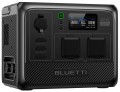 |
|---|---|---|
| Allpowers R600 | BLUETTI AC60 | |
| Compare prices 1 | Compare prices 1 | |
| User reviews | ||
| TOP sellers | ||
Flashlight | ||
| In box | charging station | charging station |
| Rated power | 600 W | 600 W |
| Peak power | 1200 W | 1200 W |
| Output waveform | sinusoid (PSW) | sinusoid (PSW) |
| UPS function |  | |
| Switchover time to battery | 15 ms | |
Outputs | ||
| Sockets (230 V) | 2 | 2 |
| USB-A | 2 pcs 18 W | 2 pcs |
| USB-C | 2 pcs 100 W | 1 pcs 100 W |
| Wireless charging | 1 zone 15 W | 1 zone 15 W |
| Car cigarette lighter | | |
Inputs (station charging) | ||
| From solar panels | | |
| Input port XT60 | |  |
Battery and charging time | ||
| Connecting an additional battery | | |
| Battery type | LiFePO4 | LiFePO4 |
| Battery capacity | 299 Wh | 403.2 Wh |
| Charging cycles | 3500 | 3000 |
| Charging time (socket) ≈ | 60 min | 90 min |
| Charging time (solar panel) ≈ | 180 min | |
| Charging time (cigarette lighter) ≈ | 300 min | |
| Charging power (socket) | 400 W | 600 W |
| Charging power (solar panel) | 220 W | 200 W |
| Charging power (cigarette lighter) | 200 W | |
General | ||
| Smartphone synchronization | Bluetooth | |
| PSU | built into the body | built into the body |
| Display | | |
| Built-in light | | |
| Carrying handle | | |
| Waterproof | IP65 | |
| Operating temperature | 0 °C ~ +40 °C | 0 °C ~ +40 °C |
| Dimensions (LxWxH) | 285x195x190 mm | 290x205x234 mm |
| Weight | 5.8 kg | 8.6 kg |
| Warranty | 5 years | 6 years |
| Added to E-Catalog | july 2024 | july 2023 |


Compare Allpowers R600 and BLUETTI AC60
Charging stations Allpowers R600 and BLUETTI AC60 have similar characteristics but differ in some key aspects. Both models feature a rated power of 600 W and a peak power of 1200 W, and also support a Pure Sine Wave (PSW) output and UPS function. However, the BLUETTI AC60 has a larger battery capacity (18 Ah compared to 11.68 Ah for the Allpowers R600), which can provide longer usage. The charging time from an outlet for Allpowers is approximately 60 minutes, whereas for BLUETTI it is 90 minutes. Additionally, the Allpowers R600 offers more outputs (2 outlets of 230 V and 2 USB A), whereas the BLUETTI AC60 has only 1 output for connection. Users note that both stations are convenient to use and have good portability, but the BLUETTI AC60 might be preferable for those seeking larger battery capacity and longer operating time.
Price comparison
You may be interested in
Allpowers R600 often compared


BLUETTI AC60 often compared


Glossary
Switchover time to battery
The delay (usually in milliseconds) between the power going out from the outlet and the moment when the station starts feeding connected devices from its battery, maintaining "pass-through" power. The shorter this time, the higher the chance that devices won't notice the drop at all: for routers, cameras, NAS, and PCs, this is critical because a long pause can cause a reboot, loss of connection, or even filesystem errors. Essentially, this is the same parameter as in a classic UPS, but for charging stations, it greatly depends on implementation: models with a more "UPS-like" switching scheme switch considerably faster, while some stations formally have a UPS mode but actually create a noticeable break or activate the output only after "realizing" the network's loss. In practice, this point helps distinguish a charging station that is truly suitable as a UPS for sensitive electronics from an option "for lights and charging": for example, for home internet and video surveillance, minimal switching time is important, while for lamps, charging phones, or a heater, a brief pause is typically not critical.
USB-A
Full-size USB ports for powering and charging compatible portable devices: smartphones, tablets, flashlights, action cameras, power banks, and other devices. USB-A remains relevant thanks to the large number of cables and accessories that use this connector, so it can be useful, for example, for simultaneously charging a phone and a flashlight during a power outage.
The number of ports (1, 2, 3, and more) determines how many devices can be connected without a splitter, while the maximum power indicates the capabilities of the highest-output USB-A port: the other connectors may provide less. When several devices are connected simultaneously, the available power may also be distributed among the ports, so the actual charging speed depends on the station's output configuration and the supported standards.
The number of ports (1, 2, 3, and more) determines how many devices can be connected without a splitter, while the maximum power indicates the capabilities of the highest-output USB-A port: the other connectors may provide less. When several devices are connected simultaneously, the available power may also be distributed among the ports, so the actual charging speed depends on the station's output configuration and the supported standards.
USB-C
USB type C ports are smaller compared to classic USB ports and have a convenient reversible design that allows connecting the plug either way. USB type C was initially created to implement various advanced features: increased power, fast charging technologies, etc.
Since the port is relatively new and quite powerful (you can find USB type C with 60W, even 100W and 140W), the total number of such connectors is often limited to one port, or sometimes two).
— Current. The maximum current delivered through the USB type C port to the device being charged. Note that different ports of a charging station may deliver different currents (for example, 1.5A and 2.1A). In such cases, the highest current is usually specified.
— Power. The maximum power in watts (W) that the charging station can deliver to one charging gadget. The high output power of the USB type C port allows for faster charging. However, the device being charged must support the corresponding power; otherwise, the speed of the process will be limited by the gadget's specifications.
Since the port is relatively new and quite powerful (you can find USB type C with 60W, even 100W and 140W), the total number of such connectors is often limited to one port, or sometimes two).
— Current. The maximum current delivered through the USB type C port to the device being charged. Note that different ports of a charging station may deliver different currents (for example, 1.5A and 2.1A). In such cases, the highest current is usually specified.
— Power. The maximum power in watts (W) that the charging station can deliver to one charging gadget. The high output power of the USB type C port allows for faster charging. However, the device being charged must support the corresponding power; otherwise, the speed of the process will be limited by the gadget's specifications.
Input port XT60
Power connector with two round connectors, used to replenish energy reserves in the battery cells of the charging station. For the most part, the input port of the XT60 is for charging the device from solar panels using the appropriate cable.
Connecting an additional battery
Ability to connect an external battery to the charging station to increase the overall energy consumption and, as a result, extend the battery life. This connection is fast and convenient. On the other hand, the battery takes up extra space on the outside, making the whole structure more cumbersome.
Battery capacity
Nominal battery capacity, in fact - the amount of energy that is supposed to be stored. The larger it is, the longer the battery life of the charging station will be, all other things being equal. On the other hand, this parameter also affects the dimensions, weight and price of the battery, despite the fact that an energy-intensive battery is not always required. By the indicator of capacity in watt-hours, you can compare batteries with each other.
Charging cycles
The number of charge-discharge cycles that the battery can withstand without significant loss of performance.
In the process of operation, the batteries wear out, which causes their performance to suffer (in the first place, the capacity decreases). Battery life is usually measured in charge-discharge cycles. However, models with the same declared resource are not always equally durable in practice. Different manufacturers may interpret “significant loss of performance” in different ways: for example, one brand indicates the resource up to a 20% decrease in capacity (DOD > 80%), another - up to a 60% decrease (DOD > 40%) Behind the abbreviation DOD worth decoding Depth of Discharge, i.e. discharge depth. Therefore, when choosing, it makes sense to focus not only on pure numbers, but also on other sources - test results, reviews, etc. Also note that battery life can be noticeably reduced if the operating conditions are violated (for example, in case of overheating or hypothermia).
In the process of operation, the batteries wear out, which causes their performance to suffer (in the first place, the capacity decreases). Battery life is usually measured in charge-discharge cycles. However, models with the same declared resource are not always equally durable in practice. Different manufacturers may interpret “significant loss of performance” in different ways: for example, one brand indicates the resource up to a 20% decrease in capacity (DOD > 80%), another - up to a 60% decrease (DOD > 40%) Behind the abbreviation DOD worth decoding Depth of Discharge, i.e. discharge depth. Therefore, when choosing, it makes sense to focus not only on pure numbers, but also on other sources - test results, reviews, etc. Also note that battery life can be noticeably reduced if the operating conditions are violated (for example, in case of overheating or hypothermia).
Charging time (socket) ≈
Time to charge the portable power station from a fully discharged state to 100% charge when using the power adapter from a household outlet. This refers to the original battery and standard charger.
Charging time (solar panel) ≈
Time spent on a full charge when using the original panel in bright sunlight. In cloudy weather, the charging time of the device from the solar panel can be strikingly different downwards.