
Comparison Eachine EV800D vs BetaFPV VR03
Add to comparison | 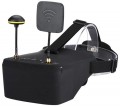 |  |
|---|---|---|
| Eachine EV800D | BetaFPV VR03 | |
from £5.42 | from £84.99 | |
| TOP sellers | ||
Built-in 5.8GHz 40-channel receiver with Raceband support. Removable antennas. Possibility of installation on a tripod. | Built-in 48-channel 5.8 GHz receiver. Automatic and manual channel search function. Removable antenna. | |
| Device type | FPV goggles | FPV goggles |
| Purpose (compatibility) | quadcopter (drone) | quadcopter (drone) |
| Receiver (FPV) | 5.8 GHz, 40 channels | 5.8 GHz, 48 channels |
Specs | ||
| Screen resolution | 800x480 px | 800x480 px |
| Field of view | 55 ° | |
Multimedia | ||
| Card reader |  | |
| USB-C | + | |
| Headphone output | | |
General | ||
| Control | button controls | button controls |
| Battery capacity | 2000 mAh | 2000 mAh |
| Operating time | 2 h | |
| Material | plastic | plastic |
| Dimensions (HxWxD) | 180x145x82 mm | 130x145x90 mm |
| Weight | 362 g | 300 g |
| Added to E-Catalog | november 2023 | november 2023 |


Compare Eachine EV800D and BetaFPV VR03
You may be interested in
My comparisons
Eachine EV800D often compared


BetaFPV VR03 often compared


Glossary
Receiver (FPV)
In this section, the operating frequency range is usually specified (most commonly 5.8 GHz, less frequently other ranges), the number of supported channels and bands, and the type of system — whether the receiver is designed for an analog or digital video link. The more channels and ranges the FPV goggles receiver supports, the easier it is to select a "clean" frequency for your transmitter and fly in a group without interfering with other pilots. It's important for the frequency and protocol of the receiver to match the video transmitter on the drone: for example, racing quadcopters use popular channel sets, and goggles with a full-fledged receiver will allow you to quickly tune to the desired video feed or switch between multiple drones during training and competitions.
Field of view
The viewing angle provided by virtual reality glasses is the angular size of the space that falls into the user's field of view. Usually, the characteristics indicate the size of this space horizontally; however, if you need the most accurate information, this point needs to be specified separately.
The wider the viewing angle — the more the game space the user can see without turning his head, the more powerful the immersion effect and the less likely that the image will be subject to the "tunnel vision" effect. On the other hand, making the field of view too wide also does not make sense, given the characteristics of the human eye. In general, a large viewing angle is considered to be an angle of 100° or more. On the other hand, there are models where this indicator is 30° or even less — these are, usually, specific devices (for example, drone piloting glasses and augmented reality glasses), where such characteristics are quite justified given the overall functionality.
The wider the viewing angle — the more the game space the user can see without turning his head, the more powerful the immersion effect and the less likely that the image will be subject to the "tunnel vision" effect. On the other hand, making the field of view too wide also does not make sense, given the characteristics of the human eye. In general, a large viewing angle is considered to be an angle of 100° or more. On the other hand, there are models where this indicator is 30° or even less — these are, usually, specific devices (for example, drone piloting glasses and augmented reality glasses), where such characteristics are quite justified given the overall functionality.
USB-C
Presence of a USB-C port in glasses. This is a relatively new type of USB port, with miniature size (slightly larger than microUSB) and a convenient reversible design, allowing the plug to be connected either way. It can be found in glasses of different purposes and, accordingly, designed for various applications. For example, in models for PCs/consoles, this port is used similarly to traditional USB-A — for main connection, alongside HDMI or DisplayPort interfaces. In standalone devices, in turn, USB-C is mainly intended for battery charging and connection to a computer for direct file exchange, settings management, firmware updates, etc.
It should also be noted that this section might specify the USB version that the USB-C port corresponds to. Currently, two versions are relevant — 5Gbps and 10Gbps; for VR glasses, the difference between them is generally not significant.
It should also be noted that this section might specify the USB version that the USB-C port corresponds to. Currently, two versions are relevant — 5Gbps and 10Gbps; for VR glasses, the difference between them is generally not significant.