
Comparison Logitech MX Master 2S vs Logitech MX Master Wireless Mouse
Add to comparison | 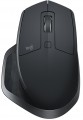 | 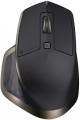 |
|---|---|---|
| Logitech MX Master 2S | Logitech MX Master Wireless Mouse | |
| Compare prices 31 | Compare prices 3 | |
| User reviews | ||
| TOP sellers | ||
It is possible to simultaneously work with three computers — with two via Bluetooth, and with the third via the Unifying receiver. Fast charging support. | Connect to three devices. 5 keys. 2 scroll wheels. Radio and Bluetooth connection. | |
| Product type | mouse | mouse |
| Connection | Bluetooth/radio | Bluetooth/radio |
| Multi-Device |  | |
| Sensor | laser, Darkfield | laser, Darkfield |
Sensor and control | ||
| Sensor resolution | 4000 DPI | 1600 DPI |
| Number of buttons | 5 | 5 |
| DPI-button | | |
| Scroll wheels | 2 | 2 |
| Inertial wheel | |  |
Connection and power supply | ||
| Power source | battery | battery |
| Battery life | 70 days | |
| Port on the device | microUSB | USB-C |
General | ||
| In box | USB-A dongle | USB-A dongle |
| Weight | 145 g | 145 g |
| Color | ||
| Added to E-Catalog | july 2017 | march 2015 |





Compare Logitech MX Master 2S and MX Master Wireless Mouse
Price comparison
You may be interested in
My comparisons
Logitech MX Master 2S often compared


Logitech MX Master Wireless Mouse often compared

Glossary
Sensor resolution
Resolution of the sensor responsible for tracking mouse movements on the work surface. Specified in DPI — dots per inch.
The physical meaning of DPI as a whole is as follows. The sensor of a modern mouse works on the same principle as the camera matrix, and consists of pixels. And DPI is the number of pixels that fall on 1 inch of the underlying surface (length or width), "visible" by the sensor.
It is believed that more DPI means a more advanced sensor and mouse in general; nowadays, models for 3500 – 5000 DPI, 12000 DPI, 16000 DPI even more are not uncommon. In a way, it is — high resolution contributes to accuracy. However, the only thing that is directly determined by this indicator is the speed at which the cursor moves across the screen: the higher the resolution of the sensor, the greater the number of pixels that the cursor will move when the mouse itself moves a certain distance. At the same time, it is worth recalling that too high a speed is even more undesirable than too low. So the real need for high DPI ( 1000 and above) arises mainly when working on large screens (4K resolution and more); for more modest displays (HD and Full HD), smaller values are often enough.
The physical meaning of DPI as a whole is as follows. The sensor of a modern mouse works on the same principle as the camera matrix, and consists of pixels. And DPI is the number of pixels that fall on 1 inch of the underlying surface (length or width), "visible" by the sensor.
It is believed that more DPI means a more advanced sensor and mouse in general; nowadays, models for 3500 – 5000 DPI, 12000 DPI, 16000 DPI even more are not uncommon. In a way, it is — high resolution contributes to accuracy. However, the only thing that is directly determined by this indicator is the speed at which the cursor moves across the screen: the higher the resolution of the sensor, the greater the number of pixels that the cursor will move when the mouse itself moves a certain distance. At the same time, it is worth recalling that too high a speed is even more undesirable than too low. So the real need for high DPI ( 1000 and above) arises mainly when working on large screens (4K resolution and more); for more modest displays (HD and Full HD), smaller values are often enough.
Inertial wheel
A wheel with an accelerated scrolling mode that allows you to scroll through a large “sheet” of pages in text documents, spreadsheets or on Internet resources in just one movement. The inertial wheel is a hallmark of a number of Logitech mouse models.
Battery life
The battery life of the mouse (see "Power") on a single battery charge.
The operating time in this case is quite approximate: it is indicated for a certain average mode of use, and the actual battery life may turn out to be either less or more than the claimed one, depending on the specifics of the application. Nevertheless, this is a fairly reliable indicator, it is quite possible to evaluate different battery models and compare them with each other: the difference in the claimed operating time is usually quite consistent with the difference in real battery life.
Separately, we note that the operating time for rechargeable mice is generally less than for battery-powered models, so this parameter is indicated in days, not months.
The operating time in this case is quite approximate: it is indicated for a certain average mode of use, and the actual battery life may turn out to be either less or more than the claimed one, depending on the specifics of the application. Nevertheless, this is a fairly reliable indicator, it is quite possible to evaluate different battery models and compare them with each other: the difference in the claimed operating time is usually quite consistent with the difference in real battery life.
Separately, we note that the operating time for rechargeable mice is generally less than for battery-powered models, so this parameter is indicated in days, not months.
Port on the device
Connector on the mouse body for detachable cable connection; it is found in both wired models and wireless ones with a battery, where through this port the mouse charges and, if necessary, operates "wired" without delays.
— microUSB. One of the miniature versions of the USB connector, still popular in gadgets despite the emergence of the more advanced USB-C. It has comparatively modest capabilities (specifically, it falls short of USB-C in terms of maximum possible charging power), however, this is rarely critical. Meanwhile, there are a plethora of cables and chargers for microUSB.
— USB-C. The latest (as of the end of 2025) type of USB connector. It is symmetrical, allowing the cable to be inserted either way, eliminating the possibility of incorrect connection. USB-C is more reliable, has an extended lifespan, and supports higher data transfer and charging speed. Additionally, it is compatible with modern devices and is gradually becoming a universal standard, making mice with such a connector more convenient and relevant for users.
— microUSB. One of the miniature versions of the USB connector, still popular in gadgets despite the emergence of the more advanced USB-C. It has comparatively modest capabilities (specifically, it falls short of USB-C in terms of maximum possible charging power), however, this is rarely critical. Meanwhile, there are a plethora of cables and chargers for microUSB.
— USB-C. The latest (as of the end of 2025) type of USB connector. It is symmetrical, allowing the cable to be inserted either way, eliminating the possibility of incorrect connection. USB-C is more reliable, has an extended lifespan, and supports higher data transfer and charging speed. Additionally, it is compatible with modern devices and is gradually becoming a universal standard, making mice with such a connector more convenient and relevant for users.