
Comparison Logitech B100 vs Logitech B110
Add to comparison | 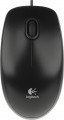 | 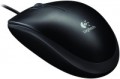 |
|---|---|---|
| Logitech B100 | Logitech B110 | |
| Compare prices 68 | from £18.59 | |
| User reviews | ||
| TOP sellers | ||
| Product type | mouse | mouse |
| Connection | wired | wired |
| Sensor | optical | optical |
| Type | notebook | |
Sensor and control | ||
| Sensor resolution | 800 DPI | 800 DPI |
| Number of buttons | 2 | 2 |
| Scroll wheels | 1 | 1 |
| 4D wheel |  |  |
Connection and power supply | ||
| Cable | USB-A | USB-A |
| Cable length | 1.8 m | 1.8 m |
General | ||
| Suitable for left-handers | | |
| Left handed | | |
| Size (LxWxH) | 113x62x37 mm | 113x62x37 mm |
| Weight | 122 g | |
| Color | ||
| Added to E-Catalog | february 2011 | july 2009 |





Compare Logitech B100 and B110
Comparing Logitech B100 and Logitech B110, it can be noted that both mice have wired connection and an optical sensor with a resolution of 800 DPI. However, the B110 offers a horizontal scroll wheel, which can be useful for users working with large documents or web pages. In reviews, users note that the B100 fits more comfortably in the hand and has a durable cable, while the B110 may be cheaper and also comfortable, but sometimes there are issues with button clicks. Overall, both models are suitable for budget use, but the choice depends on user preferences.
Price comparison
You may be interested in
Logitech B100 often compared


Glossary
Type
The direction the mouse is facing. Specified only for models with additional specialization or design features — namely, for laptop, gaming and vertical mice. Here are their main features:
— Laptop. Mice well suited for use with laptops. Most of these models have compact dimensions — the length of the case in them is less than 110 mm, and often less than 100 mm. This makes it easy to transport along with the laptop. And larger devices are considered laptops if such specialization is somehow indicated by the manufacturer. In addition, this category includes most models with a Bluetooth connection (see "Connection type") — such a module is found in almost any modern laptop. And wired laptop mice can be equipped with a wire winding system that allows you to adjust the length of the cable for different situations and twist it compactly for transportation.
— Game. Mice designed primarily for use in computer games and intended for gamers — including professional e-sportsmen (although the price category and capabilities of different models, of course, may vary). Such devices are often made in a characteristic "aggressive" design, with unusual patterns, logos, coloured backlighting (in some models — with effects), etc. On the functional side, gaming mice are distinguished primarily by increased sensor accuracy, as well as the presence of various specialized feat...ures — such as additional buttons with the ability to “attach” certain game actions or even a sequence of actions to them, a triple-click (“queue”) button, a sniper button, DPI switching (see below), weight adjustment, etc. Note that narrow the specialization of such models can be different: there are both universal gaming mice and devices optimized for a specific genre (shooters, RPGs, etc.) or even a specific game.
— Ergonomic (vertical). Mice of a specific design: the surface on which the hand is placed during work is not located horizontally in such models, but with an inclination to the right (in left-handed models — to the left). As a result, the body height is noticeably greater than that of traditional models — hence the name "vertical". And the user's hand actually covers such a case from two sides: on one side (on an inclined surface) there is a palm, on the other (in a special recess) — a thumb. This position of the hand is considered more natural and comfortable than the classic horizontal position, it reduces the load on the joints and ligaments, thus reducing fatigue and the likelihood of carpal tunnel syndrome and other disorders. Vertical models are well suited for those who have to work at the computer for a long time — except that it may take some time to get used to the unusual shape after a traditional mouse.
— Laptop. Mice well suited for use with laptops. Most of these models have compact dimensions — the length of the case in them is less than 110 mm, and often less than 100 mm. This makes it easy to transport along with the laptop. And larger devices are considered laptops if such specialization is somehow indicated by the manufacturer. In addition, this category includes most models with a Bluetooth connection (see "Connection type") — such a module is found in almost any modern laptop. And wired laptop mice can be equipped with a wire winding system that allows you to adjust the length of the cable for different situations and twist it compactly for transportation.
— Game. Mice designed primarily for use in computer games and intended for gamers — including professional e-sportsmen (although the price category and capabilities of different models, of course, may vary). Such devices are often made in a characteristic "aggressive" design, with unusual patterns, logos, coloured backlighting (in some models — with effects), etc. On the functional side, gaming mice are distinguished primarily by increased sensor accuracy, as well as the presence of various specialized feat...ures — such as additional buttons with the ability to “attach” certain game actions or even a sequence of actions to them, a triple-click (“queue”) button, a sniper button, DPI switching (see below), weight adjustment, etc. Note that narrow the specialization of such models can be different: there are both universal gaming mice and devices optimized for a specific genre (shooters, RPGs, etc.) or even a specific game.
— Ergonomic (vertical). Mice of a specific design: the surface on which the hand is placed during work is not located horizontally in such models, but with an inclination to the right (in left-handed models — to the left). As a result, the body height is noticeably greater than that of traditional models — hence the name "vertical". And the user's hand actually covers such a case from two sides: on one side (on an inclined surface) there is a palm, on the other (in a special recess) — a thumb. This position of the hand is considered more natural and comfortable than the classic horizontal position, it reduces the load on the joints and ligaments, thus reducing fatigue and the likelihood of carpal tunnel syndrome and other disorders. Vertical models are well suited for those who have to work at the computer for a long time — except that it may take some time to get used to the unusual shape after a traditional mouse.
4D wheel
The presence in the mouse of 4D-wheels — wheels with the function of navigating in four directions. In other words, such equipment allows you to scroll the image on the screen not only up and down, but also left and right. The specific implementation of this function may be different: in some models for horizontal navigation, the wheel can tilt to the sides, in others, switching between horizontal and vertical scrolling is carried out using a separate button. However, anyway, this feature expands the functionality of the mouse, while the 4D wheel is cheaper and takes up less space than two separate wheels (see "Number of scroll wheels").
Weight
The total weight of the mouse. For models with a wired connection, usually, it is indicated without cable, and for devices with weight adjustment (see above) — without weights.
This parameter is important primarily for professional gaming applications, although it is often relevant for ordinary users. Theoretically, less weight promotes speed and reduces fatigue. At the same time, in fact, much depends on the personal habits and preferences of the user: a mouse that is too light may “not be felt in the hands” and not give familiar feedback. Therefore, although most mice have a lower weight limit of 60 – 80 g, however, even among professional gaming models there are much more massive devices — 120 – 140 g or more. The lightest variety of "rodents" is laptop (see "In the direction"), among them devices come across and less than 60 g.
Also note that the weight to some extent depends on the size and “tricked out” of the device, but there is no unambiguous dependence here: models similar in size and functionality can differ markedly in weight.
This parameter is important primarily for professional gaming applications, although it is often relevant for ordinary users. Theoretically, less weight promotes speed and reduces fatigue. At the same time, in fact, much depends on the personal habits and preferences of the user: a mouse that is too light may “not be felt in the hands” and not give familiar feedback. Therefore, although most mice have a lower weight limit of 60 – 80 g, however, even among professional gaming models there are much more massive devices — 120 – 140 g or more. The lightest variety of "rodents" is laptop (see "In the direction"), among them devices come across and less than 60 g.
Also note that the weight to some extent depends on the size and “tricked out” of the device, but there is no unambiguous dependence here: models similar in size and functionality can differ markedly in weight.