
Comparison MikroTik hEX RB750Gr3 vs MikroTik hEX lite
Add to comparison | 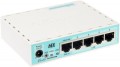 |  |
|---|---|---|
| MikroTik hEX RB750Gr3 | MikroTik hEX lite | |
| Compare prices 6 | Compare prices 7 | |
| TOP sellers | ||
Support for The Dude Server. The hEX RB750Gr3 model differs from the hEX RB750Gr2 in an increased amount of RAM (from 64 to 256 MB), a processor (from a single-core 720 MHz to a dual-core 880 MHz), a USB port and a slot for a Micro SD memory card. | ||
| Type | router | router |
| Mount | desktop | desktop |
Ports | ||
| Connections | Ethernet 3G/4G modem (USB) | Ethernet |
| Fast Ethernet | 5 pcs | |
| Gigabit Ethernet | 5 pcs | |
| Of which dedicated WANs | 1 pcs | |
| Of which dedicated LAN | 4 pcs | |
| USB ports | 1 | |
Features | ||
| Control | SSH Telnet Web interface SNMP | SSH Telnet Web interface SNMP |
| Basic features | DHCP server port forwarding VPN | DHCP server port forwarding VPN |
Hardware | ||
| CPU | MediaTek MT7621A | Qualcomm QCA9533 |
| CPU cores | 2 | 1 |
| CPU speed | 0.88 GHz | 0.89 GHz |
| RAM | 256 MB | 64 MB |
| Flash memory | 16 MB | 16 MB |
Security | ||
| Security | MAC address filtering | MAC address filtering |
PoE | ||
| PoE (input) | passive | passive |
General | ||
| PSU | external | external |
| Operating temperature | -40 °C ~ +60 °C | -40 °C ~ +70 °C |
| Dimensions (WxDxH) | 113x89x28 mm | 113x89x28 mm |
| Added to E-Catalog | november 2017 | july 2016 |




Compare MikroTik hEX RB750Gr3 and hEX lite
Comparing MikroTik hEX RB750Gr3 and MikroTik hEX lite, several key differences can be highlighted. The hEX RB750Gr3 is equipped with a dual-core processor with a clock speed of 0.88 GHz and 256 MB of RAM, providing better performance compared to the single-core hEX lite processor at 0.89 GHz and 64 MB of RAM. Both routers support DHCP server, port forwarding, and VPN, but the hEX RB750Gr3 offers Gigabit Ethernet ports, whereas the hEX lite is limited to Fast Ethernet. The operating temperature of the hEX lite is higher, reaching +70 °C, while the hEX RB750Gr3 is +60 °C. The choice between them depends on your performance needs and connection type.
Price comparison
You may be interested in
My comparisons
MikroTik hEX RB750Gr3 often compared


MikroTik hEX lite often compared

Glossary
Connections
How the router connects to the Internet or other external network.
Almost all modern routers have ethernet network connectors for this purpose, however, in addition to them, other connection options can be provided — both wired ( ADSL, SFP / SFP + optics) and wireless (mobile access via 3G / 4G modem or SIM card). Here are the features of each option:
— Ethernet. A standard LAN network cable connector (“twisted pair”) is the most popular modern wired connection format in computer networks. Widely used both in "local" and to provide access to the Internet. This standard is somewhat inferior to SFP / SFP + (see below) in terms of speed and noise immunity, but it is much cheaper. The speed of work in modern versions of Ethernet can reach 10 Gbps (see "Connection speed of WAN ports"), theoretically, a further increase in throughput is possible.
— SFP / SFP + (optics). A connector for transmitting network traffic over a fiber optic cable. The main advantage of such a cable is complete insensitivity to electromagnetic interference. And data transfer rates can reach 2.7 Gbps in the original SFP and 16 Gbps in SFP+. At the same time, maintaining this standard is not cheap, and the benefits mentioned are not often needed in fact. Therefore, SFP / SFP + is found mainly in mid-range a...nd top-level routers.
— ADSL. Connecting to the Internet through a fixed telephone network using ADSL technology. The key advantage of this connection is the ability to use existing networks without laying additional wires; at the same time, Internet access is completely separated from telephone communication and traffic does not interfere with voice calls. On the other hand, the bandwidth of ADSL is very low by modern standards (less than 24 Mbps), moreover, the data transmission speed is noticeably lower than the reception speed. This can create problems for video communication and some other specific tasks. So nowadays ADSL is used less and less.
— 3G/4G modem (USB). Internet connection via mobile network using a separate 3G or 4G modem connected to the USB port. This feature can be useful where there is no full-fledged wired connection (for example, in rural areas), and also as a fallback option in case the main communication channel fails. And the type of network supported depends mainly on the modem used (the compatibility of the router with different models needs to be specified separately, but most often there are no problems with this). As for specific types of networks, most 3G modems work in UMTS networks (the same ones that are massively used by mobile phones); the data transfer rate in such networks can reach 75 Mbit / s (however, usually it is much lower). Less common are 3G modems for EV-DO networks based on CDMA — this standard has lower speeds (up to 14.7 Mbps) and not as extensive coverage as UMTS, however, both the equipment and the connection itself can be cheaper. And the designation "4G" means only one type of networks — LTE; it provides speeds up to 173 Mbps, but is not as widespread as 3G.
— SIM card. Another option for connecting to the Internet via mobile networks is its own SIM card slot provided in the design of the router. This option is convenient because you do not need to buy an additional device (modem) for mobile Internet — you just need to purchase an operator's SIM card. On the other hand, due to the built-in mobile communication modules, such routers themselves are more expensive than analogues for USB modems. In addition, the connectivity options in them are limited by the characteristics of the module: for example, a router for 3G networks will not be able to fully use 4G networks (whereas a USB modem can usually be changed to a more advanced one). As a result, this option is relatively rare in modern equipment.
Almost all modern routers have ethernet network connectors for this purpose, however, in addition to them, other connection options can be provided — both wired ( ADSL, SFP / SFP + optics) and wireless (mobile access via 3G / 4G modem or SIM card). Here are the features of each option:
— Ethernet. A standard LAN network cable connector (“twisted pair”) is the most popular modern wired connection format in computer networks. Widely used both in "local" and to provide access to the Internet. This standard is somewhat inferior to SFP / SFP + (see below) in terms of speed and noise immunity, but it is much cheaper. The speed of work in modern versions of Ethernet can reach 10 Gbps (see "Connection speed of WAN ports"), theoretically, a further increase in throughput is possible.
— SFP / SFP + (optics). A connector for transmitting network traffic over a fiber optic cable. The main advantage of such a cable is complete insensitivity to electromagnetic interference. And data transfer rates can reach 2.7 Gbps in the original SFP and 16 Gbps in SFP+. At the same time, maintaining this standard is not cheap, and the benefits mentioned are not often needed in fact. Therefore, SFP / SFP + is found mainly in mid-range a...nd top-level routers.
— ADSL. Connecting to the Internet through a fixed telephone network using ADSL technology. The key advantage of this connection is the ability to use existing networks without laying additional wires; at the same time, Internet access is completely separated from telephone communication and traffic does not interfere with voice calls. On the other hand, the bandwidth of ADSL is very low by modern standards (less than 24 Mbps), moreover, the data transmission speed is noticeably lower than the reception speed. This can create problems for video communication and some other specific tasks. So nowadays ADSL is used less and less.
— 3G/4G modem (USB). Internet connection via mobile network using a separate 3G or 4G modem connected to the USB port. This feature can be useful where there is no full-fledged wired connection (for example, in rural areas), and also as a fallback option in case the main communication channel fails. And the type of network supported depends mainly on the modem used (the compatibility of the router with different models needs to be specified separately, but most often there are no problems with this). As for specific types of networks, most 3G modems work in UMTS networks (the same ones that are massively used by mobile phones); the data transfer rate in such networks can reach 75 Mbit / s (however, usually it is much lower). Less common are 3G modems for EV-DO networks based on CDMA — this standard has lower speeds (up to 14.7 Mbps) and not as extensive coverage as UMTS, however, both the equipment and the connection itself can be cheaper. And the designation "4G" means only one type of networks — LTE; it provides speeds up to 173 Mbps, but is not as widespread as 3G.
— SIM card. Another option for connecting to the Internet via mobile networks is its own SIM card slot provided in the design of the router. This option is convenient because you do not need to buy an additional device (modem) for mobile Internet — you just need to purchase an operator's SIM card. On the other hand, due to the built-in mobile communication modules, such routers themselves are more expensive than analogues for USB modems. In addition, the connectivity options in them are limited by the characteristics of the module: for example, a router for 3G networks will not be able to fully use 4G networks (whereas a USB modem can usually be changed to a more advanced one). As a result, this option is relatively rare in modern equipment.
Fast Ethernet
The number of standard RJ-45 network connectors of the Fast Ethernet format, provided in the design of the device.
Fast Ethernet is the most modest of the wired connection formats over a twisted-pair network cable in our time - it provides data transfer rates up to 100 Mbps. Nevertheless, even this speed is often enough for relatively simple tasks that are not associated with large amounts of data.
As for the number of connectors, it corresponds to the number of network devices that can be connected to the "switch" directly, without the use of additional equipment.
Fast Ethernet is the most modest of the wired connection formats over a twisted-pair network cable in our time - it provides data transfer rates up to 100 Mbps. Nevertheless, even this speed is often enough for relatively simple tasks that are not associated with large amounts of data.
As for the number of connectors, it corresponds to the number of network devices that can be connected to the "switch" directly, without the use of additional equipment.
Gigabit Ethernet
The number of standard Gigabit Ethernet RJ-45 network connectors provided in the device design.
As the name suggests, these connectors provide data transfer rates up to 1 Gbps. Initially, Gigabit Ethernet was considered a professional standard, and even now the real needs for such speeds arise mainly when performing special tasks. Nevertheless, even relatively inexpensive computers are now equipped with gigabit network adapters, not to mention more advanced technology.
As for the number of connectors, it corresponds to the number of network devices that can be connected to the "switch" directly, without the use of additional equipment. At the same time, it is worth noting that in some "switches" individual connectors of this type are combined with optical SFP or SFP +. Such connectors are marked "combo" and are taken into account both when counting RJ-45 and when counting SFP / SFP +.
As the name suggests, these connectors provide data transfer rates up to 1 Gbps. Initially, Gigabit Ethernet was considered a professional standard, and even now the real needs for such speeds arise mainly when performing special tasks. Nevertheless, even relatively inexpensive computers are now equipped with gigabit network adapters, not to mention more advanced technology.
As for the number of connectors, it corresponds to the number of network devices that can be connected to the "switch" directly, without the use of additional equipment. At the same time, it is worth noting that in some "switches" individual connectors of this type are combined with optical SFP or SFP +. Such connectors are marked "combo" and are taken into account both when counting RJ-45 and when counting SFP / SFP +.
Of which dedicated WANs
The number of ports designated as WAN by the manufacturer. They are intended for wired connection of the device to the Internet or other external networks (to solve some specific problems).
Of which dedicated LAN
In this case, dedicated LANs mean directly marked network connectors designed for wired connection of LAN devices - PCs, servers, additional access points, etc. The number of ports corresponds to the number of devices that can be directly connected to the equipment by wire.
USB ports
The number of USB ports provided in the design of the router. USB is a universal interface used in computer technology to connect peripheral devices for various purposes. One of its uses is to connect a 3G modem (if provided, see “Data entry (WAN-port)”), but this is not limited to this: in fact, the options for using USB ports directly depend only on the capabilities specified in the router firmware. So, in some models, you can connect a flash drive or an external hard drive to this connector — to update the firmware or even organize an FTP server directly on the router. And for other peripherals — printers, cameras, etc. — USB connection can be used to work as network devices (however, such functions are rare in standard firmware).
CPU
The model of the processor installed in the device. The processor is responsible for processing network traffic and running software. Knowing its name, you can get more detailed data on the speed capabilities of the equipment and understand how much such a powerful or, on the contrary, mediocre element is needed on board. In new models of Wi-Fi equipment, coprocessors or so-called NPU modules are often installed, which relieve the load from the main processor.
CPU cores
The number of cores in the processor installed in the device. The core in this case refers to the part of the processor that executes one thread of instructions. Accordingly, the presence of multiple cores allows you to work with multiple threads simultaneously, which has a positive effect on performance.
CPU speed
The number of cycles per second that the processor produces in its normal operating mode. A clock is a single electrical impulse used to process data and synchronize the processor with the rest of the computer system. Different operations may require fractions of a clock or several clocks, but anyway, the clock frequency is one of the main parameters characterizing the performance and speed of the processor — all other things being equal, a processor with a higher clock frequency will work faster and better cope with significant loads.