
Comparison DJI Osmo Pro vs FeiYu Tech Summon Plus
Add to comparison | 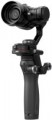 | 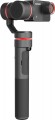 |
|---|---|---|
| DJI Osmo Pro | FeiYu Tech Summon Plus | |
| Outdated Product | from $319.96 up to $355.96 | |
| TOP sellers | ||
Two ¼" connectors allow you to attach the stabilizer to various mounts. Built-in two microphones for noise reduction. The Summon Plus model differs from the Summon model in higher quality sound recording. | ||
| Type | with camera | with camera |
| In box | phone mount (like a screen) | |
Gimbal specifications | ||
| Rotation angle | ±320° | 360° |
| Tilt angle | -130° +45° | 310° |
| Bank angle | -90° +30° | 310° |
| Max. controlled speed | 180 °/sec | 120 °/sec |
| Max. phone diagonal | 6 " | |
Camera and filming | ||
| WVGA (480p) | 640x480 px 240 fps | |
| HD (720p) | 1280x720 px 120 fps | |
| Full HD (1080p) | 1920x1080 px 100 fps | 1920x1080 px 60 fps |
| Quad HD | 2704x1520 px 30 fps | 2704x1520 px 30 fps |
| Ultra HD (4K) | 3840x2160 px 30 fps | 4096x2160 px 25 fps |
| Field of view | 72 ° | 95 ° |
| Video file format | MOV | |
| Digital stabilization |  |  |
| Optical zoom | 3.5 | |
| Digital zoom | 2x | |
| Photo megapixels | 16 | 16 |
| Photo resolution | 4608x3456 px | 4608x3456 px |
Battery | ||
| Battery model | HB02-542465 | 22650 |
| Capacity | 1225 mAh | 3000 mAh |
| Battery life | 3 h | |
| Removable battery | | |
Shooting features | ||
| Camera control | joystick | joystick |
| Functions | camera position fixing | camera position fixing axis lock |
| Shooting modes | Time lapse selfie mode autopanorama tracking mode inversion mode | Time lapse autopanorama tracking mode inversion mode |
General | ||
| Connection | Wi-Fi | Wi-Fi |
| Dimensions (folded) | 61.8x48.2x161.5 mm | 81x97x232 mm |
| Weight | 526 g | 350 g |
| Added to E-Catalog | may 2017 | february 2017 |


Compare DJI Osmo Pro and FeiYu Tech Summon Plus
You may be interested in
DJI Osmo Pro often compared


FeiYu Tech Summon Plus often compared

Glossary
In box
— Phone mount(like a screen). The ability to use your smartphone as your stabiliser screen. The device's camera is not used in this case: filming is carried out either on the built-in camera of the stabiliser or on the action camera attached to it. Note that the smartphone can be used not only as a viewfinder but also to control the camera; specific features depend on the stabiliser model.
— Focus control mechanism. A device that allows the stabiliser controls to focus the lens on the installed camera. It simplifies the use of manual focus lenses greatly.
— Two-handed handle. The two-handed handle increases agility, stability and precision.
— Quick release plate. This element makes it possible to quickly install and remove the camera from the stabiliser without using third-party tools.
— Tripod. The presence of a small tripod in the stabiliser kit — a tripod, which allows you to use the device in a stationary position, setting it on a flat hard surface. Usually the tripod is detachable.
— Remote control. The presence in the kit of a small remote control. It is convenient when the device is installed at a remote distance, for example, in a car.
— Bag / Case. The pre...sence of a bag or case in the standard package of the stabilizer. Bags often come with handles or a strap for convenient carrying, while cases are somewhat simpler — they don't have handles and are designed to be carried in a travel bag, backpack, etc. A bag or case protects the device from dust and other contaminants and to some extent shields the contents from damage in case of bumps or falls. Additionally, bags or cases can often be used to store extra accessories.
— Focus control mechanism. A device that allows the stabiliser controls to focus the lens on the installed camera. It simplifies the use of manual focus lenses greatly.
— Two-handed handle. The two-handed handle increases agility, stability and precision.
— Quick release plate. This element makes it possible to quickly install and remove the camera from the stabiliser without using third-party tools.
— Tripod. The presence of a small tripod in the stabiliser kit — a tripod, which allows you to use the device in a stationary position, setting it on a flat hard surface. Usually the tripod is detachable.
— Remote control. The presence in the kit of a small remote control. It is convenient when the device is installed at a remote distance, for example, in a car.
— Bag / Case. The pre...sence of a bag or case in the standard package of the stabilizer. Bags often come with handles or a strap for convenient carrying, while cases are somewhat simpler — they don't have handles and are designed to be carried in a travel bag, backpack, etc. A bag or case protects the device from dust and other contaminants and to some extent shields the contents from damage in case of bumps or falls. Additionally, bags or cases can often be used to store extra accessories.
Rotation angle
The range of rotation angles supported by the steadicam.
In this case, it means turning the camera to the right or left, without tilting back and forth.
In this case, it means turning the camera to the right or left, without tilting back and forth.
Tilt angle
The range of forward-backwards tilt angles relative to the vertical position supported by the stabiliser.
It can be written in different ways.
The simplest option is when one angle value is indicated in the characteristics. This may mean that the camera can deviate from the neutral position in both directions by the same angle, which is half the range.
Another option is used when the angles of tilt forward and backward are not the same. In such cases, the horizontal position of the camera on a vertical steadicam is taken as zero, the “-” sign indicates the maximum angle of camera deflection back, lens up, and the “+” sign — forward, lens down.
It can be written in different ways.
The simplest option is when one angle value is indicated in the characteristics. This may mean that the camera can deviate from the neutral position in both directions by the same angle, which is half the range.
Another option is used when the angles of tilt forward and backward are not the same. In such cases, the horizontal position of the camera on a vertical steadicam is taken as zero, the “-” sign indicates the maximum angle of camera deflection back, lens up, and the “+” sign — forward, lens down.
Bank angle
The range of roll angles (to the side) supported by the stabiliser.
Can be recorded in two ways (See "Tilt angle")
Can be recorded in two ways (See "Tilt angle")
Max. controlled speed
The maximum controlled speed supported by the stabiliser is, in fact, the highest speed of rotation of the camera along one axis or another, provided by the device. This is the maximum rotation speed of the entire structure, at which the stabiliser automation can provide effective stabilisation along the corresponding axis (that is, keep the camera stationary).
This item is directly related to the purpose of the stabiliser — for shooting while hiking or cycling on flat terrain, a high stabilization speed is hardly necessary, but during surfing, acrobatic aerobatics and other similar activities, the “slow” stabiliser often turns out to be ineffective.
This item is directly related to the purpose of the stabiliser — for shooting while hiking or cycling on flat terrain, a high stabilization speed is hardly necessary, but during surfing, acrobatic aerobatics and other similar activities, the “slow” stabiliser often turns out to be ineffective.
Max. phone diagonal
The maximum diagonal of the phone that can be installed on this stabiliser.
This parameter is more relevant for models for various purposes, not only for those that were originally designed for smartphones. Here we note that the maximum diagonal is a rather approximate parameter: models with the same screen size may have different actual dimensions.
This parameter is more relevant for models for various purposes, not only for those that were originally designed for smartphones. Here we note that the maximum diagonal is a rather approximate parameter: models with the same screen size may have different actual dimensions.
WVGA (480p)
WVGA (480p) video recording capabilities supported by the bundled stabiliser's camera.
WVGA (480p) — the simplest and most modest of the standards used in modern video technology. The standard resolution of such a video is 640x480, the frame rate is usually 30 or 60 fps, and support for 120 fps means that the camera supports slow motion.
WVGA (480p) — the simplest and most modest of the standards used in modern video technology. The standard resolution of such a video is 640x480, the frame rate is usually 30 or 60 fps, and support for 120 fps means that the camera supports slow motion.
HD (720p)
HD (720p) video recording capabilities supported by the stabiliser's camera.
The HD (720p) standard allows the size of 1280x720 pixels. It offers a fairly decent picture quality with relatively small file sizes and low requirements for the processing power of video equipment.
Note that the quality of the video depends not only on the resolution but also on the frame rate. 30 fps gives more or less normal image quality, 60 fps is good, and higher values are usually used in slow motion which means that the camera supports this feature.
The HD (720p) standard allows the size of 1280x720 pixels. It offers a fairly decent picture quality with relatively small file sizes and low requirements for the processing power of video equipment.
Note that the quality of the video depends not only on the resolution but also on the frame rate. 30 fps gives more or less normal image quality, 60 fps is good, and higher values are usually used in slow motion which means that the camera supports this feature.
Full HD (1080p)
Full HD (1080p) video recording capabilities supported by the stabiliser's camera.
Full HD has a resolution of 1920x1080 pixels. To date, this format is considered to be almost optimal in terms of the ratio between image quality and technical requirements: it noticeably surpasses HD in terms of image detail and, at the same time, does not require such capacious storage drives as 2K and especially 4K standards.
Full HD has a resolution of 1920x1080 pixels. To date, this format is considered to be almost optimal in terms of the ratio between image quality and technical requirements: it noticeably surpasses HD in terms of image detail and, at the same time, does not require such capacious storage drives as 2K and especially 4K standards.