
Comparison Sven SPS-517 vs Sven 430
Add to comparison | 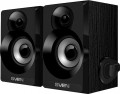 | 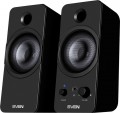 |
|---|---|---|
| Sven SPS-517 | Sven 430 | |
| Outdated Product | Outdated Product | |
| User reviews | ||
| TOP sellers | ||
| Speakers | kit 2.0 | kit 2.0 |
| Lines | 1 | 1 |
Specs | ||
| Frequency range | 100 – 20000 Hz | 80 – 20000 Hz |
| Speaker output | 6 W | 6 W |
| Front | 3 W/channel | 3 W/channel |
| Speaker port tube |  | |
Features | ||
| Connection | mini-Jack (3.5 mm) | mini-Jack (3.5 mm) headphone output |
General | ||
| USB port powered | | |
| Volume control | side | front |
| Inclined design |  | |
| Speaker material | MDF | plastic |
| Front speaker size (WxHxD) | 141x97x97 mm | 87x200x105 mm |
| Weight | 0.75 kg | 0.9 kg |
| Color | ||
| Added to E-Catalog | may 2018 | march 2018 |


Compare Sven SPS-517 and 430
You may be interested in
Sven SPS-517 often compared


Glossary
Frequency range
The range of audio frequencies supported by acoustics. The wider this range — the fuller the reproduced sound, the lower the likelihood that some of these details at low or high frequencies will remain “behind the scenes”. At the same time, the human ear is able to hear frequencies of the order of 16 – 22,000 Hz, and with age, this range narrows even more. In modern audio equipment, especially at the top level, there may be more extensive ranges, but from a practical point of view, this does not make much sense. In addition, it is worth noting that a wide frequency range in itself does not guarantee high-quality sound — a lot also depends on the frequency response.
Connection
— mini-Jack (3.5 mm). The 3.5 mm jack is used as a standard analog audio output on almost all modern PCs and laptops. Additionally, it's installed in most smartphones, tablets, and portable players, and is quite common in many other types of equipment. In light of this, the mini-jack plug is equipped on most contemporary computer speakers (except perhaps for Bluetooth models). It can be a plug on a non-removable or removable cable, or an adapter from another connector — for example, "2 RCA — mini-jack".
— RCA. The RCA connector, also colloquially known as "tulip," is used here as a line input for receiving an analog audio signal, similar to the 3.5 mm mini-jack. The differences lie in several important aspects. Firstly, RCA operates on the "one connector per channel" principle, and the number of such connectors will depend on the sound format. For instance, stereo acoustics will require a set of two such connectors, a 5.1 system — six, and so on. Secondly, RCA is quite popular in traditional audio equipment but is relatively uncommon among computers. Therefore, in computer acoustics, this input is relatively rare — mainly found in rather advanced models (including solutions with an external amplifier). Moreover, note that in sets with a subwoofer, an RCA connector may also be provided in the main satellite for connecting the "sub," playing the role of an output in this case.
— USB-A.... Sound transmission from a PC, laptop, monitor, or another device is carried out through a standard USB connector of the USB-A format. In this case, the sound is transmitted digitally, reducing the speakers' dependency on the computer's sound card quality.
— USB-C. Sound is transmitted via the USB-C port, through which the speakers receive a digital audio signal from a compatible device. This format is particularly well-suited for modern electronics, where USB-C has already become one of the main connection interfaces. In practice, this makes the speakers more convenient for new laptops, tablets, and other devices without a separate analog output.
— Optical input. A digital input for transmitting high-quality sound, including multichannel. This connection is notable for being completely immune to electrical interference; however, the fiber optic cable is not well-suited to bends and strong pressure.
— Coaxial input. An input for transmitting sound in digital form, allowing for multichannel sound transmission. It uses the RCA connector (known colloquially as "tulip"), though it is incompatible with the RCA interface described above. Unlike optical connections, coaxial connections are susceptible to electromagnetic interference, but they don't require special delicacy in handling the cable.
— Microphone input. An input for connecting an external microphone, located directly on the speakers' body. The purpose of this function is similar to the headphone output described above: connecting a microphone to a speaker placed on the table is often more convenient than connecting it directly to the system unit. Generally, speakers with this feature have an additional plug connected to the sound card's microphone input.
— Subwoofer output. The availability of a connector for connecting a subwoofer allows further enhancement of the system's lower frequency sound. Naturally, the subwoofer is purchased separately, and the output serves as an option to expand the acoustics as needed.
— Headphone output. An output for connecting headphones, located directly on the body of one of the speakers. This connector is particularly convenient when using headphones with a traditional desktop PC: attaching the headphones to a speaker body located on the table is noticeably more convenient than stretching the cord to the system unit. As a rule, the role of this output is played by a standard mini-Jack 3.5 mm socket, which is exactly what most modern headphones (both for computers and general use) are designed for.
— RCA. The RCA connector, also colloquially known as "tulip," is used here as a line input for receiving an analog audio signal, similar to the 3.5 mm mini-jack. The differences lie in several important aspects. Firstly, RCA operates on the "one connector per channel" principle, and the number of such connectors will depend on the sound format. For instance, stereo acoustics will require a set of two such connectors, a 5.1 system — six, and so on. Secondly, RCA is quite popular in traditional audio equipment but is relatively uncommon among computers. Therefore, in computer acoustics, this input is relatively rare — mainly found in rather advanced models (including solutions with an external amplifier). Moreover, note that in sets with a subwoofer, an RCA connector may also be provided in the main satellite for connecting the "sub," playing the role of an output in this case.
— USB-A.... Sound transmission from a PC, laptop, monitor, or another device is carried out through a standard USB connector of the USB-A format. In this case, the sound is transmitted digitally, reducing the speakers' dependency on the computer's sound card quality.
— USB-C. Sound is transmitted via the USB-C port, through which the speakers receive a digital audio signal from a compatible device. This format is particularly well-suited for modern electronics, where USB-C has already become one of the main connection interfaces. In practice, this makes the speakers more convenient for new laptops, tablets, and other devices without a separate analog output.
— Optical input. A digital input for transmitting high-quality sound, including multichannel. This connection is notable for being completely immune to electrical interference; however, the fiber optic cable is not well-suited to bends and strong pressure.
— Coaxial input. An input for transmitting sound in digital form, allowing for multichannel sound transmission. It uses the RCA connector (known colloquially as "tulip"), though it is incompatible with the RCA interface described above. Unlike optical connections, coaxial connections are susceptible to electromagnetic interference, but they don't require special delicacy in handling the cable.
— Microphone input. An input for connecting an external microphone, located directly on the speakers' body. The purpose of this function is similar to the headphone output described above: connecting a microphone to a speaker placed on the table is often more convenient than connecting it directly to the system unit. Generally, speakers with this feature have an additional plug connected to the sound card's microphone input.
— Subwoofer output. The availability of a connector for connecting a subwoofer allows further enhancement of the system's lower frequency sound. Naturally, the subwoofer is purchased separately, and the output serves as an option to expand the acoustics as needed.
— Headphone output. An output for connecting headphones, located directly on the body of one of the speakers. This connector is particularly convenient when using headphones with a traditional desktop PC: attaching the headphones to a speaker body located on the table is noticeably more convenient than stretching the cord to the system unit. As a rule, the role of this output is played by a standard mini-Jack 3.5 mm socket, which is exactly what most modern headphones (both for computers and general use) are designed for.
Volume control
The location of the own volume control provided in the speakers. In modern computer speakers, there are regulators installed in the front, back, side, top, on the signal cable, on the amplifier and on the remote control (the latter can be either the only regulator or in addition to the regulator with a different location; see below for details). Here are the features of each option:
— Front. The most popular arrangement nowadays: the front panel of the speaker is the easiest to reach, the regulator can be twisted at any time without any problems, and even if the speakers are tightly surrounded by foreign objects from the back and sides, the front panel usually remains free. Of the shortcomings, one can only note the moment that not everyone likes the extra handles on the front panel of the speaker — however, this is a purely aesthetic nuance that does not affect convenience.
— Behind. The knob mounted on the rear panel of the speaker is not very convenient for frequent volume changes — you usually have to find it by touch, and some free space around the speaker is required to access it. So on such speakers it is most convenient to initially select a certain optimal sound level, and then, if necessary, adjust the volume through the computer's software settings and not reach out to the regul...ator once again. Therefore, this option is quite rare. On the other hand, such invisibility has its advantages: acoustics acquires the most accurate appearance, without unnecessary small elements on the outside.
— Sideways. A kind of compromise between the two options described above: the regulator is not as noticeable as the front one, and at the same time it is easier to get to it than the rear one. However there should be enough free space on the corresponding side of the speaker for this, but this drawback is not particularly critical. So the lateral arrangement is found, although less often than the anterior one, but noticeably more often than the posterior one.
— Above. Pretty specific option. In terms of general specifics, it is similar to the side arrangement described above, however, for a number of reasons it is extremely rare — in speakers of non-standard design, as well as in some sets in which the system control is located on the subwoofer (this component is often installed on the floor, and the top position of the regulator is the most convenient).
— On the signal cable. A regulator placed directly on the wire carrying the audio signal. It is used mainly in inexpensive compact speakers: it is easier and cheaper to install a regulator in this way than to build it into a case, and the dimensions of the case itself can be reduced due to the absence of “extra” parts inside.
— On the amplifier. Option for models with external amplifier (see above). It is the parameters of the amplifier that determine the volume of the sound, so it is more logical to place the volume control on it, and not on one of the speakers. Theoretically, the specific location of the regulator can be different; in fact, this knob (like other controls) is usually mounted on the front panel. Note that such equipment is often supplemented by a regulator on the remote control (see below) — the amplifier is not always conveniently located, for frequent adjustments it is more convenient to use the remote control.
— On the remote control. The controller mounted on the remote control — this can be either a wired or wireless accessory (see "Remote control"). Actually, the presence of a remote control is almost guaranteed to mean the presence of a volume control in it, exceptions are extremely rare; and if there are two such consoles (wired and wireless), then the regulators are often installed in both. Also note that volume control from the remote control can be supplemented by a knob located in any of the places described above (except for the signal cable).
— Front. The most popular arrangement nowadays: the front panel of the speaker is the easiest to reach, the regulator can be twisted at any time without any problems, and even if the speakers are tightly surrounded by foreign objects from the back and sides, the front panel usually remains free. Of the shortcomings, one can only note the moment that not everyone likes the extra handles on the front panel of the speaker — however, this is a purely aesthetic nuance that does not affect convenience.
— Behind. The knob mounted on the rear panel of the speaker is not very convenient for frequent volume changes — you usually have to find it by touch, and some free space around the speaker is required to access it. So on such speakers it is most convenient to initially select a certain optimal sound level, and then, if necessary, adjust the volume through the computer's software settings and not reach out to the regul...ator once again. Therefore, this option is quite rare. On the other hand, such invisibility has its advantages: acoustics acquires the most accurate appearance, without unnecessary small elements on the outside.
— Sideways. A kind of compromise between the two options described above: the regulator is not as noticeable as the front one, and at the same time it is easier to get to it than the rear one. However there should be enough free space on the corresponding side of the speaker for this, but this drawback is not particularly critical. So the lateral arrangement is found, although less often than the anterior one, but noticeably more often than the posterior one.
— Above. Pretty specific option. In terms of general specifics, it is similar to the side arrangement described above, however, for a number of reasons it is extremely rare — in speakers of non-standard design, as well as in some sets in which the system control is located on the subwoofer (this component is often installed on the floor, and the top position of the regulator is the most convenient).
— On the signal cable. A regulator placed directly on the wire carrying the audio signal. It is used mainly in inexpensive compact speakers: it is easier and cheaper to install a regulator in this way than to build it into a case, and the dimensions of the case itself can be reduced due to the absence of “extra” parts inside.
— On the amplifier. Option for models with external amplifier (see above). It is the parameters of the amplifier that determine the volume of the sound, so it is more logical to place the volume control on it, and not on one of the speakers. Theoretically, the specific location of the regulator can be different; in fact, this knob (like other controls) is usually mounted on the front panel. Note that such equipment is often supplemented by a regulator on the remote control (see below) — the amplifier is not always conveniently located, for frequent adjustments it is more convenient to use the remote control.
— On the remote control. The controller mounted on the remote control — this can be either a wired or wireless accessory (see "Remote control"). Actually, the presence of a remote control is almost guaranteed to mean the presence of a volume control in it, exceptions are extremely rare; and if there are two such consoles (wired and wireless), then the regulators are often installed in both. Also note that volume control from the remote control can be supplemented by a knob located in any of the places described above (except for the signal cable).
Inclined design
The sloping design of the front face of the speaker allows you to place the speakers in the case at an angle. Thus, the sound from them does not spread horizontally, but slightly upwards. This favorably affects the use of speakers near the monitor, when the distance from the listener to the audio system is insignificant. We can say that the inclined design allows you to direct the signal directly into the human ear. However, in fact it is more of an aesthetic nature. Therefore, computer speakers of a high price segment, and, accordingly, quality are rarely made inclined and more often have a straight body.
Speaker material
A material used to finish speaker cabinets. It is believed that this parameter can significantly affect the characteristics of the sound; however, in fact, the sound quality is determined by so many other factors that against their background this influence is practically not noticeable. In addition, the shortcomings of various materials are easily compensated for by certain technical tricks. Thanks to this, for example, plastic, which was originally considered a low-cost material, is quite successfully used in premium acoustics. And the main advantage of wood ( MDF) is not so much practical properties as a characteristic appearance. Therefore, the main selection criterion for the material is how much you like the design of the columns.