
Comparison Mobvoi TicWatch E2 vs Mobvoi TicWatch Pro
Add to comparison | 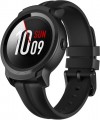 | 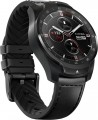 |
|---|---|---|
| Mobvoi TicWatch E2 | Mobvoi TicWatch Pro | |
from £91.99 | from £100.62 | |
| User reviews | ||
| TOP sellers | ||
Voice assistant. Built-in GPS, Beidou, GLONASS. Possibility to load many watch faces. Wi-Fi module. | The watch is equipped with a dual-layer AMOLED and FSTN display. Essential Mode to increase the battery life of the watch by activating the FSTN display which consumes less power. NFC module for contactless payment. GPS, compass. The strap is leather on the outside and silicone on the inside. Most Wear OS features are not available in Essential Mode. The main part of the body is made of plastic, the upper part is made of steel. The operating time in Smart Mode is 24 hours. | |
| Type | smartwatch | smartwatch |
| Interface | Bluetooth v4.1 | Bluetooth v4.2 |
| Gadget OS | Wear OS | Wear OS |
Telephony | ||
| Calls and alerts | notifications voice control Google Assistant vibration built-in microphone | notifications voice control Google Assistant sound signal vibration built-in microphone built-in speaker |
Sports and tourism | ||
| Possible measurements | heart rate monitor number of steps distance traveled movement speed calories burned activity time stress level | heart rate monitor number of steps distance traveled movement speed calories burned activity time stress level |
| Swimming mode |  |  |
| Navigation | GPS module GLONASS | GPS module GLONASS compass |
Display | ||
| Touch screen | | |
| Type | colour | colour |
| Display type | AMOLED | AMOLED |
| Size | 1.39 " | 1.39 " |
| Screen resolution | 400x400 px | 400x400 px |
| PPI | 407 ppi | 407 ppi |
| Light sensor | | |
| Watch face protection | glass | |
Hardware | ||
| CPU model | Qualcomm Snapdragon Wear 2100 | Qualcomm Snapdragon Wear 2100 |
| CPU frequency | 1200 MHz | 1200 MHz |
| Processor cores | 4 | 4 |
| RAM | 512 MB | 512 MB |
| Memory storage | 4 GB | 4 GB |
| Extra features | Wi-Fi accelerometer gyroscope | built-in player Wi-Fi 3 (802.11g) 2.4GHz NFC Google Wallet contactless payment accelerometer gyroscope |
Power source | ||
| Device charging | proprietary connector | proprietary connector |
| Source of power | Li-Ion | Li-Ion |
| Battery capacity | 415 mAh | 415 mAh |
| Operating time (normal mode) | 48 h | |
| Operating time (normal mode) | 30 days | |
| Operating time (active mode) | 24 h | |
Case and strap | ||
| Material | plastic | steel |
| Bezel | + | |
| Strap | quick release | quick release |
| Strap Options | rubber/silicone | leather |
| Clasp options | classic buckle | classic buckle |
| Band Width | 22 mm | 22 mm |
General | ||
| Protection rating | 50 WR (5 ATM) | IP68 |
| Dimensions (without strap) | 52.2x46.9x12.9 mm | 45x45x12.6 mm |
| Weight | 53 g | 77 g |
| Color | ||
| Added to E-Catalog | june 2019 | june 2019 |


Compare Mobvoi TicWatch E2 and TicWatch Pro
You may be interested in
My comparisons
Mobvoi TicWatch E2 often compared


Mobvoi TicWatch Pro often compared


Glossary
Interface
The primary way to connect a wrist gadget with external devices. For smartwatches and fitness bands (see "Type"), it is assumed to be connected to a smartphone or tablet, while in the case of watch-phones, it's usually about headsets.
— Bluetooth. A wireless technology for direct communication between various devices. There are different versions that indicate the device's capabilities.
— Bluetooth. A wireless technology for direct communication between various devices. There are different versions that indicate the device's capabilities.
- — 5.0. The fifth generation of Bluetooth was released in 2016. The key innovation in version 5.0 was expanding the capabilities related to the "Internet of Things." For example, the Bluetooth Low Energy protocol introduced the ability to double data transfer speed (up to 2 Mbps) at the cost of reducing range, as well as quadruple the range at the cost of reducing speed; additionally, several improvements were introduced concerning simultaneous operation with a large number of connected devices.
- — v 5.1. An update of the version v 5.0 described above. In addition to general improvements in connection quality and reliability, this update implemented an interesting feature such as determining the direction from which the Bluetooth signal comes. This makes it possible to determine the location of connected devices with centimeter accuracy.
- — v 5.2. The update following 5.1 of the fifth-generation Bluetooth. The main innovations in this version included several security improvements, additional optimization of power consumption in LE mode, and a new audio signal format for synchronizing parallel playback on multiple devices.
- — v 5.3.... The Bluetooth v 5.3 wireless communication protocol was introduced in early 2022. Innovations included speeding up the process of coordinating the communication channel between the controller and the device, implementing a feature for rapid switching between low-duty cycle and high-speed modes, improved bandwidth and connection stability by reducing susceptibility to interference. In the event of unexpected interference in Low Energy mode, the procedure for selecting a communication channel for switching is sped up. There were no fundamental innovations in protocol 5.3; however, it is evident that there are several qualitative improvements.
- — v 5.4. The standard generation approved in 2023, which became an intermediate step before Bluetooth 6. The main innovation was the introduction of the PAwR (Periodic Advertising with Responses) mode, allowing watches and other devices to exchange data in large sensor networks with minimal power consumption. Also added was the Encrypted Advertising Data mechanism, enhancing protection against eavesdropping and packet forgery, which is important when using watches for contactless keys or payments. Compared to earlier versions 5.2 and 5.3, Bluetooth 5.4 focuses on security, energy efficiency, and operation in a "noisy" radio environment. In real-world use, this is manifested in more stable data transmission from sensors (heart rate, steps, sleep), battery savings with constant phone connection, and the reliability of functions like notifications or fitness tracking even with many connected devices around.
- — v 6.0. Bluetooth 6 has been officially approved by Bluetooth SIG and offers a number of significant benefits in smartwatches compared to version 5.4. Thanks to the improved Channel Sounding system and LE Audio optimization, such devices maintain connections faster and more stably, determine the distance to the smartphone more accurately (to centimeters), lose frames less frequently during calls or Auracast broadcasts, and provide longer battery life. In practice, this manifests in functions like unlocking a laptop upon approach, precise indoor watch search, reliable operation of heart rate sensors and sports sensors, as well as stable calls even in crowded gyms.
Naturally, to utilize all the capabilities of a particular Bluetooth version, it must be supported not only by the gadget itself but also by the smartphone/tablet to which it is connected.
Calls and alerts
Types of notifications, as well as basic voice communication features supported by the gadget.
- Notifications. In classic smart watches and fitness trackers, the specific functionality of such notifications can be different – from a regular sound or vibration signal to the ability to display on the screen and even respond. But in any case, such notifications are often more noticeable to the user than the own signal from a smartphone located deep in a pocket or bag.
— Voice control. The ability to control the device through voice commands. In order for a smartwatch or fitness tracker to perform some simple feature, it is enough to say its name aloud.
— Voice assistant. In watches with voice assistant support, the level of user interaction with the device is displayed in a new qualitative way. The most popular virtual assistants are Google Assistant and Amazon Alexa. In Apple devices, the role of an assistant is performed by Apple Siri, in Samsung wearable gadgets — a virtual assistant Bixby. Unlike the voice control function, the assistant does not just turn on this or that feature, but allows you to perform certain operations in applications that require feedback.
— Sound signal. The ability to give sound signals using the built-in speaker. This feature will be useful primarily in situations where the gadget is not on hand — for example, if it is used as an ala...rm clock and is removed at night.
— Vibration. Vibration signal similar to that used in mobile phones. In wearable gadgets, such a signal is especially convenient due to the fact that the device is constantly in contact with the wearer's skin, so that the vibration is perfectly felt — and regardless of the level of noise around. In addition, vibration mode is also useful in quiet environments where a loud sound signal is undesirable.
— Built-in microphone. Own microphone built into the body of the device. Such equipment can be used for different purposes, depending on the type and features of the gadget. First of all, voice communication is impossible without a microphone. Another feature for which a microphone is required is the voice assistant (see above). And in children's smartwatches, it may be possible to remotely turn on the microphone from the parent gadget and listen to what is happening around the child; see the relevant paragraph below for details.
— Speakerphone(speaker). The ability to work the gadget in hands-free mode, using the built-in speaker and microphone for conversation. In a conventional smartwatch (see "Type"), this feature allows you to talk through the watch without removing the smartphone from your pocket; in watch-phones, speakerphone allows you to do so without headphones and headsets, and for children's smartwatches, this feature is almost mandatory. However the volume of the built-in speaker is usually low, so in a noisy environment its power may not be enough.
- Notifications. In classic smart watches and fitness trackers, the specific functionality of such notifications can be different – from a regular sound or vibration signal to the ability to display on the screen and even respond. But in any case, such notifications are often more noticeable to the user than the own signal from a smartphone located deep in a pocket or bag.
— Voice control. The ability to control the device through voice commands. In order for a smartwatch or fitness tracker to perform some simple feature, it is enough to say its name aloud.
— Voice assistant. In watches with voice assistant support, the level of user interaction with the device is displayed in a new qualitative way. The most popular virtual assistants are Google Assistant and Amazon Alexa. In Apple devices, the role of an assistant is performed by Apple Siri, in Samsung wearable gadgets — a virtual assistant Bixby. Unlike the voice control function, the assistant does not just turn on this or that feature, but allows you to perform certain operations in applications that require feedback.
— Sound signal. The ability to give sound signals using the built-in speaker. This feature will be useful primarily in situations where the gadget is not on hand — for example, if it is used as an ala...rm clock and is removed at night.
— Vibration. Vibration signal similar to that used in mobile phones. In wearable gadgets, such a signal is especially convenient due to the fact that the device is constantly in contact with the wearer's skin, so that the vibration is perfectly felt — and regardless of the level of noise around. In addition, vibration mode is also useful in quiet environments where a loud sound signal is undesirable.
— Built-in microphone. Own microphone built into the body of the device. Such equipment can be used for different purposes, depending on the type and features of the gadget. First of all, voice communication is impossible without a microphone. Another feature for which a microphone is required is the voice assistant (see above). And in children's smartwatches, it may be possible to remotely turn on the microphone from the parent gadget and listen to what is happening around the child; see the relevant paragraph below for details.
— Speakerphone(speaker). The ability to work the gadget in hands-free mode, using the built-in speaker and microphone for conversation. In a conventional smartwatch (see "Type"), this feature allows you to talk through the watch without removing the smartphone from your pocket; in watch-phones, speakerphone allows you to do so without headphones and headsets, and for children's smartwatches, this feature is almost mandatory. However the volume of the built-in speaker is usually low, so in a noisy environment its power may not be enough.
Swimming mode
A training programme for waterproof smartwatches or fitness trackers with water sports disciplines support. In swimming mode the wearable gadget determines the speed, distance and time of the swim, advanced instances of smartwatches measure the number of laps in the pool, calculate the frequency and efficiency of strokes in certain swimming styles. A personal assistant on the wrist evaluates the performance of water workouts and often makes recommendations to improve their effectiveness.
Navigation
This block contains both various navigation systems ( GPS, Galileo) and auxiliary features for them ( aGPS, GPS tracking, maps, compass, altimeter , barometer). More about them:
— GPS module. GPS satellite navigation module built right into the watch/tracker. The initial purpose of such a module is to determine the current geographic coordinates; but how this information will be used depends on the specific type and model of the gadget. For example, in some devices GPS is used only for measuring the distance traveled and/or speed of movement, while more advanced models support full navigation and are equipped with built-in maps. In addition, this feature is almost mandatory in children's beacons (see "Type") — it is GPS that is responsible for determining the location of the child.
— aGPS. An auxiliary feature that allows you to speed up the start of the main GPS receiver. To work for its main purpose, such a receiver must update data on the location of navigation satellites; Obtaining this data in the classical way, directly from the satellites themselves, can take quite a long time (up to several minutes). This is especially true for the so-called "cold start" — when the receiver starts up after a long break in opera...tion, and the data stored in it has become completely outdated. aGPS (Assisted GPS) allows you to receive up-to-date service information from a mobile operator — from the nearest base station (this feature is supported by most operators nowadays). This can greatly speed up the startup process.
— GLONASS. This system is a Russian alternative to the American GPS. However it provides somewhat less accuracy, so GLONASS support is usually provided in addition to the GPS module. Simultaneous use of two systems, in turn, improves positioning accuracy.
— Galileo. European satellite navigation system, created as an alternative to the American GPS. Note that it is under the control of civilian departments, not the military. With a full fleet of 24 active satellites, the system gives an accuracy of up to 1 m in public mode and up to 20 cm with the GHA service. Working in conjunction with GPS, the Galileo system provides a more accurate position measurement, especially in densely populated areas.
— Maps. The feature of displaying topographic maps of the area with heights, relief and types of vegetation on the clock screen. Preinstalled maps are used for visual GPS navigation without being tied to a smartphone. Often, the ability to display maps is implemented in tactical smartwatches with a focus on tourism.
— GPS tracking. Many watches with the possibility of laying routes have the feature of guiding by the GPS track. At the same time, the wearable gadget acts as a navigator around the area, showing the route on the screen and suggesting where it is necessary to turn in one direction or another. Some smartwatches with a pronounced touristic bias also have a “Return Route” programme that allows you to go back along an already traveled route. In GPS tracker mode, trackpoints are usually recorded automatically based on the selected fixing interval. You can also mark a track point manually at any time.
— Compass. A classic compass is a device that indicates the direction to the cardinal points. Wearable gadgets usually use an electronic compass — a miniature magnetic sensor, the data from which, if necessary, are displayed on the display.
— Altimeter. A feature that allows you to determine the current altitude of the user's location. Note that the principle and format of the altimeter may be different. So, some models use barometer data for height measurements, others use information from a GPS sensor; the height itself can be determined relative to sea level, relative to some reference point, or in any of these ways, at the choice of the user. These details should be clarified separately.
— Barometer. A feature that allows you to determine the current atmospheric pressure. One of the applications of the barometer is weather forecasting: for example, a sharp drop in pressure usually signals the approach of bad weather. In addition, information from this sensor can be used to operate the altimeter (see above); and even if the gadget does not have an altimeter, the height difference between two points on the ground can be easily calculated from the pressure difference between them.
— GPS module. GPS satellite navigation module built right into the watch/tracker. The initial purpose of such a module is to determine the current geographic coordinates; but how this information will be used depends on the specific type and model of the gadget. For example, in some devices GPS is used only for measuring the distance traveled and/or speed of movement, while more advanced models support full navigation and are equipped with built-in maps. In addition, this feature is almost mandatory in children's beacons (see "Type") — it is GPS that is responsible for determining the location of the child.
— aGPS. An auxiliary feature that allows you to speed up the start of the main GPS receiver. To work for its main purpose, such a receiver must update data on the location of navigation satellites; Obtaining this data in the classical way, directly from the satellites themselves, can take quite a long time (up to several minutes). This is especially true for the so-called "cold start" — when the receiver starts up after a long break in opera...tion, and the data stored in it has become completely outdated. aGPS (Assisted GPS) allows you to receive up-to-date service information from a mobile operator — from the nearest base station (this feature is supported by most operators nowadays). This can greatly speed up the startup process.
— GLONASS. This system is a Russian alternative to the American GPS. However it provides somewhat less accuracy, so GLONASS support is usually provided in addition to the GPS module. Simultaneous use of two systems, in turn, improves positioning accuracy.
— Galileo. European satellite navigation system, created as an alternative to the American GPS. Note that it is under the control of civilian departments, not the military. With a full fleet of 24 active satellites, the system gives an accuracy of up to 1 m in public mode and up to 20 cm with the GHA service. Working in conjunction with GPS, the Galileo system provides a more accurate position measurement, especially in densely populated areas.
— Maps. The feature of displaying topographic maps of the area with heights, relief and types of vegetation on the clock screen. Preinstalled maps are used for visual GPS navigation without being tied to a smartphone. Often, the ability to display maps is implemented in tactical smartwatches with a focus on tourism.
— GPS tracking. Many watches with the possibility of laying routes have the feature of guiding by the GPS track. At the same time, the wearable gadget acts as a navigator around the area, showing the route on the screen and suggesting where it is necessary to turn in one direction or another. Some smartwatches with a pronounced touristic bias also have a “Return Route” programme that allows you to go back along an already traveled route. In GPS tracker mode, trackpoints are usually recorded automatically based on the selected fixing interval. You can also mark a track point manually at any time.
— Compass. A classic compass is a device that indicates the direction to the cardinal points. Wearable gadgets usually use an electronic compass — a miniature magnetic sensor, the data from which, if necessary, are displayed on the display.
— Altimeter. A feature that allows you to determine the current altitude of the user's location. Note that the principle and format of the altimeter may be different. So, some models use barometer data for height measurements, others use information from a GPS sensor; the height itself can be determined relative to sea level, relative to some reference point, or in any of these ways, at the choice of the user. These details should be clarified separately.
— Barometer. A feature that allows you to determine the current atmospheric pressure. One of the applications of the barometer is weather forecasting: for example, a sharp drop in pressure usually signals the approach of bad weather. In addition, information from this sensor can be used to operate the altimeter (see above); and even if the gadget does not have an altimeter, the height difference between two points on the ground can be easily calculated from the pressure difference between them.
Light sensor
A small sensor that helps watches and bracelets adapt to the surrounding environment, making the screen comfortable in all conditions while simultaneously extending battery life. Unlike a simple "fixed" brightness level, it reduces the risk of the display being too dim in sunlight or too bright in darkness, and compared to the "scheduled auto-brightness" mode, it works more accurately because it responds to the actual light around. Light sensor significantly influences convenience: there's less need to fiddle with settings, it's easier to read notifications on the go, and at night, the screen doesn't disturb you or those around you. An example is the quick brightness switch when entering a building after being outside or when checking the time in the bedroom when the light is almost off.
Watch face protection
The material from which the transparent cover of the display is made.
— Plastic. Inexpensive, moreover, quite durable and impact-resistant material: even with a strong impact, the plastic is more likely to crack than crumble into fragments. At the same time, scratches easily appear on such a surface, and over time it inevitably becomes cloudy. Because of this, plastic is found predominantly in inexpensive wearable gadgets.
— Glass. In this case, it can mean both classic silicate glass (the same as, for example, in windows), and some original types of impact-resistant glass that are not related to Gorilla Glass(see below). Regular glass costs more than plastic, but not by much, and it looks better and stays clear longer due to its scratch resistance. The main disadvantages of this material are fragility and a tendency to crumble into sharp fragments upon impact. Impact-resistant glass types are devoid of this drawback to one degree or another, but they are also more expensive. According to the price category of the gadget, you can quite accurately determine what kind of glass it uses — ordinary or shock-resistant.
— Sapphire. The coating made of synthetic sapphire is used exclusively in premium-class gadgets — this is due to the complexity of its production and, accordingly, the high cost. On the practical s...ide, sapphire is extremely scratch resistant (it is only possible to scratch such glass with a diamond or special tools), but at the same time it is fragile and easily breaks from impact.
— Gorilla glass. A family of shock-resistant glass types created by Corning and widely used in modern electronics, including wearable gadgets. In addition to strength, Gorilla Glass is also distinguished by good scratch resistance, while being relatively inexpensive (by the standards of such a coating), which has led to their popularity. However, the specific properties of such glass depend on its version; Here are the options that are relevant for modern wearable devices:
— Plastic. Inexpensive, moreover, quite durable and impact-resistant material: even with a strong impact, the plastic is more likely to crack than crumble into fragments. At the same time, scratches easily appear on such a surface, and over time it inevitably becomes cloudy. Because of this, plastic is found predominantly in inexpensive wearable gadgets.
— Glass. In this case, it can mean both classic silicate glass (the same as, for example, in windows), and some original types of impact-resistant glass that are not related to Gorilla Glass(see below). Regular glass costs more than plastic, but not by much, and it looks better and stays clear longer due to its scratch resistance. The main disadvantages of this material are fragility and a tendency to crumble into sharp fragments upon impact. Impact-resistant glass types are devoid of this drawback to one degree or another, but they are also more expensive. According to the price category of the gadget, you can quite accurately determine what kind of glass it uses — ordinary or shock-resistant.
— Sapphire. The coating made of synthetic sapphire is used exclusively in premium-class gadgets — this is due to the complexity of its production and, accordingly, the high cost. On the practical s...ide, sapphire is extremely scratch resistant (it is only possible to scratch such glass with a diamond or special tools), but at the same time it is fragile and easily breaks from impact.
— Gorilla glass. A family of shock-resistant glass types created by Corning and widely used in modern electronics, including wearable gadgets. In addition to strength, Gorilla Glass is also distinguished by good scratch resistance, while being relatively inexpensive (by the standards of such a coating), which has led to their popularity. However, the specific properties of such glass depend on its version; Here are the options that are relevant for modern wearable devices:
- Gorilla Glass v3. The oldest current version was released in 2013. Nevertheless, even such a coating is noticeably superior to traditional glass (not to mention plastic) in terms of transparency and scratch resistance.
- Gorilla Glass v4. Version released in 2014. A key feature was that the development of this coating focused on impact resistance (whereas previous generations focused mainly on scratch resistance). As a result, the glass turned out to be twice as strong as in version 3, despite the fact that its thickness was only 0.4 mm.
- Gorilla Glass SR+. The first version of Gorilla Glass, designed specifically for smartwatches and other miniature wearable gadgets; presented in 2016. According to the creators, the scratch resistance of such coatings approaches those of sapphire glass while maintaining the main advantages of Gorilla Glass — high strength and transparency. In general, for this material, superiority over "alternative options" is claimed by 70% in terms of strength specs and by 25% in terms of optical properties.
- Gorilla Glass DX. Another type of glass, specially designed for wearable devices. It was released in 2018 at the same time as the DX+ version (see below). Of the key improvements in Gorilla Glass DX, in particular, increased anti-reflective properties and an increase in the contrast level of the visible image by 50% are announced; the latter, among other things, allows you to reduce the actual brightness and, accordingly, the power consumption of screens without compromising image quality, which is especially important for miniature wearable devices. And this material differs from the DX+ type coating, on the one hand, by lower scratch resistance, and, on the other hand, by higher anti-reflective specs.
- Gorilla Glass DX+. Almost the same as the original version of DX, related to the same specialization — wearable wearable gadgets and other miniature devices. At the same time, DX + has a higher scratch resistance, but has slightly worse anti-reflective specs. Otherwise, these types of coverage are almost identical.
Extra features
— Built-in player. The presence of a player in the smartwatch allows you to use the gadget to listen to music. There is no need to connect to the phone for this. The songs will play directly from the watch. Therefore, these devices must necessarily have an impressive (as for a watch) amount of storage and be able to connect to headphones (for connection with headphones).
— WiFi. A technology originally used to access the Internet via wireless access points, but more recently also used for direct communication between two devices (such a connection has several advantages over traditional Bluetooth). In wearable gadgets, the first option is most often provided, although the second is also found. However, the specific uses of Wi-Fi may be different depending on the device: accessing websites and various Internet services, remote communication with smart home systems, remote control of digital cameras and other electronics, transmission of the GPS- coordinates via Internet (in children's beacons), etc.
— NFC. Wireless communication technology over short distances (up to 10 cm). The methods of its application, including in wearable devices, may be different. One of the more popular options is using contactless payment (see below); however, the presence of such a function does not hurt to verify separately. Another common fe...ature is the simplification of Bluetooth connection with a smartphone or tablet that also has NFC: instead of manual configuration, it is enough to bring one device to another — and they will automatically establish a connection, all that remains is to confirm it. Other ways of interaction may also be possible, for example, launching a “sports” application on a smartphone when bringing a fitness tracker to it. And theoretically, more specific options for using NFC are also allowed — for example, as a travel pass, ID, etc. Actually, in many models of wearable gadgets, the set of these methods is limited only by installed applications.
— Contactless payment. The possibility of using a wearable gadget for contactless payment. This feature is found only in models with NFC (see above); it actually turns the device into an analogue of a credit card with a chip and allows you to pay without taking the card out of your wallet — just bring your hand with the gadget to the terminal reader. This provides not only additional convenience, but also security. So, bringing the watch to the terminal is definitely easier than reaching into your pocket or purse for a credit card — especially if your hands are busy shopping. And instead of a traditional card, from which an attacker can copy basic details such as a number, CVV code and expiration date (for example, by “peeping” them with the built-in camera), a gadget is used that transmits this data in encrypted form and does not display it explicitly anywhere.
To use contactless payment, usually, you need to synchronize your gadget with your smartphone and set up such payment in the Google Pay or Apple Pay system. But to make payments, a smartphone is no longer required — many wearable devices are able to perform this feature completely autonomously (although this possibility still needs to be specified separately).
— Accelerometer. A sensor that determines the direction of gravity, as well as the accelerations acting on the device. This allows you to track two parameters at once: the current position in space and various physical influences (like tapping or shaking). Most often, the accelerometer is responsible for two main features: automatic rotation of the image on the screen, as well as the operation of the pedometer (in fact, the presence of such a sensor is almost guaranteed to mean the presence of a pedometer, see "Possible measurements"). However, there are other ways to use this sensor — for example, rejecting an incoming call when shaking the watch, turning on the screen when tapping on it, etc.
— Gyroscope. A device that allows you to track the turns of the gadget in one direction or another. Typically used in conjunction with an accelerometer. The gyroscope improves the accuracy of positioning in space (which has a positive effect on the quality of the pedometer and other similar functions), and also provides additional options for managing gestures. However, the specific applications of this sensor are highly dependent on the model.
— Camera. The watch/bracelet has its own built-in camera; its location and purpose differs from model to model. In some devices, the lens is located on the front panel, above the screen, and the matter is limited only to video communication and taking selfies, while others allow you to shoot “classic” photos or videos. At the same time, it is worth noting that anyway, the specs of such cameras are usually very limited — for example, the resolution rarely exceeds 2 megapixels, and autofocus is provided only in the most advanced models.
— Flashlight. Built-in flashlight — usually in the form of a small LED mounted directly in the case. Usually, it has a relatively modest brightness, but it can still be useful for simple tasks like lighting your path at night, lighting in a garage or basement, etc.
— WiFi. A technology originally used to access the Internet via wireless access points, but more recently also used for direct communication between two devices (such a connection has several advantages over traditional Bluetooth). In wearable gadgets, the first option is most often provided, although the second is also found. However, the specific uses of Wi-Fi may be different depending on the device: accessing websites and various Internet services, remote communication with smart home systems, remote control of digital cameras and other electronics, transmission of the GPS- coordinates via Internet (in children's beacons), etc.
— NFC. Wireless communication technology over short distances (up to 10 cm). The methods of its application, including in wearable devices, may be different. One of the more popular options is using contactless payment (see below); however, the presence of such a function does not hurt to verify separately. Another common fe...ature is the simplification of Bluetooth connection with a smartphone or tablet that also has NFC: instead of manual configuration, it is enough to bring one device to another — and they will automatically establish a connection, all that remains is to confirm it. Other ways of interaction may also be possible, for example, launching a “sports” application on a smartphone when bringing a fitness tracker to it. And theoretically, more specific options for using NFC are also allowed — for example, as a travel pass, ID, etc. Actually, in many models of wearable gadgets, the set of these methods is limited only by installed applications.
— Contactless payment. The possibility of using a wearable gadget for contactless payment. This feature is found only in models with NFC (see above); it actually turns the device into an analogue of a credit card with a chip and allows you to pay without taking the card out of your wallet — just bring your hand with the gadget to the terminal reader. This provides not only additional convenience, but also security. So, bringing the watch to the terminal is definitely easier than reaching into your pocket or purse for a credit card — especially if your hands are busy shopping. And instead of a traditional card, from which an attacker can copy basic details such as a number, CVV code and expiration date (for example, by “peeping” them with the built-in camera), a gadget is used that transmits this data in encrypted form and does not display it explicitly anywhere.
To use contactless payment, usually, you need to synchronize your gadget with your smartphone and set up such payment in the Google Pay or Apple Pay system. But to make payments, a smartphone is no longer required — many wearable devices are able to perform this feature completely autonomously (although this possibility still needs to be specified separately).
— Accelerometer. A sensor that determines the direction of gravity, as well as the accelerations acting on the device. This allows you to track two parameters at once: the current position in space and various physical influences (like tapping or shaking). Most often, the accelerometer is responsible for two main features: automatic rotation of the image on the screen, as well as the operation of the pedometer (in fact, the presence of such a sensor is almost guaranteed to mean the presence of a pedometer, see "Possible measurements"). However, there are other ways to use this sensor — for example, rejecting an incoming call when shaking the watch, turning on the screen when tapping on it, etc.
— Gyroscope. A device that allows you to track the turns of the gadget in one direction or another. Typically used in conjunction with an accelerometer. The gyroscope improves the accuracy of positioning in space (which has a positive effect on the quality of the pedometer and other similar functions), and also provides additional options for managing gestures. However, the specific applications of this sensor are highly dependent on the model.
— Camera. The watch/bracelet has its own built-in camera; its location and purpose differs from model to model. In some devices, the lens is located on the front panel, above the screen, and the matter is limited only to video communication and taking selfies, while others allow you to shoot “classic” photos or videos. At the same time, it is worth noting that anyway, the specs of such cameras are usually very limited — for example, the resolution rarely exceeds 2 megapixels, and autofocus is provided only in the most advanced models.
— Flashlight. Built-in flashlight — usually in the form of a small LED mounted directly in the case. Usually, it has a relatively modest brightness, but it can still be useful for simple tasks like lighting your path at night, lighting in a garage or basement, etc.
Payment system
The watch supports a certain system of contactless payment for purchases and services through the built-in NFC. See contactless payment for details.
— Apple Pay. "Apple" system of contactless payments, available to owners of the Apple Watch. To use it, you bind a bank card to the device and touch the terminal with your Apple Watch at the stage of paying for purchases or services. The Apple Pay electronic wallet only works with Apple wearable technology.
— Google Wallet. Google Wallet (formerly Google Pay) allows you to pay for purchases using NFC-chip smartwatches based on the Wear OS operating system. The device must have the Google Wallet application installed, and the user will first need to have a supported card of the issuing bank.
— Garmin Pay. A payment service for one-touch payments for purchases using Garmin smartwatches. To pay for goods, you must activate the e-wallet menu on your watch and enter your password from the Garmin Connect Mobile app. After that, it is enough to touch the terminal with your watch at the checkout. In the future, you can make payments without additional entering a password within 24 hours. If you remove your watch from your wrist or turn off the heart rate monitor, you will need to re-enter your password before making a payment.
...>
— Samsung Pay. Contactless payment service for purchases and services for smartwatches of the Samsung Gear Watch and Galaxy Watch families. The system is notable for the fact that the Magnetic Secure Transmission (MST) technology introduced by Samsung specialists makes it possible to pay even in terminals without support for contactless payments. Some watches of the South Korean brand can create a magnetic field that imitates a strip of a bank card and transmit information to outdated payment terminals.
— Apple Pay. "Apple" system of contactless payments, available to owners of the Apple Watch. To use it, you bind a bank card to the device and touch the terminal with your Apple Watch at the stage of paying for purchases or services. The Apple Pay electronic wallet only works with Apple wearable technology.
— Google Wallet. Google Wallet (formerly Google Pay) allows you to pay for purchases using NFC-chip smartwatches based on the Wear OS operating system. The device must have the Google Wallet application installed, and the user will first need to have a supported card of the issuing bank.
— Garmin Pay. A payment service for one-touch payments for purchases using Garmin smartwatches. To pay for goods, you must activate the e-wallet menu on your watch and enter your password from the Garmin Connect Mobile app. After that, it is enough to touch the terminal with your watch at the checkout. In the future, you can make payments without additional entering a password within 24 hours. If you remove your watch from your wrist or turn off the heart rate monitor, you will need to re-enter your password before making a payment.
Operating time (normal mode)
Battery life is the number of hours during which the gadget can stay afloat on a single battery charge in normal use.
Normal mode, as a rule, means working with a relatively low load. At this time, the display can display some data, basic functions can also work (counting steps, periodically checking heart rate, etc.), but in any case, power consumption is low. The declared operating time in hours is indicated for wearable gadgets that operate on a full battery charge for up to 72 hours (3 days). These are all “Apple” smart watches from Apple, many models of children’s “smart” watches, etc. For more autonomous models, operating time is indicated in days (see “Operating time (normal mode, days)”). When choosing based on this indicator, it also doesn’t hurt to pay attention to the declared battery life in active mode (see below) - especially if a long operating time is critical, or you plan to use the gadget intensively. The actual autonomy of the device will most likely be somewhere in between these two values, depending on the actual load. If only the time in normal mode is indicated for the gadget, you should choose with a certain reserve.
Normal mode, as a rule, means working with a relatively low load. At this time, the display can display some data, basic functions can also work (counting steps, periodically checking heart rate, etc.), but in any case, power consumption is low. The declared operating time in hours is indicated for wearable gadgets that operate on a full battery charge for up to 72 hours (3 days). These are all “Apple” smart watches from Apple, many models of children’s “smart” watches, etc. For more autonomous models, operating time is indicated in days (see “Operating time (normal mode, days)”). When choosing based on this indicator, it also doesn’t hurt to pay attention to the declared battery life in active mode (see below) - especially if a long operating time is critical, or you plan to use the gadget intensively. The actual autonomy of the device will most likely be somewhere in between these two values, depending on the actual load. If only the time in normal mode is indicated for the gadget, you should choose with a certain reserve.