
Comparison Myriwell RP600A vs Myriwell RP400A
Add to comparison | 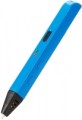 | 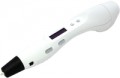 |
|---|---|---|
| Myriwell RP600A | Myriwell RP400A | |
| Outdated Product | from $80.00 | |
| TOP sellers | ||
| Product Type | hot printing | hot printing |
| Filament Material | ABS + PLA | ABS + PLA |
| Min thread diameter | 1.75 mm | 1.75 mm |
| Nozzle Diameter | 0.6 mm | 0.5 mm |
Features | ||
| Temperature Adjust |  | |
| Smooth Speed Adjust | |  |
| Number of Speeds | 6 | |
| USB powered | | |
| Display | | |
General | ||
| Tip Material | ceramics | ceramics |
| Country of brand origin | China | China |
| Dimensions | 175x20x17 mm | 184x31x46 mm |
| Thickness | 17 mm | 31 mm |
| Weight | 40 g | 60 g |
| Added to E-Catalog | november 2016 | march 2016 |


Compare Myriwell RP600A and RP400A
You may be interested in
Myriwell RP600A often compared


Myriwell RP400A often compared

Glossary
Nozzle Diameter
The diameter of the nozzle provided in the pen.
The larger the nozzle, the thicker the lines produced by the pen will be (ceteris paribus; the actual thickness of the lines will also depend on the type of plastic and the adjusted temperature). In the thinnest models, the nozzle diameter is less than 0.5 mm, in the thickest models it is about 0.9 mm. Most modern 3D pens have nozzles in the range of 0.6 – 0.7 mm — this value is considered the most versatile and convenient for practical use.
The larger the nozzle, the thicker the lines produced by the pen will be (ceteris paribus; the actual thickness of the lines will also depend on the type of plastic and the adjusted temperature). In the thinnest models, the nozzle diameter is less than 0.5 mm, in the thickest models it is about 0.9 mm. Most modern 3D pens have nozzles in the range of 0.6 – 0.7 mm — this value is considered the most versatile and convenient for practical use.
Smooth Speed Adjust
The ability to smoothly change the feed rate of the material. The speed adjust allows you to set the mode of operation of the pen to the circumstances: for example, a low speed will be convenient for fine work, and a high speed is so for large elements. Specifically, the smooth speed adjust is convenient because it allows you to select almost any speed in the range from minimum to maximum.
In addition to this type, there is also a step adjustment, for more details, see “Number of Speeds”.
In addition to this type, there is also a step adjustment, for more details, see “Number of Speeds”.
Number of Speeds
The number of fixed speed settings provided in the pen. This spec is specified only if there is more than one such setting.
The speed control allows you to adjust the mode of operation to the circumstances: for example, a low speed will be convenient for fine work, and a high speed is so for large elements. And the more speed settings there are in the pen, the wider the choice for the user to configure the device more accurately. In the most advanced models, the number of speeds can reach eight.
Note that the speed adjust can be not only stepwise, but also smooth (see above).
The speed control allows you to adjust the mode of operation to the circumstances: for example, a low speed will be convenient for fine work, and a high speed is so for large elements. And the more speed settings there are in the pen, the wider the choice for the user to configure the device more accurately. In the most advanced models, the number of speeds can reach eight.
Note that the speed adjust can be not only stepwise, but also smooth (see above).
USB powered
The pen is powered by a standard USB connector. Such devices are as versatile as possible in connectivity: they can be powered via a PC, a portable device like a laptop or tablet, an external power bank, a USB wall charger or car charger.
Display
The availability of a built-in display. Usually, these are the simplest single-colour screens that display the basic operating parameters — speed and/or temperature. However, even such a display makes the pen more convenient and allows you to get important information about its operation.