
Comparison HTC Vive Focus vs HTC Vive Pro
Add to comparison | 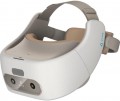 | 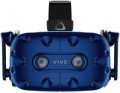 |
|---|---|---|
| HTC Vive Focus | HTC Vive Pro | |
from £233.20 | from £1,545.99 | |
| User reviews | ||
| TOP sellers | ||
Headphones have a built-in amplifier. Dual front camera. Increased resolution of AMOLED matrices. Comfortable fit. Huge library of PC games. Requires a relatively powerful PC and a lot of free space in the room. | ||
| Device type | VR glasses | VR glasses |
| Purpose (compatibility) | autonomous device | Windows |
Specs | ||
| Screen resolution | 2880x1600 px | 2880x1600 px |
| Field of view | 110 ° | 110 ° |
| CPU | Qualcomm Snapdragon 835 | |
| Refresh rate | 75 fps | 90 fps |
| 6DoF motion tracking |  | |
| Accelerometer | | |
| Gyroscope | | |
| Lens distance adjusting | | |
| Pupillary distance adjustment | | |
Multimedia | ||
| Card reader | |  |
| USB-C | + | + |
| DisplayPort | v1.2 | |
| Bluetooth | + | |
| Wi-Fi | Wi-Fi 5 (802.11ac) | |
| Microphone | | |
| Headphones | | |
| Headphone output | | |
General | ||
| Controller | | |
| Track camera | | |
| Operating time | 3 h | |
| Material | plastic | plastic |
| Dimensions (HxWxD) | 240x200x115 mm | |
| Weight | 435 g | |
| Added to E-Catalog | november 2019 | january 2018 |


Compare HTC Vive Focus and Vive Pro
You may be interested in
My comparisons
HTC Vive Focus often compared


HTC Vive Pro often compared


Glossary
Purpose (compatibility)
The signal source in VR headsets reveals where exactly the image comes from and who performs the main "heavy" graphic processing. In one case, the image is generated by a powerful PC or console, in another — a mobile phone, and for FPV goggles, the signal comes directly from the drone via a radio channel. Stand-alone devices that do not require connection to external gadgets deserve special mention. The chosen signal source affects the image quality, latency, the range of available games and applications, as well as how the VR headset is connected — via cable, Wi-Fi, Bluetooth, or through a specialized transmitter.
— Stand-alone Device. VR headsets where the headset itself acts as the signal source: it has a mobile processor, video chip, memory, and its own operating system inside, so the image is generated directly in the headset, not on a computer or phone. The user wears the headset, connects to Wi-Fi, and launches games and apps from the built-in store — no wires, no PC, and no mandatory smartphone at hand. Such solutions are closer in power to a good Android smartphone and fall short of a Windows PC setup, but are noticeably more convenient than mobile headsets, where everything is tied to the phone: no need to insert the device into the casing, monitor heating, or charge two devices at once. Stand-alone VR headsets are especially suitable for everyday games, fitness, and education, where freedom of movement and ease of launc...h are more important than maximum graphic settings.
— Android. VR headsets are tied to Google's mobile platform and work either in tandem with a smartphone or independently as an Android stand-alone device. In the first case, the phone is inserted into the headset casing or connected to it wirelessly, forming the image and transmitting it to the headset's screens, in the second case, the headset contains a built-in chipset, memory, and app store, and the phone is used only for setup and streaming. This signal source makes VR mobile: a smartphone and headset are enough to run simple games, 360 videos, and educational apps without a powerful PC, but in terms of graphics, these solutions fall short of full-fledged PC and console systems.
— iOS (iPhone). Similar in concept to Android, but tailored to the Apple ecosystem and iPhone smartphones. In this case, the VR headset receives an image either from the phone itself, installed in the headset casing, or through a special streaming/mirroring mode from the iPhone via Wi-Fi or Lightning/USB-C cable. iOS support means that the user can access a large number of applications, 360 videos, and educational content from the App Store, while the system is generally simpler and more reliable in setup, but the choice of "real" VR games is smaller than in the Android or Windows world.
— Windows. VR headsets work in conjunction with a PC running Windows, which is fully responsible for 3D graphics output. Typically, the headset connects via USB-C / DisplayPort or via Wi-Fi in streaming mode, and the headset acts as a "display with sensors." This signal source provides the most advanced VR gaming: major gaming platforms, simulators, mods are supported, and the quality and stability depend on the computer's graphics card and processor.
— MacOS. VR headsets can receive images from Apple computers — iMac, MacBook, and other models with macOS. Here, VR is more often used for demonstrations, design, 3D viewing, and professional applications than hardcore gaming, so stable integration and proper driver operation are more important than maximum performance. Connection is usually through USB-C / Thunderbolt and specialized software, and the choice of native VR content for macOS is noticeably more modest than for Windows.
— PlayStation. VR headsets are designed to work with PS4 or PS5 consoles, which render all graphics. Proprietary HDMI/USB connections and Sony's own protocols are used here, and the headset itself is optimized for the console's ecosystem. This option provides a predictable experience: PS VR games are carefully adapted to the specific model of headset, latency is minimal, and the user does not need to think about drivers or hardware configuration.
— Xbox. The Xbox signal source implies compatibility with the console in display mode or via an intermediate PC. In the traditional sense, Xbox lacks complete VR support, so the headset is more often used as an external display rather than a comprehensive VR solution with game space tracking. If the manufacturer still declares Xbox as a signal source, it is worth carefully studying the description: most often these are specific scenarios like a "cinema" or streaming output, rather than full VR projects.
— Drone (quadcopter). A separate class of VR headsets where the image comes directly from the drone's camera in real-time via radio channel. Such goggles have a receiver operating on specific frequencies and protocols inside, so compatibility is usually strictly tied to a specific system: the headset "understands" only those video transmitters and modules for which it was originally designed. The main task here is to ensure minimal latency so the pilot can safely and accurately control the drone "first-person" rather than launching ordinary games, and it is crucial to check in advance whether the goggles will work correctly with your FPV set or if it will require changing the camera/transmitter to the required standard.
— Stand-alone Device. VR headsets where the headset itself acts as the signal source: it has a mobile processor, video chip, memory, and its own operating system inside, so the image is generated directly in the headset, not on a computer or phone. The user wears the headset, connects to Wi-Fi, and launches games and apps from the built-in store — no wires, no PC, and no mandatory smartphone at hand. Such solutions are closer in power to a good Android smartphone and fall short of a Windows PC setup, but are noticeably more convenient than mobile headsets, where everything is tied to the phone: no need to insert the device into the casing, monitor heating, or charge two devices at once. Stand-alone VR headsets are especially suitable for everyday games, fitness, and education, where freedom of movement and ease of launc...h are more important than maximum graphic settings.
— Android. VR headsets are tied to Google's mobile platform and work either in tandem with a smartphone or independently as an Android stand-alone device. In the first case, the phone is inserted into the headset casing or connected to it wirelessly, forming the image and transmitting it to the headset's screens, in the second case, the headset contains a built-in chipset, memory, and app store, and the phone is used only for setup and streaming. This signal source makes VR mobile: a smartphone and headset are enough to run simple games, 360 videos, and educational apps without a powerful PC, but in terms of graphics, these solutions fall short of full-fledged PC and console systems.
— iOS (iPhone). Similar in concept to Android, but tailored to the Apple ecosystem and iPhone smartphones. In this case, the VR headset receives an image either from the phone itself, installed in the headset casing, or through a special streaming/mirroring mode from the iPhone via Wi-Fi or Lightning/USB-C cable. iOS support means that the user can access a large number of applications, 360 videos, and educational content from the App Store, while the system is generally simpler and more reliable in setup, but the choice of "real" VR games is smaller than in the Android or Windows world.
— Windows. VR headsets work in conjunction with a PC running Windows, which is fully responsible for 3D graphics output. Typically, the headset connects via USB-C / DisplayPort or via Wi-Fi in streaming mode, and the headset acts as a "display with sensors." This signal source provides the most advanced VR gaming: major gaming platforms, simulators, mods are supported, and the quality and stability depend on the computer's graphics card and processor.
— MacOS. VR headsets can receive images from Apple computers — iMac, MacBook, and other models with macOS. Here, VR is more often used for demonstrations, design, 3D viewing, and professional applications than hardcore gaming, so stable integration and proper driver operation are more important than maximum performance. Connection is usually through USB-C / Thunderbolt and specialized software, and the choice of native VR content for macOS is noticeably more modest than for Windows.
— PlayStation. VR headsets are designed to work with PS4 or PS5 consoles, which render all graphics. Proprietary HDMI/USB connections and Sony's own protocols are used here, and the headset itself is optimized for the console's ecosystem. This option provides a predictable experience: PS VR games are carefully adapted to the specific model of headset, latency is minimal, and the user does not need to think about drivers or hardware configuration.
— Xbox. The Xbox signal source implies compatibility with the console in display mode or via an intermediate PC. In the traditional sense, Xbox lacks complete VR support, so the headset is more often used as an external display rather than a comprehensive VR solution with game space tracking. If the manufacturer still declares Xbox as a signal source, it is worth carefully studying the description: most often these are specific scenarios like a "cinema" or streaming output, rather than full VR projects.
— Drone (quadcopter). A separate class of VR headsets where the image comes directly from the drone's camera in real-time via radio channel. Such goggles have a receiver operating on specific frequencies and protocols inside, so compatibility is usually strictly tied to a specific system: the headset "understands" only those video transmitters and modules for which it was originally designed. The main task here is to ensure minimal latency so the pilot can safely and accurately control the drone "first-person" rather than launching ordinary games, and it is crucial to check in advance whether the goggles will work correctly with your FPV set or if it will require changing the camera/transmitter to the required standard.
CPU
The model of the processor installed in the glasses.
This information is indicated mainly for stand-alone devices (see "Intended use") — it is in them that the capabilities of the glasses as a whole directly depend on the processor model. And knowing the name of the chip, you can find detailed data on it and evaluate its effectiveness. At the same time, in fact, such a need arises extremely rarely: manufacturers choose processors in such a way that glasses can be used for their main purpose without any problems. So when choosing, you should pay attention to more practical parameters — display resolution, refresh rate, etc.
This information is indicated mainly for stand-alone devices (see "Intended use") — it is in them that the capabilities of the glasses as a whole directly depend on the processor model. And knowing the name of the chip, you can find detailed data on it and evaluate its effectiveness. At the same time, in fact, such a need arises extremely rarely: manufacturers choose processors in such a way that glasses can be used for their main purpose without any problems. So when choosing, you should pay attention to more practical parameters — display resolution, refresh rate, etc.
Refresh rate
The refresh rate supported by the glasses' built-in screens, in simple terms, is the maximum frame rate that the screens are capable of delivering.
Recall that screens are provided in models for PC / consoles and in stand-alone devices (see "Intended use"). And the quality of the picture directly depends on this indicator: other things being equal, a higher frame rate provides a smoother image, without jerks and with good detail in dynamic scenes. The flip side of these benefits is an increase in price.
It is also worth considering that in some cases the actual frame rate will not be limited by the capabilities of the glasses, but by the characteristics of the external device or the properties of the content being played. For example, a relatively weak PC graphics card may not be able to pull out a high frame rate signal, or a certain frame rate may be set in the game and not provide boosting. Therefore, you should not chase after large values and points with a frequency of 90 fps will be enough.
Recall that screens are provided in models for PC / consoles and in stand-alone devices (see "Intended use"). And the quality of the picture directly depends on this indicator: other things being equal, a higher frame rate provides a smoother image, without jerks and with good detail in dynamic scenes. The flip side of these benefits is an increase in price.
It is also worth considering that in some cases the actual frame rate will not be limited by the capabilities of the glasses, but by the characteristics of the external device or the properties of the content being played. For example, a relatively weak PC graphics card may not be able to pull out a high frame rate signal, or a certain frame rate may be set in the game and not provide boosting. Therefore, you should not chase after large values and points with a frequency of 90 fps will be enough.
Card reader
The presence of a card reader in the glasses — a device for reading removable memory cards.
Such equipment is found only in independent devices (see "Intended use"). The card reader allows you to install an additional amount of memory to store various data — in addition to your own points drive. At the same time, removable cards have a number of advantages: they are much cheaper than built-in storage (in terms of gigabytes of volume), and the volume of such a card can be chosen at your discretion. So a model with a small capacity, but with a card reader, can be a good alternative to glasses with a large amount of internal memory. Also note that you can purchase several memory cards and change them as needed. And card readers are available in many modern devices (laptops, smartphones, tablets, etc.), so that removable cards make it easier to store information with such devices (for example, you can record a movie on a card for viewing). On the other hand, removable memory is slower than the built-in memory, and some software functions may be limited for it — in particular, not every model of glasses allows you to install applications on the card.
Such equipment is found only in independent devices (see "Intended use"). The card reader allows you to install an additional amount of memory to store various data — in addition to your own points drive. At the same time, removable cards have a number of advantages: they are much cheaper than built-in storage (in terms of gigabytes of volume), and the volume of such a card can be chosen at your discretion. So a model with a small capacity, but with a card reader, can be a good alternative to glasses with a large amount of internal memory. Also note that you can purchase several memory cards and change them as needed. And card readers are available in many modern devices (laptops, smartphones, tablets, etc.), so that removable cards make it easier to store information with such devices (for example, you can record a movie on a card for viewing). On the other hand, removable memory is slower than the built-in memory, and some software functions may be limited for it — in particular, not every model of glasses allows you to install applications on the card.
DisplayPort
Availability of DisplayPort input in glasses; the version of this interface can also be specified here.
DisplayPort is one of the most popular high-resolution digital video interfaces these days (however, audio transmission is also possible). It is especially common in computer technology, and is actually a standard in Apple PCs and laptops. Only glasses for computers and set-top boxes are equipped with this type of input (see “Purpose”) - it is used to receive a video signal (and audio signal, if necessary) from an external device. As for DisplayPort versions, the options here could be:
- v.1.2. The earliest (2010) version that is relevant today, but at the same time a more than functional version. Fully supports video quality up to 5K (30 fps), and with certain restrictions - up to 8K.
- v.1.3. Update released in 2014. It provided the opportunity to fully work with 8K resolutions at 30 fps, and with 4K and 5K at 120 and 60 fps, respectively.
- v.1.4. Updated in 2016, in which the bandwidth was further increased - up to support for 5K video at 240 fps and 8K at 120 fps. In addition, there is compatibility with HDR 10 technology, which improves color reproduction and overall picture quality.
DisplayPort is one of the most popular high-resolution digital video interfaces these days (however, audio transmission is also possible). It is especially common in computer technology, and is actually a standard in Apple PCs and laptops. Only glasses for computers and set-top boxes are equipped with this type of input (see “Purpose”) - it is used to receive a video signal (and audio signal, if necessary) from an external device. As for DisplayPort versions, the options here could be:
- v.1.2. The earliest (2010) version that is relevant today, but at the same time a more than functional version. Fully supports video quality up to 5K (30 fps), and with certain restrictions - up to 8K.
- v.1.3. Update released in 2014. It provided the opportunity to fully work with 8K resolutions at 30 fps, and with 4K and 5K at 120 and 60 fps, respectively.
- v.1.4. Updated in 2016, in which the bandwidth was further increased - up to support for 5K video at 240 fps and 8K at 120 fps. In addition, there is compatibility with HDR 10 technology, which improves color reproduction and overall picture quality.
Bluetooth
The presence of a Bluetooth module in the glasses; The Bluetooth version to which this module corresponds can also be specified here.
Bluetooth is a technology created for direct wireless connection between various devices. This technology is found in all types of VR glasses (see “Purpose”), although most models with its support are independent devices. In any case, the most popular way to use Bluetooth in virtual reality glasses is to broadcast sound wirelessly. Moreover, the format of such a broadcast may be different, depending on the specifics of the glasses themselves. Thus, standalone devices broadcast the reproduced sound to external headphones. Models for PCs and smartphones may have built-in headphones, and here the sound is transmitted via Bluetooth to the glasses from an external device; Audio from the built-in microphone can be transmitted in the opposite direction.
In addition, there are other possible ways to use Bluetooth, such as directly exchanging files with another device or connecting game controllers. Such capabilities are found exclusively in stand-alone glasses; the specific functionality for each model should be clarified separately.
As for the versions, the oldest one used in VR glasses today is Bluetooth 3.0, the newest is Bluetooth 5.0. However, the differences between different versions for such devices are not fundamental; this information is provided mainly for reference purposes.
Bluetooth is a technology created for direct wireless connection between various devices. This technology is found in all types of VR glasses (see “Purpose”), although most models with its support are independent devices. In any case, the most popular way to use Bluetooth in virtual reality glasses is to broadcast sound wirelessly. Moreover, the format of such a broadcast may be different, depending on the specifics of the glasses themselves. Thus, standalone devices broadcast the reproduced sound to external headphones. Models for PCs and smartphones may have built-in headphones, and here the sound is transmitted via Bluetooth to the glasses from an external device; Audio from the built-in microphone can be transmitted in the opposite direction.
In addition, there are other possible ways to use Bluetooth, such as directly exchanging files with another device or connecting game controllers. Such capabilities are found exclusively in stand-alone glasses; the specific functionality for each model should be clarified separately.
As for the versions, the oldest one used in VR glasses today is Bluetooth 3.0, the newest is Bluetooth 5.0. However, the differences between different versions for such devices are not fundamental; this information is provided mainly for reference purposes.
Wi-Fi
The Wi-Fi version supported by the glasses.
Wi-Fi technology is known mainly as the most popular way to connect to the Internet wirelessly, although it can also be used for direct connection between different devices (Wi-Fi Direct). Anyway, this function is found exclusively in stand-alone devices (see "Intended Use"). It is mainly used to connect to the World Wide Web, but the possibilities of such a connection may be different. So, in some models, a Wi-Fi connection is used to access proprietary application repositories, cloud services for storing game data, etc. Others may provide support for third-party services such as social networks or instant messengers, or even a full-fledged browser for web surfing. Technically, nothing prevents the use of Wi-Fi Direct in VR glasses, but for a number of reasons, this format of work is almost never found.
As for the versions, in modern virtual reality glasses there are mainly Wi-Fi 4 (802.11 n) and Wi-Fi 5 (802.11 ac). The difference between them in most cases is not fundamental, especially since, for compatibility, Wi-Fi modules often provide support for not only one of these standards, but also earlier ones. And the new Wi-Fi 6 at the beginning of 2021 has not yet gained much popularity. But everything has its time.
Wi-Fi technology is known mainly as the most popular way to connect to the Internet wirelessly, although it can also be used for direct connection between different devices (Wi-Fi Direct). Anyway, this function is found exclusively in stand-alone devices (see "Intended Use"). It is mainly used to connect to the World Wide Web, but the possibilities of such a connection may be different. So, in some models, a Wi-Fi connection is used to access proprietary application repositories, cloud services for storing game data, etc. Others may provide support for third-party services such as social networks or instant messengers, or even a full-fledged browser for web surfing. Technically, nothing prevents the use of Wi-Fi Direct in VR glasses, but for a number of reasons, this format of work is almost never found.
As for the versions, in modern virtual reality glasses there are mainly Wi-Fi 4 (802.11 n) and Wi-Fi 5 (802.11 ac). The difference between them in most cases is not fundamental, especially since, for compatibility, Wi-Fi modules often provide support for not only one of these standards, but also earlier ones. And the new Wi-Fi 6 at the beginning of 2021 has not yet gained much popularity. But everything has its time.
Microphone
The presence of a microphone in the design of VR glasses.
This function is mainly equipped with models for PC / consoles (see "Intended use"). The built-in microphone is mainly used for voice communication in online games. At the same time, it often turns out to be more convenient than a desktop microphone or a microphone built into a headset: glasses can interfere with the comfortable wearing of a headset, and a desktop device is not applicable because at least the user’s head (or even the whole body) is constantly moving in VR games, and constantly it is impossible to be at the optimal distance from the microphone.
For added convenience, your own microphone can be made retractable or removable.
This function is mainly equipped with models for PC / consoles (see "Intended use"). The built-in microphone is mainly used for voice communication in online games. At the same time, it often turns out to be more convenient than a desktop microphone or a microphone built into a headset: glasses can interfere with the comfortable wearing of a headset, and a desktop device is not applicable because at least the user’s head (or even the whole body) is constantly moving in VR games, and constantly it is impossible to be at the optimal distance from the microphone.
For added convenience, your own microphone can be made retractable or removable.
Headphone output
Availability in points of an exit for connection of earphones. Most often, the role of such a connector is played by a standard 3.5 mm mini-jack socket.
A full-fledged "immersion" in the virtual world requires not only a picture on the screen, but also an appropriate sound accompaniment, for which headphones are the best option. Its own headphone output allows you to connect wired "ears" directly to the glasses — it is much more convenient and safer during use than connecting headphones to a computer or set-top box. However, independent devices can also have such a connector (see "Purpose").
Note that there are VR glasses with their own built-in headphones, but this option is more convenient: it allows you to select the “ears” separately, according to the user’s own preferences.
A full-fledged "immersion" in the virtual world requires not only a picture on the screen, but also an appropriate sound accompaniment, for which headphones are the best option. Its own headphone output allows you to connect wired "ears" directly to the glasses — it is much more convenient and safer during use than connecting headphones to a computer or set-top box. However, independent devices can also have such a connector (see "Purpose").
Note that there are VR glasses with their own built-in headphones, but this option is more convenient: it allows you to select the “ears” separately, according to the user’s own preferences.