
Eaton Tripp Lite DMCS1732S Mobile Workstation with Monitor Mount - For 17" to 32" Displays Height Adjustable Black 81.3
 |


We recommend products in stockOffice Desks Eaton →

gaming, 1220x660x760 mm, height adjustment in absent, maximum 760 mm, cable hole, RGB lights, headphone holder, cup holder


office, 1000x600x750 mm, height adjustment in absent, maximum 750 mm, 1xUSB-A 2.0, 1хUSB-C, RGB lights

gaming, 1100x600x762 mm, height adjustment in absent, maximum 762 mm, cable hole, RGB lights, headphone holder, cup holder


gaming, 1220x600x710 mm, height adjustment in absent, maximum 710 mm, cable hole, RGB lights

gaming, 1200x600x750 mm, height adjustment in absent, maximum 750 mm, cable hole, RGB lights, headphone holder, cup holder

gaming, 1600x800x mm, height adjustment electric motor, 2 motors, 2хUSB-C, cable management, RGB lights, headphone holder
Roll This All-in-One Adjustable-Height Workstation Wherever You Need to Go
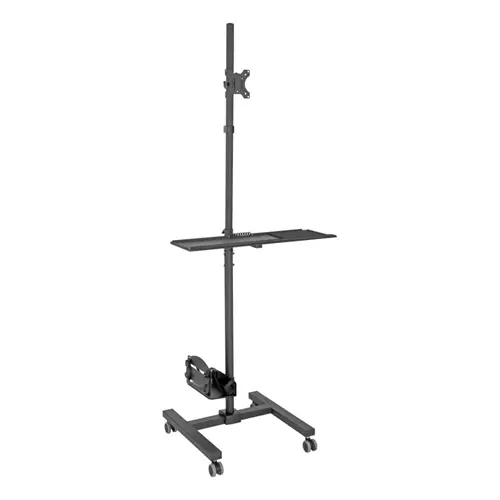
This workstation with monitor mount has four swivel casters so you can roll it wherever your work takes you. The placement of the monitor and keyboard tray are adjustable so you can use the DMCS1732S as a standing desk or a sitting workspace at home school or the office. Because of its small footprint the workstation fits in spaces too small for a traditional desk. When not in use the workstation can be rolled into a secure area for storage. Two of the casters lock to prevent unwanted movement.
Easily Mount a 17" to 32" Display and Adjust the Viewing Angle
For hassle-free display compatibility this rolling cart supports 75 x 75 75 x 100 100 x 75 and 100 x 100 VESA mounting hole patterns for flat-panel displays from 17 to 32 inches. Maximum supported weight is 17.6 lbs (7.9 kgs) Depending on where it is secured to the steel support pole the monitor mount can provide a viewing height anywhere from 37 to 68.9 inches above the floor. The mount offers -15 to +15 tilt adjustment to improve the viewing angle. It also has 180 rotation.
Move the Keyboard Tray to a Comfortable Height
The keyboard tray adjusts from 34.8 to 66.7 inches above the floor. To raise or lower the tray simply loosen the adjustment knobs move the tray to the desired height and tighten the knobs. The keyboard tray has a wrist rest and plenty of room for the included mouse pad. It supports up to 4.4 lbs (1.9 kgs). A cable manager keeps keyboard and mouse cables separated and untangled. The support pole has two guides for neatly routing all cables toward the bottom of the workstation.
Adjust the CPU Holder to Accommodate Different Form Factors
To accommodate a variety of form factors the CPU holder's width adjusts from 4.8 to 8.3 inches. You can also adjust the height of the holder from 4.4 to 28.8 inches above the floor. The holder supports up to 22 lbs (9.9 kgs) and includes straps to secure a CPU or other component.
This workstation with monitor mount has four swivel casters so you can roll it wherever your work takes you. The placement of the monitor and keyboard tray are adjustable so you can use the DMCS1732S as a standing desk or a sitting workspace at home school or the office. Because of its small footprint the workstation fits in spaces too small for a traditional desk. When not in use the workstation can be rolled into a secure area for storage. Two of the casters lock to prevent unwanted movement.
Easily Mount a 17" to 32" Display and Adjust the Viewing Angle
For hassle-free display compatibility this rolling cart supports 75 x 75 75 x 100 100 x 75 and 100 x 100 VESA mounting hole patterns for flat-panel displays from 17 to 32 inches. Maximum supported weight is 17.6 lbs (7.9 kgs) Depending on where it is secured to the steel support pole the monitor mount can provide a viewing height anywhere from 37 to 68.9 inches above the floor. The mount offers -15 to +15 tilt adjustment to improve the viewing angle. It also has 180 rotation.
Move the Keyboard Tray to a Comfortable Height
The keyboard tray adjusts from 34.8 to 66.7 inches above the floor. To raise or lower the tray simply loosen the adjustment knobs move the tray to the desired height and tighten the knobs. The keyboard tray has a wrist rest and plenty of room for the included mouse pad. It supports up to 4.4 lbs (1.9 kgs). A cable manager keeps keyboard and mouse cables separated and untangled. The support pole has two guides for neatly routing all cables toward the bottom of the workstation.
Adjust the CPU Holder to Accommodate Different Form Factors
To accommodate a variety of form factors the CPU holder's width adjusts from 4.8 to 8.3 inches. You can also adjust the height of the holder from 4.4 to 28.8 inches above the floor. The holder supports up to 22 lbs (9.9 kgs) and includes straps to secure a CPU or other component.
The product description is generated based on data from online stores. Before purchasing be sure to verify all information directly with the seller.

Back-to-School Shopping Guide: What Really Matters and What’s Just a Nice BonusA desk, a backpack with an orthopedic back, a tablet and other essential items for a schoolchild.
The Perfect Home Office: How to Create a Comfortable Remote WorkspaceEquipment and useful accessories for productive and efficient remote work