
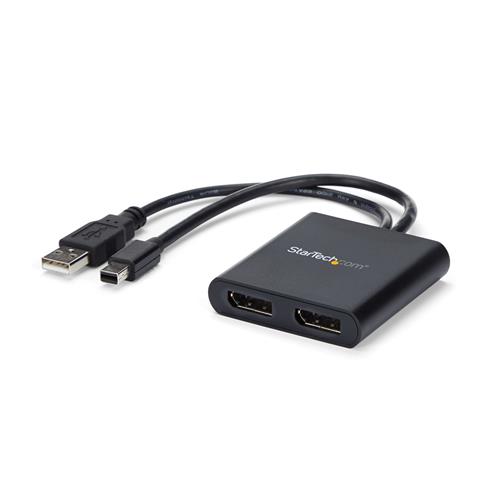
Startech.com 2-Port Multi Monitor Adapter - Mini DisplayPort to 2x DisplayPort MST Hub - Dual 4K 30Hz - Video Splitter for E
 |
Buy Startech.com 2-Port Multi Monitor Adapter - Mini DisplayPort to 2x DisplayPort MST Hub - Dual 4K 30Hz - Video Splitter for E
When you make a purchase through links on our site, we may receive a affiliate commission.
StarTech.com 2-Port Multi Monitor Adapter - Mini DisplayPort to 2x DisplayPort MST Hub - Dual 4K 30Hz - Video Splitter for E | £24.56 |  | |||
| £24.99 |  | ||||
StarTech.com Mini DisplayPort to DisplayPort Multi-Monitor Splitter - 2-Port MST Hub | £29.64 |  | |||
| £31.22 |  | ||||
Startech 2-Port Multi Monitor Adapter, Mini DisplayPort 1.2 to DisplayPort MST Hub, Dual 4K 30Hz, Windows Extended Desktop ( | £23.98 |  | |||
Use this adapter to connect two independent displays to a single mDP 1.2 port
This MST hub lets you connect two DisplayPort monitors to your Mini DisplayPort computer. MST works on any Windows device that supports DisplayPort 1.2 such as models of the Lenovo Think Pad and Microsoft Surface. When connected to earlier revisions of DisplayPort such as DP 1.1 the MST hub acts as a video splitter.The MST hub is USB powered so the only thing you'll need to operate the hub is your computer.
Increase your productivity with multiple monitors
The newest generations of laptops are more portable than ever unfortunately this means youre left with fewer video outputs and a small integrated screen. The MST hub solves these problems by letting you connect two independent displays to a single mDP port on your computer which makes multitasking much easier. Using the MST hub you can extend your desktop onto additional monitors and stream independent content to each display which makes it easier to multitask and increase your productivity - perfect for creating an easy-to-dock hot desk solution with a wireless keyboard and mouse peripheral set. You can also mirror the same image onto multiple displays for remote viewing applications such as digital signage.
Astonishing picture quality that wont drain your system resources
MST technology uses your existing video card to minimize the use of system resources while delivering Ultra HD 4K resolutions. 4K is supported by the latest A/V devices and delivers four times the resolution of 1080p. Plus because the MST hub can output high-definition 1080p the MST hub is perfect for all high-resolution applications such as graphic design and medical imaging.
Works with any monitor television or projector
With this MST hub you can use separate mDP video adapters to connect HDMI VGA or DVI displays for compatibility with all of your existing monitors. The hub is VESA and DisplayPort certified to support DP 1.2 enabled systems for seamless integration with your existing video equipment.
The MSTMDP122DP has been certified by Microsoft and tested for compatibility with your Microsoft Surface Pro 3 Surface Pro 4 and Surface Book and is backed by a 3-year StarTech.com warranty and free lifetime technical support.
The StarTech.com Advantage
- MULTIPLE MONITORS: Mini DisplayPort multi monitor adapter drives 2x DP displays (DP 1.2/HBR2/MST/21.6Gbps) at 4K 30Hz or 2x 1080p 60Hz using an mDP port on Windows PCs
- macOS does not support dual displays single display or mirrored screen only
- COMPATIBLE WITH: Any Mini DisplayPort 1.2 host (supporting MST and HBR2) incl. Microsoft Surface Pro 1-6 Dell Precison Workstation HP Z Workstation Lenovo P Series ThinkStation models plus AMD Nvidia video cards
This MST hub lets you connect two DisplayPort monitors to your Mini DisplayPort computer. MST works on any Windows device that supports DisplayPort 1.2 such as models of the Lenovo Think Pad and Microsoft Surface. When connected to earlier revisions of DisplayPort such as DP 1.1 the MST hub acts as a video splitter.The MST hub is USB powered so the only thing you'll need to operate the hub is your computer.
Increase your productivity with multiple monitors
The newest generations of laptops are more portable than ever unfortunately this means youre left with fewer video outputs and a small integrated screen. The MST hub solves these problems by letting you connect two independent displays to a single mDP port on your computer which makes multitasking much easier. Using the MST hub you can extend your desktop onto additional monitors and stream independent content to each display which makes it easier to multitask and increase your productivity - perfect for creating an easy-to-dock hot desk solution with a wireless keyboard and mouse peripheral set. You can also mirror the same image onto multiple displays for remote viewing applications such as digital signage.
Astonishing picture quality that wont drain your system resources
MST technology uses your existing video card to minimize the use of system resources while delivering Ultra HD 4K resolutions. 4K is supported by the latest A/V devices and delivers four times the resolution of 1080p. Plus because the MST hub can output high-definition 1080p the MST hub is perfect for all high-resolution applications such as graphic design and medical imaging.
Works with any monitor television or projector
With this MST hub you can use separate mDP video adapters to connect HDMI VGA or DVI displays for compatibility with all of your existing monitors. The hub is VESA and DisplayPort certified to support DP 1.2 enabled systems for seamless integration with your existing video equipment.
The MSTMDP122DP has been certified by Microsoft and tested for compatibility with your Microsoft Surface Pro 3 Surface Pro 4 and Surface Book and is backed by a 3-year StarTech.com warranty and free lifetime technical support.
The StarTech.com Advantage
- MULTIPLE MONITORS: Mini DisplayPort multi monitor adapter drives 2x DP displays (DP 1.2/HBR2/MST/21.6Gbps) at 4K 30Hz or 2x 1080p 60Hz using an mDP port on Windows PCs
- macOS does not support dual displays single display or mirrored screen only
- COMPATIBLE WITH: Any Mini DisplayPort 1.2 host (supporting MST and HBR2) incl. Microsoft Surface Pro 1-6 Dell Precison Workstation HP Z Workstation Lenovo P Series ThinkStation models plus AMD Nvidia video cards
The product description is generated based on data from online stores. Before purchasing be sure to verify all information directly with the seller.
HDMI vs. DisplayPort: Which Is Better for a Monitor?Detailed comparison of the two most popular video interfaces
How Gadgets React to Heat and How to Protect Them from OverheatingWe explain how different devices react to heat, how to prevent overheating, and what to do if it has already happened.
How to place an order?How to add store?
Remember that the online store is responsible for the accuracy of information regarding price, warranty, and delivery!
You may be interested in