When you make a purchase through links on our site, we may receive a affiliate commission.
|
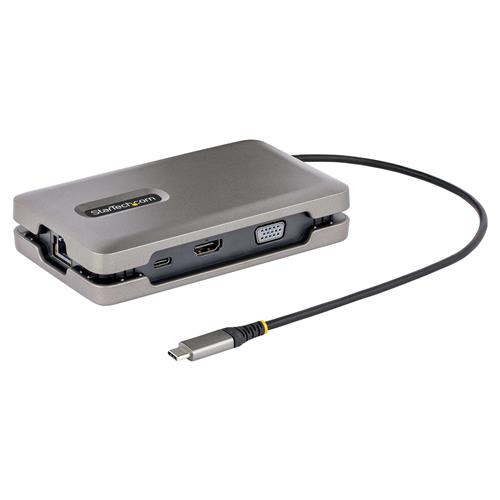
| Startech DKM31C3HVCPDThis Usb-C™ Multiport Adapter/Docking Station With Displayport™ 1.4 (Alt Mode) And Multi-Stream Transport (Mst), Features Thr... moreee Video Output Options (Hdmi, Vga And Usb-C Video) To Support A Single Or Multi-Monitor Workstation.The Usb-C Video Port Supports Usb 3.2 Gen 2 (10gbps) With 10w Of Power, To Connect A Usb-C Monitor Or A Usb-C Peripheral.In Addition, The Docking Station Also Features A 2-Port Usb-A 3.2 Gen 2 (10 Gbps) Hub, A Gigabit Ethernet Port, And Providing Advanced Charging Through A Usb Power Delivery (Pd) 3.0 Pass-Through Port.The Multiport Adapter Connects To A Laptop´s Usb-C Or Thunderbolt 3/4™ Port, Using The Integrated 10-Inch (25cm) Usb-C Cable.Versatile Tradeinn.comDelivery: in United Kingdom Report | £24.99 |  | |
|
| StarTech.com USB-C Dual Monitor Multiport Adapter up to 4K 60Hz USB-C DP Alt Mode Video Output & HDMI 2.0, or 1080p VGA, 100DUAL MONITOR MULTIPORT ADAPTER: Multi monitor 4K UHD mini dock with USB-C DP Alt mode video output, HDMI 2.0b, or VGA, 2 x US... moreB-A hub, 100W USB-C PD Pass-Through (80W laptop charging), Gigabit Ethernet; USB-C video port also supports USB 10Gbps data. USB-C VIDEO OUTPUT: USB-C hub with downstream USB-C port (video + 10Gbps data) supports USB-C or desktop monitors; NOTE: Host system must support USB-C Power Delivery and DP alt mode. For a multi-monitor configuration, the computer must support MST. VIDEO PERFORMANCE: Dual Monitor support upto 1 x 4K 30Hz & 1 x 1440p 60Hz through USB-C and HDMI with Intel 11th Gen DP 1.4 Alt Mode or higher Processors and Discreet GPU, backwards compatible with DP 1.2 laptops supporting dual 1080p video. RELIABLE PERFORMANCE: Adapter is designed to bus power the portable USB-C monitor upto 12W; 100W USB-C PD Pass-Through w/20W reserved for adapter to avoid video flickering, device dropouts or overdrawing power common in other hubs. OUR ADVANTAGE: Includes IT Pro Connectivity Tools to improve network performance and security - featuring MAC Address passthrough, USB Event Monitoring, Windows Layout, and Wi-Fi Auto Switch; Works w/ USB-C, Thunderbolt 3/4, Windows, Linux, ChromeOS. This USB-C™ Multiport Adapter/Docking Station with DisplayPort™ 1.4 (Alt Mode) and Multi-Stream Transport (MST), features three video output options (HDMI, VGA and USB-C video) to support a single or multi-monitor workstation. The USB-C video port supports USB 3.2 Gen 2 (10Gbps) with 10W of power, to connect a USB-C monitor or a USB-C peripheral. In addition, the Docking Station also features a 2-Port USB-A 3.2 Gen 2 (10 Gbps) Hub, a Gigabit Ethernet port, and providing advanced charging through a USB Power Delivery (PD) 3.0 pass-through port. The Multiport Adapter connects to a laptop's USB-C or Thunderbolt 3/4™ port, using the integrated 10-inch (25cm) USB-C cable.. Versatile, High-Performanc Backtotheoffice.co.ukDelivery: in United Kingdom Report | £24.99 |  | |
|
| StarTech USB-C Multiport Adapter w/ USB-C DP Alt Mode Video Output/4K HDMI 2.0/VGA Dual Monitor 100W PD Pass-Through USB TypStarTech USB-C Multiport Adapter w/ USB-C DP Alt Mode Video Output/4K HDMI 2.0/VGA Dual Monitor 100W PD Pass-Through USB Type... moreC Mini Dock/MST Adapter Hub (DKM31C3HVCPD) Space Gray dual video 2 x USB-A 1 x USB-CGenre: Accessories rarewaves.comDelivery: in United Kingdom Report | £32.90 |  | |
|
| StarTech.com USB-C Dual Monitor Multiport Adapter up to 4K 60Hz USB-C DP Alt Mode Video Output & HDMI 2.0 or 1080p VGA 1Portable Docking Station | Up to 4K 60Hz HDMI | VGA | GbE | Thunderbolt 3 & 4 CompatibleThis USB-C Multiport Adapter/Docking... moreStation with DisplayPort 1.4 (Alt Mode) and Multi-Stream Transport (MST) features three video output options (HDMI VGA and USB-C video) to support a single or multi-monitor workstation. The USB-C video port supports USB 3.2 Gen 2 (10Gbps) with 10W of power to connect a USB-C monitor or a USB-C peripheral. In addition the Docking Station also features a 2-Port USB-A 3.2 Gen 2 (10 Gbps) Hub a Gigabit Ethernet port and providing advanced charging through a USB Power Delivery (PD) 3.0 pass-through port. The Multiport Adapter connects to a laptop's USB-C or Thunderbolt 3/4 port using the integrated 10-inch (25cm) USB-C cable.Versatile High-Performanc Quzo.co.ukDelivery: to United Kingdom Report | £36.54 |  | |
|
| USB-C MULTIPORT ADAPTER W/USB-CUSB-C MULTIPORT ADAPTER W/USB-C OnBuy.comDelivery: in United Kingdom Report | £39.65 |  | |
|
| StarTech.com USB-C Dual Monitor Multiport Adapter up to 4K 60Hz USB-C DKM31C3HVCPDThis USB-C™ Multiport Adapter/Docking Station with DisplayPort™ 1.4 (Alt Mode) and Multi-Stream Transport (MST). features thr... moreee video output options (HDMI. VGA and USB-C video) to support a single or multi-monitor workstation. The USB-C video port supports USB 3.2 Gen 2 (10Gbps) with 10W of power. to connect a USB-C monitor or a USB-C peripheral. In addition. the Docking Station also features a 2-Port USB-A 3.2 Gen 2 (10 Gbps) Hub. a Gigabit Ethernet port. and providing advanced charging through a USB Power Delivery (PD) 3.0 pass-through port. The Multiport Adapter connects to a laptop's USB-C or Thunderbolt 3/4™ port. using the integrated 10-inch (25cm) USB-C cable.Versatile Gamingkit.co.ukDelivery: in United Kingdom Report | £47.75 |  | |