Buy Startech.com Triple-Monitor USB4 Docking Station 4K 60Hz HDMI or DisplayPort 100W Laptop Charging 2.5GbE USB-C Multi-Monitor
When you make a purchase through links on our site, we may receive a affiliate commission.
|
| StarTech.com Triple-Monitor USB4 Docking Station, 4K 60Hz HDMI or DisplayPort, 100W Laptop Charging, 2.5GbE, USB-C Multi-MonTriple 4K60 over USB4: Connect up to three 4K 60Hz displays through a single USB4 or Thunderbolt 4 port with uncompressed vid... moreeo powered by your laptop's native GPU; Drive demanding workflows with high-performanc Backtotheoffice.co.ukDelivery: in United Kingdom Report | £155.99 |  | |
|
| StarTech.com Triple-Monitor USB4 Docking Station 4K 60Hz HDMI or DisplayPort 100W Laptop Charging 2.5GbE USB-C Multi-MonitorTurn your USB4 laptop into a multi-monitor high-resolution workstation with 6 USB ports 2.5 Gigabit Ethernet and 100W Laptop... moreCharging
Expand your workspace with a high-performanc Quzo.co.ukDelivery: to United Kingdom Report | £159.92 |  | |
|
| Startech 904253805StarTech.com Triple 4K USB4 Docking Station - 100W PD - USB4DOCKTRIPLET Tradeinn.comDelivery: in United Kingdom Report | £193.49 |  | |
|
| Startech Triple-Monitor USB4 Docking Station, 4K 60Hz HDMI or DisplayPort, 100W Laptop Charging, 2.5GbE, USB-C Multi-MonitorStartech Triple-Monitor USB4 Docking Station, 4K 60Hz HDMI or DisplayPort, 100W Laptop Charging, 2.5GbE, USB-C Multi-Monitor... moreDock, Driverless - docking station - USB4 / Thunderbolt 4 - 3 x HDMI, 3 x DP - 1GbE, 2.5GbE Business.Currys.co.ukDelivery: to United Kingdom Report | £196.78 |  | |
|
| StarTech.com USB-C Docking Station (USB4) Triple 4K 60Hz Monitors Up to 100W Laptop Charging 2.5GbE Driverless Not macOS ComStarTech.com USB-C Docking Station (USB4) Triple 4K 60Hz Monitors Up to 100W Laptop Charging 2.5GbE Driverless Not macOS Comp... moreatible Triple 4K60 USB4 Triple MonitorDESCRIPT rarewaves.comDelivery: in United Kingdom Report | £206.35 |  | |
|
| StarTech.com Triple-Monitor USB4 Docking Station. 4K 60Hz HDMI or Disp 150UE-USB4DOCKTRIPLETurn your USB4 laptop into a multi-monitor high-resolution workstation with 6 USB ports. 2.5 Gigabit Ethernet and 100W Laptop... moreChargingExpand your workspace with a high-performanc Gamingkit.co.ukDelivery: in United Kingdom Report | £161.48 |  | |
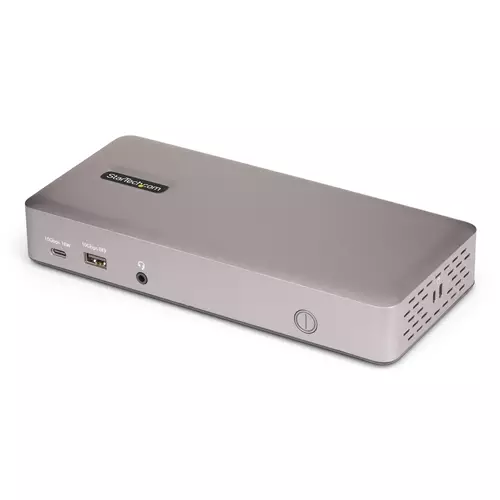
Turn your USB4 laptop into a multi-monitor high-resolution workstation with 6 USB ports 2.5 Gigabit Ethernet and 100W Laptop Charging
Expand your workspace with a high-performance docking station that delivers triple 4K 60Hz display output 2.5G Ethernet and broad device connectivity all through a single USB4 or Thunderbolt 4 connection.
High-Performance Display and Networking
Connect up to three 4K 60Hz displays via a single USB4 or Thunderbolt 4 port leveraging full GPU capabilities without software or compression. Boost productivity with fast 2.5GbE networking supporting PXE Boot and Wake-on-LAN for streamlined IT-managed deployments.
Comprehensive Connectivity and Power
The dock offers three video outputs (HDMI or DisplayPort) four USB-A ports (10Gbps) two USB-C ports (10Gbps and 5Gbps) and delivers up to 100W of host charging. A 180W power adapter ensures all ports operate at full capacity.
Driverless Deployment with Secure Mounting Options
Driverless setup with native Windows and ChromeOS support. Built-in lock slots and VESA or surface mounting options (accessories sold separately) provide secure flexible installation.
Enterprise Management Tools
StarTech.com Connectivity Tools offer practical utilities to support device management and increase productivity in modern IT environments. With features like MAC address pass-through Wi-Fi auto switch and USB device monitoring the software helps IT teams streamline deployment and strengthen security across diverse setups.
Visit www.StarTech.com/Connectivity-Tools to download the Enterprise Management Tools.
The product description is generated based on data from online stores. Before purchasing be sure to verify all information directly with the seller.
How to place an order?How to add store?Remember that the online store is responsible for the accuracy of information regarding price, warranty, and delivery!