
Startech.com Dual-Bay M.2 NVMe SSD to PCIe x8 Removable Mobile Rack; Bifurcation Required; Tool-less Installation PCIe Backp
 | Compare prices 4 → When you make a purchase through links on our site, we may receive a affiliate commission.
|
Buy Startech.com Dual-Bay M.2 NVMe SSD to PCIe x8 Removable Mobile Rack; Bifurcation Required; Tool-less Installation PCIe Backp
When you make a purchase through links on our site, we may receive a affiliate commission.
StarTech.com Dual-Bay M.2 NVMe SSD to PCIe x8 Removable Mobile Rack; Bifurcation Required; Tool-less Installation PCIe Backp | £139.70 |  | |||
StarTech.com Dual-Bay M.2 NVMe SSD to PCIe x8 Removable Mobile Rack; Bifurcation Required; Tool-less Installation, PCIe Back | £139.99 |  | |||
StarTech.com Dual-Bay M.2 NVMe SSD to PCIe x8 Removable Mobile Rack; PCI Express Bifurcation Required; Tool-less Install 2M2 | £180.68 |  | |||
StarTech.com Dual-Bay M.2 NVMe SSD Removable Mobile Rack for PCIe x8 Slot - interface adapter - M.2 NVMe Card / PCIe (NV | £211.43 |  | |||
Use an available PCIe x8 or larger expansion slot to create two removable M.2 NVMe drive bays
Utilize an available PCIe x8 expansion slot to install remove or swap PCIe M.2 SSDs. Supports 2230 2242 2260 and 2280 M-Key M.2 NVMe SSDs with high-performance read/write speeds up to 64Gbps per drive.
Toolless Installation
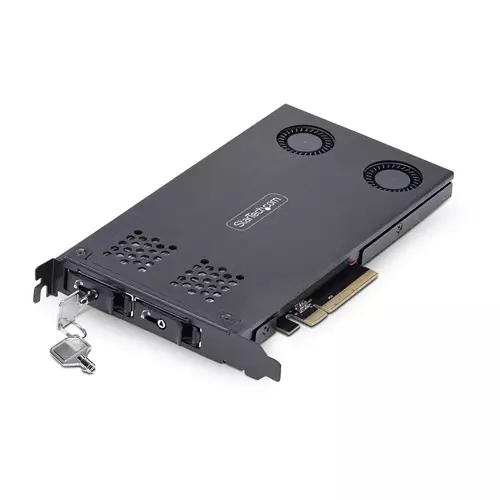
Toolless installation allows an M.2 drive to be placed into the drive tray or inserted into the drive bay without needing tools. It features a power/activity LED indicator a latching drive tray and a lockable installation with two included keys.
Effective Expansion
Provide quick-swap external access to internal M.2 NVMe drives without needing external enclosures or adapters which can affect throughput. Without chipsets or adapters the drives maintain full performance of up to 64Gbps per drive. The ability to quickly remove drives is ideal for servicing replacing or upgrading M.2 drives. Additional drive trays TR-M2-REMOVABLE-PCIE are sold separately.
Reliable Performance
Vented stainless steel frame bracket and tray with thermal pads along with an aluminum cover and active cooling fans help dissipate heat to ensure the drives stay cool during operation. Anti-vibration springs on the drive tray reduce shock or vibrations and an optional screw provides additional stability.
Access Two M.2 PCIe SSDs Simultaneously
No on-board chip means to no drivers or software requirements and is compatible with any operating system including Windows and Linux. M.2 backplane works with PCI Express 4.0/3.0 motherboards that support PCIe bifurcation and have an available x8 or x16 slot.
Note: This product is not compatible with M.2 SATA drives.
Note: PCIe bifurcation is required to read and write to multiple drives.
The StarTech.com Advantage
Utilize an available PCIe x8 expansion slot to install remove or swap PCIe M.2 SSDs. Supports 2230 2242 2260 and 2280 M-Key M.2 NVMe SSDs with high-performance read/write speeds up to 64Gbps per drive.
Toolless Installation
Toolless installation allows an M.2 drive to be placed into the drive tray or inserted into the drive bay without needing tools. It features a power/activity LED indicator a latching drive tray and a lockable installation with two included keys.
Effective Expansion
Provide quick-swap external access to internal M.2 NVMe drives without needing external enclosures or adapters which can affect throughput. Without chipsets or adapters the drives maintain full performance of up to 64Gbps per drive. The ability to quickly remove drives is ideal for servicing replacing or upgrading M.2 drives. Additional drive trays TR-M2-REMOVABLE-PCIE are sold separately.
Reliable Performance
Vented stainless steel frame bracket and tray with thermal pads along with an aluminum cover and active cooling fans help dissipate heat to ensure the drives stay cool during operation. Anti-vibration springs on the drive tray reduce shock or vibrations and an optional screw provides additional stability.
Access Two M.2 PCIe SSDs Simultaneously
No on-board chip means to no drivers or software requirements and is compatible with any operating system including Windows and Linux. M.2 backplane works with PCI Express 4.0/3.0 motherboards that support PCIe bifurcation and have an available x8 or x16 slot.
Note: This product is not compatible with M.2 SATA drives.
Note: PCIe bifurcation is required to read and write to multiple drives.
The StarTech.com Advantage
The product description is generated based on data from online stores. Before purchasing be sure to verify all information directly with the seller.

How to Choose a Party Speaker: A Guide to Speakers for PartiesOne party speaker covers everything that used to require assembling a setup: sound, a microphone, and lighting.

How Gadgets React to Heat and How to Protect Them from OverheatingWe explain how different devices react to heat, how to prevent overheating, and what to do if it has already happened.
How to place an order?How to add store?
Remember that the online store is responsible for the accuracy of information regarding price, warranty, and delivery!