
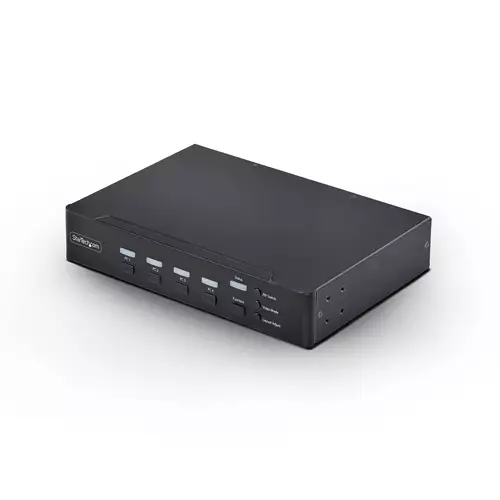
Startech.com 4-Port DisplayPort KVM Switch with Mouse Roaming and Multi-View / Picture-in-Picture 4K 60Hz USB 3.0 Hu (5Gbps)
 | Compare prices 2 → When you make a purchase through links on our site, we may receive a affiliate commission.
|
Buy Startech.com 4-Port DisplayPort KVM Switch with Mouse Roaming and Multi-View / Picture-in-Picture 4K 60Hz USB 3.0 Hu (5Gbps)
When you make a purchase through links on our site, we may receive a affiliate commission.
StarTech.com 4-Port DisplayPort KVM Switch with Mouse Roaming and Multi-View / Picture-in-Picture 4K 60Hz USB 3.0 (5Gbps) Hu | £1,849.03 |  | |||
StarTech.com 4-Port DisplayPort KVM Switch with Mouse Roaming and Multi-View / Picture-in-Picture, 4K 60Hz, USB 3.0 (5Gbps) | £1,887.99 |  | |||
Control up to four DisplayPort computers with mouse roaming quad view and picture-in-picture support
Streamline complex workflows by managing up to four DisplayPort computers from a single keyboard mouse and display. With support for true 4K 60 Hz (4:4:4) resolution this multiview KVM delivers crisp text and precise visuals across Windows macOS and Linux workstations.
Multiview Monitoring
Maintain full awareness and react faster by viewing multiple systems at once. Flexible display modes including Quad-View Picture-in-Picture (PiP) and Picture-by-Picture (PbP) let you monitor and compare the four sources.
Instant Switching With Continuous Video
Move seamlessly between systems using mouse roaming with zero latency and no screen blackout. Continuous video output keeps every system visible at all times eliminating delays caused by switching or waiting for auto-scan cycles reducing disruption in control rooms industrial environments and other time-sensitive operations.
Switch Your Way
Adapt the KVM to your environment with multiple switching methods. Use front-panel buttons keyboard hotkeys mouse roaming mouse side buttons or serial control via RJ-11 or USB-C to support hands-on use remote management or automated workflows.
Built-In Dual Display Output
Mirror the KVM output to two displays simultaneously using DisplayPort and HDMI. Use a local desktop monitor for hands-on control while displaying the same view on a larger wall-mounted TV for monitoring or team visibility. This dual console output improves visibility collaboration and redundancy without requiring external splitters or additional hardware.
Streamline complex workflows by managing up to four DisplayPort computers from a single keyboard mouse and display. With support for true 4K 60 Hz (4:4:4) resolution this multiview KVM delivers crisp text and precise visuals across Windows macOS and Linux workstations.
Multiview Monitoring
Maintain full awareness and react faster by viewing multiple systems at once. Flexible display modes including Quad-View Picture-in-Picture (PiP) and Picture-by-Picture (PbP) let you monitor and compare the four sources.
Instant Switching With Continuous Video
Move seamlessly between systems using mouse roaming with zero latency and no screen blackout. Continuous video output keeps every system visible at all times eliminating delays caused by switching or waiting for auto-scan cycles reducing disruption in control rooms industrial environments and other time-sensitive operations.
Switch Your Way
Adapt the KVM to your environment with multiple switching methods. Use front-panel buttons keyboard hotkeys mouse roaming mouse side buttons or serial control via RJ-11 or USB-C to support hands-on use remote management or automated workflows.
Built-In Dual Display Output
Mirror the KVM output to two displays simultaneously using DisplayPort and HDMI. Use a local desktop monitor for hands-on control while displaying the same view on a larger wall-mounted TV for monitoring or team visibility. This dual console output improves visibility collaboration and redundancy without requiring external splitters or additional hardware.
The product description is generated based on data from online stores. Before purchasing be sure to verify all information directly with the seller.
Best Keyboards with Optical SwitchesOptical gaming keyboards with maximum comfort and efficiency.
Best Keyboards with Adjustable Magnetic SwitchesMagnetic keyboards with extensive control customization options and advanced gaming modes.
How to place an order?How to add store?
Remember that the online store is responsible for the accuracy of information regarding price, warranty, and delivery!
We recommendCompare using chart →


play (for kids), mechanical, 80% (TKL, without Numpad), Bluetooth / radio / wired, additional keys: 3, backlight, RGB backlight, battery, up to 36 h

play (for kids), membrane, 100% (full size), wired, additional keys: 9, backlight, water resistance, RGB backlight
play (for kids), mechanical, 1800 (compact full-size), Bluetooth / radio / wired, BT v 5, additional keys: 1, backlight, RGB backlight, battery, up to 1500 h
membrane, with a mouse, 100% (full size), radio, additional keys: 8, water resistance, 2xAAA
membrane, 75% (compact TKL, without Num-block), radio, additional keys: 4, touchpad, 2xAA
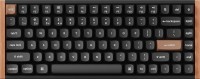
play (for kids), magnetic, 75% (compact TKL, without Num-block), Bluetooth / radio / wired, BT v 5, additional keys: 2, backlight, RGB backlight, battery, 4000 mAh, up to 110 h
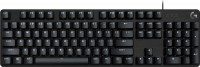

punch hole, scissor, 100% (full size), Bluetooth / radio, BT v 5, additional keys: 7, backlight, battery, 1500 mAh, up to 10 days

play (for kids), mechanical, 80% (TKL, without Numpad), Bluetooth / radio / wired, additional keys: 8, backlight, RGB backlight, battery, up to 50 h