Catalog   /   Sound & Hi-Fi   /   Other Sound & Hi-Fi

DMA Fuser Self Adaptive Resolution No Need Debugging HD Multimedia Interface Synthesizer 2K 144hz

Photos - Other Sound & Hi-Fi DMA Fuser Self Adaptive Resolution No Need Debugging HD Multimedia Interface Synthesizer 2K 144hz
When you make a purchase through links on our site, we may receive a affiliate commission.
Buy!
Joom UK

DMA Fuser Self Adaptive Resolution No Need Debugging HD Multimedia Interface Synthesizer 2K 144hz

Joom UK
Delivery: to United Kingdom
Report
add to listmy lists

Buy DMA Fuser Self Adaptive Resolution No Need Debugging HD Multimedia Interface Synthesizer 2K 144hz

When you make a purchase through links on our site, we may receive a affiliate commission.

DMA Fuser Self Adaptive Resolution No Need Debugging HD Multimedia Interface Synthesizer 2K 144hz

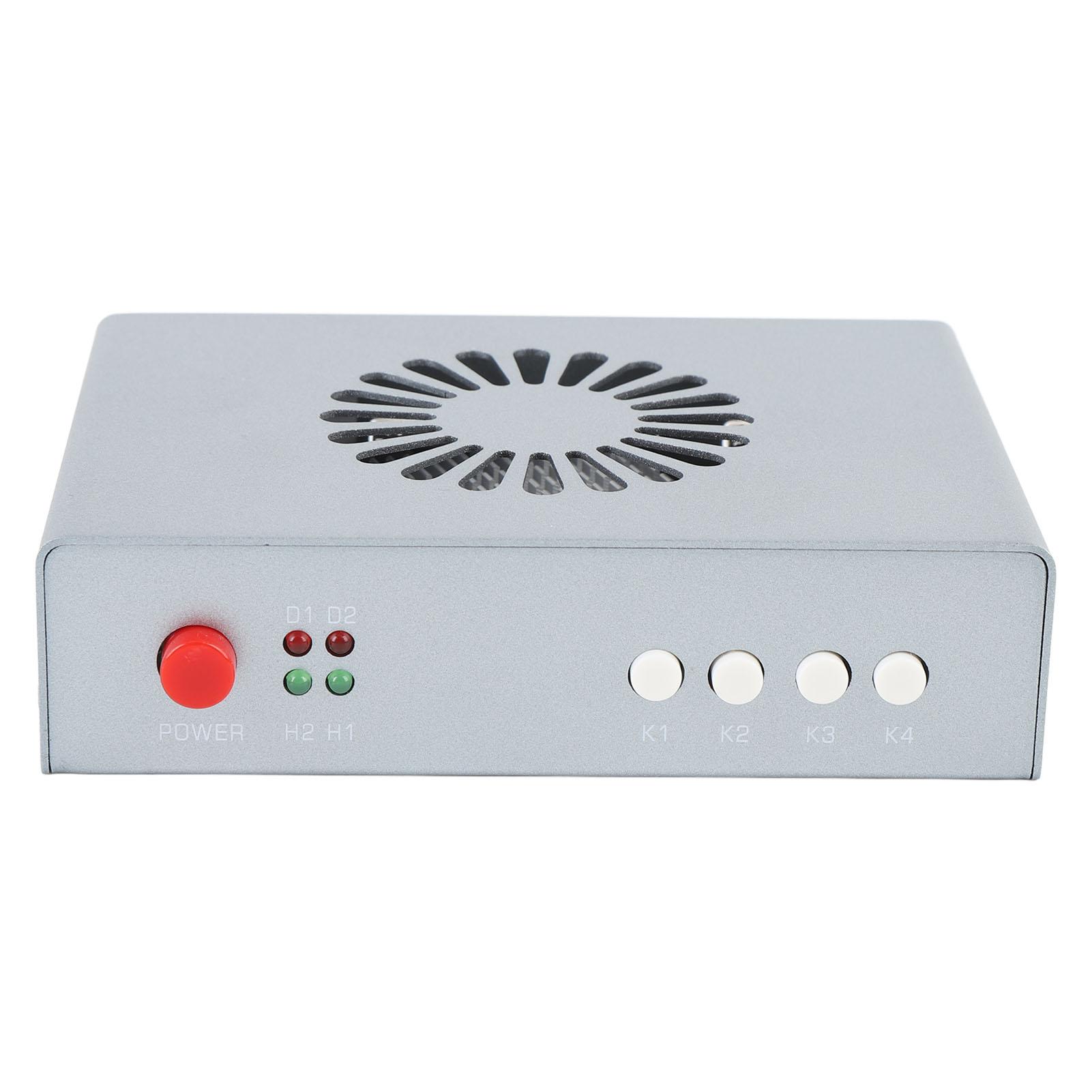
Feature: 1. [DMA Fuser] Used to optimize the efficiency of data transfer and processing, mainly for high bandwidth data transfer and processing scenarios, such as image processing, video encoding and decoding, network communication, etc. 2. [2 Signal Input] The DMA fuser supports 2 way signal input, allowing output on a single display by overlay, t... morehe overlaid image quality can be adjusted for clarity. 3. [Adaptive Resolution] The fuser supports switching between single screens for complete display, the resolution is up to 2K 144hz, no need to debug resolution, no need for EDID debugging, which is adaptive. 4. [Easy to Use] The DMA combiner ensures clear image quality, providing lossless transfer, which has built in fan for temperature control heat dissipation, simple to operate, plug and display. 5. [Wide Application] Suitable for securities trading floors, banking data centers, traffic safety emergency control centers, and video conferences. Specification: Item Type: DMA Fuser Material: Aluminum Alloy Interface: 1. HD Multimedia Interface Output: Connect to the main display (the main screen for playing games) 2. HD Multimedia Interface 1 Host: Connect the host graphics card (computer for gaming) 3. HD Multimedia Interface 2 Secondary Unit: Connect the secondary unit graphics card 4. DC12V: Power cord supply (default 12V 2A) Indicator Light: 1. D1: Power light (long on normal) 2. D2: Fuser function onoff indicator light (long on fuser function on, not on fuser function off) 3. H2: HD Multimedia Interface 2 secondary unit input signal light (long on normal) 4. H1: HD Multimedia Interface 1 host input signal light (long on normal) Key Functions: 1. Power: Power switch 2. K1: Short press once: Cycle to switch resolution, 1920 x 1080, 2560 x 1440, 3840 x 2160, 2560 x 1080, 3440 x 1440, factory default 1920 x 1080. Long press for three seconds (hold down until displayed): The current resolution and refresh rate are displayed in the upper left corner of the screen, with the host information above and the secondary device information below 3. K2: Short press once: Cycle to switch the upper layer cutout strength, with a total of 21 levels from 0-20, the factory default is 0 (0 also cutout) 4. K3: Short press once: Restore the upper layer cutout strength to the factory default of 0 5. K4: Short press once: Turn onoff fuser function . Package List: 1 x DMA Fuser 1 x USB Cable 1 x User Manual Note: 6th generation relies on device built in compatibility, no manual adjustment of resolution is needed. Currently compatible with 95percent of displays and computers.
Joom UK
Delivery: to United Kingdom
Report
£73.00
Feature: 1. [DMA Fuser] Used to optimize the efficiency of data transfer and processing, mainly for high bandwidth data transfer and processing scenarios, such as image processing, video encoding and decoding, network communication, etc. 2. [2 Signal Input] The DMA fuser supports 2 way signal input, allowing output on a single display by overlay, the overlaid image quality can be adjusted for clarity. 3. [Adaptive Resolution] The fuser supports switching between single screens for complete display, the resolution is up to 2K 144hz, no need to debug resolution, no need for EDID debugging, which is adaptive. 4. [Easy to Use] The DMA combiner ensures clear image quality, providing lossless transfer, which has built in fan for temperature control heat dissipation, simple to operate, plug and display. 5. [Wide Application] Suitable for securities trading floors, banking data centers, traffic safety emergency control centers, and video conferences. Specification: Item Type: DMA Fuser Material: Aluminum Alloy Interface: 1. HD Multimedia Interface Output: Connect to the main display (the main screen for playing games) 2. HD Multimedia Interface 1 Host: Connect the host graphics card (computer for gaming) 3. HD Multimedia Interface 2 Secondary Unit: Connect the secondary unit graphics card 4. DC12V: Power cord supply (default 12V 2A) Indicator Light: 1. D1: Power light (long on normal) 2. D2: Fuser function onoff indicator light (long on fuser function on, not on fuser function off) 3. H2: HD Multimedia Interface 2 secondary unit input signal light (long on normal) 4. H1: HD Multimedia Interface 1 host input signal light (long on normal) Key Functions: 1. Power: Power switch 2. K1: Short press once: Cycle to switch resolution, 1920 x 1080, 2560 x 1440, 3840 x 2160, 2560 x 1080, 3440 x 1440, factory default 1920 x 1080. Long press for three seconds (hold down until displayed): The current resolution and refresh rate are displayed in the upper left corner of the screen, with the host information above and the secondary device information below 3. K2: Short press once: Cycle to switch the upper layer cutout strength, with a total of 21 levels from 0-20, the factory default is 0 (0 also cutout) 4. K3: Short press once: Restore the upper layer cutout strength to the factory default of 0 5. K4: Short press once: Turn onoff fuser function . Package List: 1 x DMA Fuser 1 x USB Cable 1 x User Manual Note: 6th generation relies on device built in compatibility, no manual adjustment of resolution is needed. Currently compatible with 95percent of displays and computers.
The product description is generated based on data from online stores. Before purchasing be sure to verify all information directly with the seller.

How to place an order?How to add store?
Remember that the online store is responsible for the accuracy of information regarding price, warranty, and delivery!