
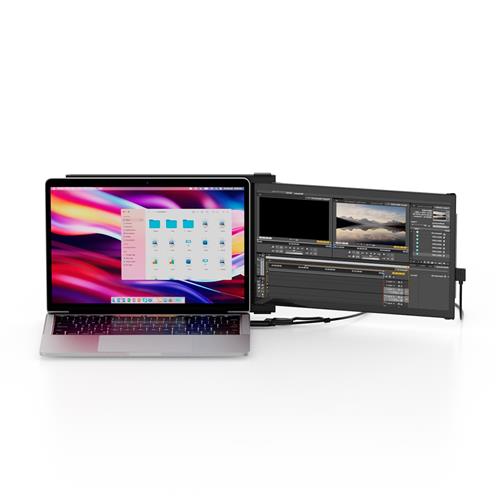
Mobile Pixels Duex Plus DS 33.8 cm LCD 1920 x 1080 pixels Full HD 16:9 300 cd/m 101-1006P04 (13.3")
 | Compare prices 3 → When you make a purchase through links on our site, we may receive a affiliate commission.
|
Buy Mobile Pixels Duex Plus DS 33.8 cm LCD 1920 x 1080 pixels Full HD 16:9 300 cd/m 101-1006P04 (13.3")
When you make a purchase through links on our site, we may receive a affiliate commission.
Mobile Pixels Duex Plus DS 33.8 cm (13.3") LCD 1920 x 1080 pixels Full HD 16:9 300 cd/m 101-1006P04 | £167.11 |  | |||
| £174.98 |  | ||||
Mobile Pixels 101-1006P04 | £182.99 |  | |||
Elevate your workspace on-the-go.
Immerse yourself with Duex Plus DS 1080P FHD monitor. Take your laptop experience to the next level by easily expanding your laptop monitor. Customize the display to your work with Duex Plus DS's flexible modes. Switch between Landscape for data analysis Portrait for coding and reading Kickstand for professional presentations and Presentation for collaborative meetings. Experience adaptability that suits your ever-changing tasks.
Improve your dual screen experience.
With rotation function we enjoy a larger workspace on the move perfect for 13"-14.5" laptops. Weighing in at just 1.3 lbs. and with a slim profile of just 0.25" this ultra-portable monitor is the ideal travel companion.
Plug in power on. Quick setup.
Simply connect it to your laptop by choosing the appropriate connection from the USB-C or Mini HDMI cable attach the magnet according to the installation guidelines and the laptop screen extender monitor portable is ready to use! Whether you flip from the left to the right the portable monitor for laptop flips to achieve ease of use.
Portability meets productivity.
This sleek and lightweight design weighing just 1.3lbs and slim at 0.60 inches ensures you can carry your productivity in easy. Whether you're at a caf or a meeting make a statement with elegance.
Compatibility with ease.
Enjoy wide compatibility with laptops Windows macOS Android Nintendo Switch and Samsung DeX. Easily connect to your technology system for a wide range of devices and operating systems and also meets your multiple scenarios of use like teaching meetings outdoor work learning and so on.
For ergonomic comfort and various scenarios.
Duex Plus DS has a rotation function and can be used in its intended landscape mode portrait mode presentation mode or kickstand modeperfect for any scenario.
Immerse yourself with Duex Plus DS 1080P FHD monitor. Take your laptop experience to the next level by easily expanding your laptop monitor. Customize the display to your work with Duex Plus DS's flexible modes. Switch between Landscape for data analysis Portrait for coding and reading Kickstand for professional presentations and Presentation for collaborative meetings. Experience adaptability that suits your ever-changing tasks.
Improve your dual screen experience.
With rotation function we enjoy a larger workspace on the move perfect for 13"-14.5" laptops. Weighing in at just 1.3 lbs. and with a slim profile of just 0.25" this ultra-portable monitor is the ideal travel companion.
Plug in power on. Quick setup.
Simply connect it to your laptop by choosing the appropriate connection from the USB-C or Mini HDMI cable attach the magnet according to the installation guidelines and the laptop screen extender monitor portable is ready to use! Whether you flip from the left to the right the portable monitor for laptop flips to achieve ease of use.
Portability meets productivity.
This sleek and lightweight design weighing just 1.3lbs and slim at 0.60 inches ensures you can carry your productivity in easy. Whether you're at a caf or a meeting make a statement with elegance.
Compatibility with ease.
Enjoy wide compatibility with laptops Windows macOS Android Nintendo Switch and Samsung DeX. Easily connect to your technology system for a wide range of devices and operating systems and also meets your multiple scenarios of use like teaching meetings outdoor work learning and so on.
For ergonomic comfort and various scenarios.
Duex Plus DS has a rotation function and can be used in its intended landscape mode portrait mode presentation mode or kickstand modeperfect for any scenario.
The product description is generated based on data from online stores. Before purchasing be sure to verify all information directly with the seller.

Most Overrated and Underrated Modern TechWhich gadgets and tech are not worth spending money on, and which ones can pleasantly surprise you.
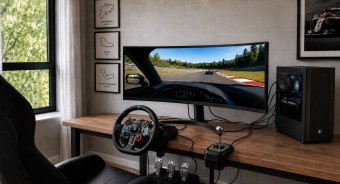
Best 34-inch Curved Gaming MonitorsA large ultra-wide screen provides full immersion in virtual gaming worlds.
How to place an order?How to add store?
Remember that the online store is responsible for the accuracy of information regarding price, warranty, and delivery!
SimilarCompare using chart →

gaming, 31.5 ", 4K, 3840x2160 (16:9), WOLED, response 0.03 ms, 165 Hz, 330 Hz (Full HD), 10-bit (1.07B Colors), DCI-P3 99 %, HDMI, v 2.1, DisplayPort, USB-C (DP Alt Mode), Power Delivery, HUB: USB-A 3x5Gbps, KVM switch, AMD FreeSync Premium Pro, NVIDIA G-Sync Compatible, HDR, TÜV Rheinland
gaming, 24.5 ", 1920x1080 (16:9), IPS, response 0.5 ms, 320 Hz, 16.7M Colors, sRGB 99 %, HDMI, v 2.1, DisplayPort, HUB: USB-A 2x5Gbps, AMD FreeSync Premium, NVIDIA G-Sync Compatible, VESA Adaptive-Sync, HDR

gaming, 31.5 ", 4K, 3840x2160 (16:9), IPS, response 0.5 ms, 160 Hz, 320 Hz (Full HD), 8-bit + FRC (1.07B Colors), sRGB 131 %, DCI-P3 99 %, HDMI, v 2.1, DisplayPort, HUB: USB-A 2x2.0, VESA Adaptive-Sync, HDR, TÜV Rheinland

gaming, 24.5 ", 1920x1080 (16:9), IPS, response 1 ms, 240 Hz, 16.7M Colors, sRGB 120 %, HDMI, DisplayPort, speakers, AMD FreeSync Premium, HDR, TÜV Rheinland

gaming, 31.5 ", 4K, 3840x2160 (16:9), QD-OLED, response 0.03 ms, 240 Hz, 10-bit (1.07B Colors), DCI-P3 99 %, HDMI, v 2.1, DisplayPort, USB-C (DP Alt Mode), Power Delivery, HUB: USB-A 2x5Gbps, KVM switch, speakers, AMD FreeSync Premium Pro, NVIDIA G-Sync Compatible, HDR
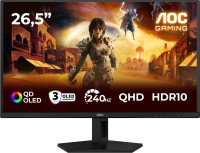
gaming, 26.5 ", 2560x1440 (16:9), QD-OLED, response 0.03 ms, 240 Hz, sRGB 147.6 %, DCI-P3 99.1 %, HDMI, DisplayPort, NVIDIA G-Sync Compatible, VESA Adaptive-Sync, HDR, TÜV Rheinland

gaming, 27 ", 2560x1440 (16:9), QD-IPS, response 1 ms, 200 Hz, 1.07B Colors, sRGB 150 %, DCI-P3 99 %, HDMI, DisplayPort, USB-C (DP Alt Mode), Power Delivery, HUB: USB-A 2x5Gbps, KVM switch, NVIDIA G-Sync Compatible, VESA Adaptive-Sync, HDR, TÜV Rheinland

gaming, 27 ", 4K, 3840x2160 (16:9), IPS, response 1 ms, 160 Hz, 320 Hz (Full HD), 1.07B Colors, sRGB 125 %, DCI-P3 95 %, HDMI, v 2.1, DisplayPort, USB-C (DP Alt Mode), Power Delivery, HUB: USB-A 3x5Gbps, KVM switch, speakers, AMD FreeSync Premium, NVIDIA G-Sync Compatible, VESA Adaptive-Sync, HDR, TÜV Rheinland

gaming, 27 ", 2560x1440 (16:9), WOLED, response 0.03 ms, 240 Hz, 10-bit (1.07B Colors), DCI-P3 99 %, HDMI, v 2.1, DisplayPort, USB-C (DP Alt Mode), AMD FreeSync Premium, NVIDIA G-Sync Compatible, HDR, TÜV Rheinland
gaming, 27 ", 2560x1440 (16:9), IPS, response 1 ms, 300 Hz, 1.07B Colors, sRGB 132 %, DCI-P3 95 %, HDMI, v 2.1, DisplayPort, USB-C (DP Alt Mode), Power Delivery, HUB: USB-A 2x5Gbps, KVM switch, NVIDIA G-Sync Compatible, VESA Adaptive-Sync, HDR, TÜV Rheinland

gaming, 27 ", 4K, 3840x2160 (16:9), Mini LED IPS, response 1 ms, 160 Hz, 320 Hz (Full HD), 8-bit + FRC (1.07B Colors), sRGB 151.8 %, DCI-P3 98 %, HDMI, v 2.1, DisplayPort, HUB: USB-A 4x5Gbps, NVIDIA G-Sync Compatible, VESA Adaptive-Sync, HDR
gaming, 27 ", 2560x1440 (16:9), QD-OLED, response 0.03 ms, 180 Hz, 1.07B Colors, DCI-P3 99 %, HDMI, DisplayPort, AMD FreeSync, NVIDIA G-Sync Compatible, HDR, Pantone Validated