Catalog   /   TVs & Video   /   Cables (video, audio, USB)

Plugable Technologies 13-in-1 USB-C Triple Monitor Docking Station with 100W Charging Compatible with Windows Mac and Chrome
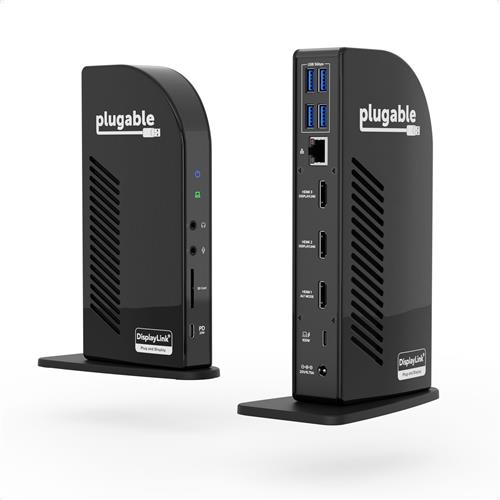
Photos - Cable (video, audio, USB) Plugable Technologies 13-in-1 USB-C Triple Monitor Docking Station with 100W Charging Compatible with Windows Mac and Chrome

Buy Plugable Technologies 13-in-1 USB-C Triple Monitor Docking Station with 100W Charging Compatible with Windows Mac and Chrome

When you make a purchase through links on our site, we may receive a affiliate commission.

Plugable Technologies 13-in-1 USB-C Triple Monitor Docking Station wit

Plugable Technologies 13-in-1 USB-C Triple Monitor Docking Station with 100W Charging. Compatible with Windows. Mac. and Chro... moreme with Thunderbolt 3 / 4 or USB-C (3x HDMI. 1x USB-C. 4x USB. Ethernet. SD Card Reader) A Plugable classic. the Triple Display Docking Station (UD-ULTCDL). gets a modern refresh with streamlined display connections and a major power boost.When we started redesigning one of our most loved triple display docking stations. we started with the video ports. This laptop docking station features three HDMI ports for a crisp. clear picture on all three screens. Easy setup for your HDMI monitors without reaching for an adapter.But we didn’t just want to modernize the display options. We wanted this USB C dock to embrace the needs of modern technology. And that means adding more power. The redesigned UD-ULTCDL offers 100W Power Delivery (96W certified) and room to charge your connected devices through the front-facing USB-C port (20W PD).Note: New and innovative products aren't without compatibility concerns. it is important to read the information below for details regarding display output types and system requirements.Not all USB-C ports offer DP Alt Mode or PD charging. Having a fully compatible USB-C. USB4. Thunderbolt 3. or Thunderbolt 4 port is required for this docking station. it will not work properly when adapted to USB 3.0. The UD-ULTCDL supports Windows 10. 11. ChromeOS 100+. and macOS 11. 12. Linux. and some older macOS versions are not supported.Crisp Clear PictureA docking station triple monitor setup gives you ample space to spread out. And when it comes to connecting monitors.HDMI is arguably the most common connection type. Our pure HDMI port configuration (1x HDMI 1.4. 2x HDMI 1.3) capitalizes on that and eliminates the legacy connections.In a typical triple monitor setup. the main screen is in the middle with the auxiliary screens placed on either side. This Windows. Chrome. or Mac docking station takes advantage of that. so when setting up a host that supports DisplayPort Alternate Mode. consider connecting your main display to the HDMI 1.4 port for resolutions up to 4k 30Hz. Your two flanking screens will look great with resolutions up to 1920x1200 @ 60Hz (HDMI 1.3).Ports a PlentyIn addition to the 100W charging to power your laptop—so you can leave the charger it came with in the bag—the UD-ULTCDL has a front-facing USB-C port for 5Gpbs data transfer and 20W charging to accommodate your phone or other devices.Speaking of peripherals. the UD-ULTCDL has a total of 13 ports including 4x USB 3.0 ports for 5Gbps data transfer rates. an SD Card Reader. a Gigabit Ethernet port. and separate audio in and audio out ports.Power OnPower Delivery—charging your laptop through a USB-C port—can get confusing. How much power is enough? How much is too much?This isn’t only designed to be a docking station 3 monitors setup. it also has you covered with 100W charging capability (96W certified) so you have enough
Pcnova.co.uk
Delivery: in United Kingdom
Report
£198.46

Plugable Technologies 13-in-1 USB-C Triple Monitor Docking Station wit UD-ULTCDL-EU

Plugable Technologies 13-in-1 USB-C Triple Monitor Docking Station with 100W Charging. Compatible with Windows. Mac. and Chro... moreme with Thunderbolt 3 / 4 or USB-C (3x HDMI. 1x USB-C. 4x USB. Ethernet. SD Card Reader)
LaptopHub.uk
Delivery: in United Kingdom
Report
£198.46

Plugable Technologies 13-in-1 USB-C Triple Monitor Docking Station with 100W Charging, Compatible with Windows, Mac, and Chr

Powerful Expansion—USB C docking station with 13 ports for the professional who needs to spread out across three monitors, ev... moreen on laptops that only support one extra screen, and offers 100W charging to power through your day. Triple Monitor—Get a pristine picture on your main display with up to 4K 30Hz, and on displays two and three resolutions up to 1920x1200 @ 60Hz. Thanks to DisplayLink technology, you can even add three screens to M1 and M2 Macs. 100W Charging—Charge your laptop with up to 100W (96W certified) directly through the DisplayLink docking station. Through the front USB-C port, charge your connected devices (20W). Compatibility—USB-C dock is compatible with Windows 10 or later, ChromeOS 100.x or later, and macOS 11+ systems with USB4, Thunderbolt 4, Thunderbolt 3, and USB-C. macOS requires installation of DisplayLink Drivers. Connection Options—Triple display docking station lets you charge your phone or other devices with 1x front-facing USB-C 3.0 (5Gbps, 20W PD), and keep expanding with 4x USB 3.0 (5Gbps), an SD card reader, Gigabit Ethernet, and audio in and out ports. A Plugable classic, the Triple Display Docking Station (UD-ULTCDL), gets a modern refresh with streamlined display connections and a major power boost.. When we started redesigning one of our most loved triple display docking stations, we started with the video ports. This laptop docking station features three HDMI ports for a crisp, clear picture on all three screens. Easy setup for your HDMI monitors without reaching for an adapter.. But we didn’t just want to modernize the display options. We wanted this USB C dock to embrace the needs of modern technology. And that means adding more power. The redesigned UD-ULTCDL offers 100W Power Delivery (96W certified) and room to charge your connected devices through the front-facing USB-C port (20W PD).. Note: New and innovative products aren't without compatibility concerns, it is important to read the information below for details regarding display output types and system requirements.. Not all USB-C ports offer DP Alt Mode or PD charging. Having a fully compatible USB-C, USB4, Thunderbolt 3, or Thunderbolt 4 port is required for this docking station, it will not work properly when adapted to USB 3.0. The UD-ULTCDL supports Windows 10, 11, ChromeOS 100+, and macOS 11, 12. Linux, and some older macOS versions are not supported.. Crisp Clear Picture. A docking station triple monitor setup gives you ample space to spread out. And when it comes to connecting monitors,. HDMI is arguably the most common connection type. Our pure HDMI port configuration (1x HDMI 1.4, 2x HDMI 1.3) capitalizes on that and eliminates the legacy connections.. In a typical triple monitor setup, the main screen is in the middle with the auxiliary screens placed on either side. This Windows, Chrome, or Mac docking station takes advantage of that, so when setting up a host that supports DisplayPort Alternate Mode, consider connecting
Backtotheoffice.co.uk
Delivery: in United Kingdom
Report
£201.99

Plugable Technologies 13-in-1 USB-C Triple Monitor Docking Station wit UD-ULTCDL-EU

A Plugable classic. the Triple Display Docking Station (UD-ULTCDL). gets a modern refresh with streamlined display connection... mores and a major power boost.When we started redesigning one of our most loved triple display docking stations. we started with the video ports. This laptop docking station features three HDMI ports for a crisp. clear picture on all three screens. Easy setup for your HDMI monitors without reaching for an adapter.But we didn’t just want to modernize the display options. We wanted this USB C dock to embrace the needs of modern technology. And that means adding more power. The redesigned UD-ULTCDL offers 100W Power Delivery (96W certified) and room to charge your connected devices through the front-facing USB-C port (20W PD).Note: New and innovative products aren't without compatibility concerns. it is important to read the information below for details regarding display output types and system requirements.Not all USB-C ports offer DP Alt Mode or PD charging. Having a fully compatible USB-C. USB4. Thunderbolt 3. or Thunderbolt 4 port is required for this docking station. it will not work properly when adapted to USB 3.0. The UD-ULTCDL supports Windows 10. 11. ChromeOS 100+. and macOS 11. 12. Linux. and some older macOS versions are not supported.Crisp Clear PictureA docking station triple monitor setup gives you ample space to spread out. And when it comes to connecting monitors.HDMI is arguably the most common connection type. Our pure HDMI port configuration (1x HDMI 1.4. 2x HDMI 1.3) capitalizes on that and eliminates the legacy connections.In a typical triple monitor setup. the main screen is in the middle with the auxiliary screens placed on either side. This Windows. Chrome. or Mac docking station takes advantage of that. so when setting up a host that supports DisplayPort Alternate Mode. consider connecting your main display to the HDMI 1.4 port for resolutions up to 4k 30Hz. Your two flanking screens will look great with resolutions up to 1920x1200 @ 60Hz (HDMI 1.3).Ports a PlentyIn addition to the 100W charging to power your laptop—so you can leave the charger it came with in the bag—the UD-ULTCDL has a front-facing USB-C port for 5Gpbs data transfer and 20W charging to accommodate your phone or other devices.Speaking of peripherals. the UD-ULTCDL has a total of 13 ports including 4x USB 3.0 ports for 5Gbps data transfer rates. an SD Card Reader. a Gigabit Ethernet port. and separate audio in and audio out ports.Power OnPower Delivery—charging your laptop through a USB-C port—can get confusing. How much power is enough? How much is too much?This isn’t only designed to be a docking station 3 monitors setup. it also has you covered with 100W charging capability (96W certified) so you have enough power to charge just about any laptop—even under a heavy workload.And if your laptop needs less power. the dock communicates with your computer to negotiate the right charge level. Plugable Technologies 13-in-1 USB-C
Gamingkit.co.uk
Delivery: in United Kingdom
Report
£202.43

Plugable USB-C Triple Monitor Docking Station 100W (UD-ULTCDL-EU) UD-ULTCDL-EU

Plugable 13-in-1 USB-C Triple Display DockMaximize your productivity with the Plugable 13-in-1 USB-C Triple Display Dock.This... moreversatile docking station delivers exceptional performance and connectivity for your laptop or computer. With three HDMI ports, 100W power delivery, and a range of additional ports, the UD-ULTCDL is the ultimate workspace solution.Enhance your workflow with the Plugable 13-in-1 USB-C Triple Display Dock.Key Features:Triple Display Support: Connect up to three monitors for an expanded workspace100W Power Delivery: Charge your laptop while connected to the dockVersatile Connectivity: 13 ports for all your devices and peripheralsSleek Design: Modern and compact for a clean workspaceEasy Setup: Simple installation and configuration.
RefreshCartridges.co.uk
Delivery: in United Kingdom
Report
£205.17

Plugable Technologies 13-in-1 USB-C Triple Monitor Docking Station with 100W Charging Compatible with Windows Mac and Chrome

A Plugable classic the Triple Display Docking Station (UD-ULTCDL) gets a modern refresh with streamlined display connections... moreand a major power boost. When we started redesigning one of our most loved triple display docking stations we started with the video ports. This laptop docking station features three HDMI ports for a crisp clear picture on all three screens. Easy setup for your HDMI monitors without reaching for an adapter. But we didnt just want to modernize the display options. We wanted this USB C dock to embrace the needs of modern technology. And that means adding more power. The redesigned UD-ULTCDL offers 100W Power Delivery (96W certified) and room to charge your connected devices through the front-facing USB-C port (20W PD). Note: New and innovative products aren't without compatibility concerns it is important to read the information below for details regarding display output types and system requirements. Not all USB-C ports offer DP Alt Mode or PD charging. Having a fully compatible USB-C USB4 Thunderbolt 3 or Thunderbolt 4 port is required for this docking station it will not work properly when adapted to USB 3.0. The UD-ULTCDL supports Windows 10 11 ChromeOS 100+ and macOS 11 12. Linux and some older macOS versions are not supported. Crisp Clear Picture A docking station triple monitor setup gives you ample space to spread out. And when it comes to connecting monitors HDMI is arguably the most common connection type. Our pure HDMI port configuration (1x HDMI 1.4 2x HDMI 1.3) capitalizes on that and eliminates the legacy connections. In a typical triple monitor setup the main screen is in the middle with the auxiliary screens placed on either side. This Windows Chrome or Mac docking station takes advantage of that so when setting up a host that supports DisplayPort Alternate Mode consider connecting your main display to the HDMI 1.4 port for resolutions up to 4k 30Hz. Your two flanking screens will look great with resolutions up to 1920x1200 @ 60Hz (HDMI 1.3). Ports a Plenty In addition to the 100W charging to power your laptopso you can leave the charger it came with in the bagthe UD-ULTCDL has a front-facing USB-C port for 5Gpbs data transfer and 20W charging to accommodate your phone or other devices. Speaking of peripherals the UD-ULTCDL has a total of 13 ports including 4x USB 3.0 ports for 5Gbps data transfer rates an SD Card Reader a Gigabit Ethernet port and separate audio in and audio out ports. Power On Power Deliverycharging your laptop through a USB-C portcan get confusing. How much power is enough? How much is too much? This isnt only designed to be a docking station 3 monitors setup it also has you covered with 100W charging capability (96W certified) so you have enough power to charge just about any laptopeven under a heavy workload. And if your laptop needs less power the dock communicates with your computer to negotiate the right charge level.
Quzo.co.uk
Delivery: to United Kingdom
Report
£210.38
A Plugable classic the Triple Display Docking Station (UD-ULTCDL) gets a modern refresh with streamlined display connections and a major power boost.

When we started redesigning one of our most loved triple display docking stations we started with the video ports. This laptop docking station features three HDMI ports for a crisp clear picture on all three screens. Easy setup for your HDMI monitors without reaching for an adapter.

But we didnt just want to modernize the display options. We wanted this USB C dock to embrace the needs of modern technology. And that means adding more power. The redesigned UD-ULTCDL offers 100W Power Delivery (96W certified) and room to charge your connected devices through the front-facing USB-C port (20W PD).

Note: New and innovative products aren't without compatibility concerns it is important to read the information below for details regarding display output types and system requirements.

Not all USB-C ports offer DP Alt Mode or PD charging. Having a fully compatible USB-C USB4 Thunderbolt 3 or Thunderbolt 4 port is required for this docking station it will not work properly when adapted to USB 3.0. The UD-ULTCDL supports Windows 10 11 ChromeOS 100+ and macOS 11 12. Linux and some older macOS versions are not supported.

Crisp Clear Picture
A docking station triple monitor setup gives you ample space to spread out. And when it comes to connecting monitors

HDMI is arguably the most common connection type. Our pure HDMI port configuration (1x HDMI 1.4 2x HDMI 1.3) capitalizes on that and eliminates the legacy connections.

In a typical triple monitor setup the main screen is in the middle with the auxiliary screens placed on either side. This Windows Chrome or Mac docking station takes advantage of that so when setting up a host that supports DisplayPort Alternate Mode consider connecting your main display to the HDMI 1.4 port for resolutions up to 4k 30Hz. Your two flanking screens will look great with resolutions up to 1920x1200 @ 60Hz (HDMI 1.3).

Ports a Plenty
In addition to the 100W charging to power your laptopso you can leave the charger it came with in the bagthe UD-ULTCDL has a front-facing USB-C port for 5Gpbs data transfer and 20W charging to accommodate your phone or other devices.

Speaking of peripherals the UD-ULTCDL has a total of 13 ports including 4x USB 3.0 ports for 5Gbps data transfer rates an SD Card Reader a Gigabit Ethernet port and separate audio in and audio out ports.

Power On
Power Deliverycharging your laptop through a USB-C portcan get confusing. How much power is enough? How much is too much?

This isnt only designed to be a docking station 3 monitors setup it also has you covered with 100W charging capability (96W certified) so you have enough power to charge just about any laptopeven under a heavy workload.

And if your laptop needs less power the dock communicates with your computer to negotiate the right charge level.
The product description is generated based on data from online stores. Before purchasing be sure to verify all information directly with the seller.

How to place an order?How to add store?
Remember that the online store is responsible for the accuracy of information regarding price, warranty, and delivery!