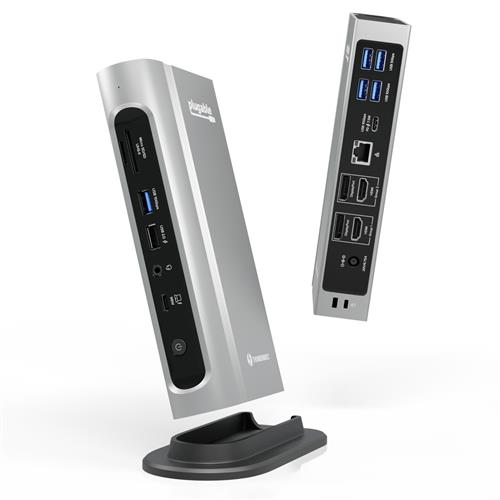
Buy Plugable Technologies 16-in-1 Thunderbolt 4 Dock with 100W Charging 4K Quad Monitor Setup for Thunderbolt 4 Windows Laptops
When you make a purchase through links on our site, we may receive a affiliate commission.
|
| Plugable 16-in-1 Thunderbolt 4 Docking Station (TBT4-UDZ-UK) TBT4-UDZ-UKThe Plugable TBT4-UDZ-UK is a Thunderbolt certified 16-in-1 docking station designed for high-performanc RefreshCartridges.co.ukDelivery: in United Kingdom Report | £374.37 |  | |
|
| Plugable Technologies 16-in-1 Thunderbolt 4 Dock with 100W Charging. 4Plugable Technologies 16-in-1 Thunderbolt 4 Dock with 100W Charging. 4K Quad Monitor Setup for Thunderbolt 4 Windows Laptops.... moreThunderbolt Certified Dock with 2x HDMI. 2x DisplayPort. 2.5G Ethernet. 7x USB. SD The Thunderbolt Certified 16-in-1 Quad docking station from Plugable delivers peak performance. The innovation starts with our display connections. Connect your 4K screens through 2x HDMI ports and 2x DisplayPort ports — a rare level of display flexibility in a Thunderbolt dock. But the real expansion picks up at the ports. Offering sixteen total ports to park your peripherals. including 7x USB ports. SD and microSD card readers. Audio. and 2.5Gbps Ethernet. It even adapts to your desk with an included stand for vertical or horizontal orientation options. Quad Display With this Thunderbolt 4 docking station Windows computers can use the 2x HDMI ports. and 2x DisplayPort ports to connect as many as 4x screens at up to 4K 60Hz. Can also be used a single. dual. or triple display docking station. On Mac (Intel. M1 Pro/Max CPU). extend your desktop to 2x screens using any combination of HDMI and/or DisplayPort. Macs with an M1 or M2 CPU only support one external display.100W Power DeliveryThe laptop Thunderbolt docking station offers USB Power Delivery up to 100W (98W certified) — no more climbing under the desk to get plugged in. Not all laptop docking stations handle power the same. With the TBT4-UDZ. if your laptop needs less power. the docking station adjusts and only sends the optimal wattage.And with 6x available USB ports. and one USB-C port. your devices will always have a place to connect. Compatibility The TBT4-UDZ is compatible with *Windows 10 and later and **macOS 11+. Actual number of screens that can be extended depends on capabilities of the host computer. Be sure to see the Display Compatibility Chart below. *On some Windows laptops. enabling four displays may require a Windows settings change to disable the internal screen.**On Macs. additional monitors beyond specs below may not function. and/or will “mirror” rather than extend. Pcnova.co.ukDelivery: in United Kingdom Report | £394.67 |  | |
|
| Plugable Technologies 16-in-1 Thunderbolt 4 Dock with 100W Charging. 4 TBT4-UDZ-UKThe Thunderbolt Certified 16-in-1 Quad docking station from Plugable delivers peak performance. The innovation starts with ou... morer display connections. Connect your 4K screens through 2x HDMI ports and 2x DisplayPort ports — a rare level of display flexibility in a Thunderbolt dock. But the real expansion picks up at the ports. Offering sixteen total ports to park your peripherals. including 7x USB ports. SD and microSD card readers. Audio. and 2.5Gbps Ethernet. It even adapts to your desk with an included stand for vertical or horizontal orientation options. Quad Display With this Thunderbolt 4 docking station Windows computers can use the 2x HDMI ports. and 2x DisplayPort ports to connect as many as 4x screens at up to 4K 60Hz. Can also be used a single. dual. or triple display docking station. On Mac (Intel. M1 Pro/Max CPU). extend your desktop to 2x screens using any combination of HDMI and/or DisplayPort. Macs with an M1 or M2 CPU only support one external display.100W Power DeliveryThe laptop Thunderbolt docking station offers USB Power Delivery up to 100W (98W certified) — no more climbing under the desk to get plugged in. Not all laptop docking stations handle power the same. With the TBT4-UDZ. if your laptop needs less power. the docking station adjusts and only sends the optimal wattage.And with 6x available USB ports. and one USB-C port. your devices will always have a place to connect. Compatibility The TBT4-UDZ is compatible with *Windows 10 and later and **macOS 11+. Actual number of screens that can be extended depends on capabilities of the host computer. Be sure to see the Display Compatibility Chart below. *On some Windows laptops. enabling four displays may require a Windows settings change to disable the internal screen.**On Macs. additional monitors beyond specs below may not function. and/or will “mirror” rather than extend. Plugable Technologies 16-in-1 Thunderbolt 4 Dock with 100W Charging. 4K Quad Monitor Setup for Thunderbolt 4 Windows Laptops. Thunderbolt Certified Dock with 2x HDMI. 2x DisplayPort. 2.5G Ethernet. 7x USB. SD Gamingkit.co.ukDelivery: in United Kingdom Report | £394.67 |  | |
|
| Plugable Technologies 16-in-1 Thunderbolt 4 Dock with 100W Charging, 4K Quad Monitor Setup for Thunderbolt 4 Windows LaptopsWired. Host interface: Thunderbolt 4. USB Power Delivery (USB PD). Ethernet LAN 100,1000,2500 Mbit/s Wake-on-LAN ready. MMC,... moreMicroSD (TransFlash), MicroSDHC, MicroSDXC, SD, SDHC, SDXC. Cable lock slot. The Thunderbolt Certified 16-in-1 Quad docking station from Plugable delivers peak performance. The innovation starts with our display connections. Connect your 4K screens through 2x HDMI ports and 2x DisplayPort ports — a rare level of display flexibility in a Thunderbolt dock. But the real expansion picks up at the ports. Offering sixteen total ports to park your peripherals, including 7x USB ports, SD and microSD card readers, Audio, and 2.5Gbps Ethernet. It even adapts to your desk with an included stand for vertical or horizontal orientation options.. Quad Display. With this Thunderbolt 4 docking station Windows computers can use the 2x HDMI ports, and 2x DisplayPort ports to connect as many as 4x screens at up to 4K 60Hz. Can also be used a single, dual, or triple display docking station.. On Mac (Intel, M1 Pro/Max CPU), extend your desktop to 2x screens using any combination of HDMI and/or DisplayPort. Macs with an M1 or M2 CPU only support one external display.. 100W Power Delivery. The laptop Thunderbolt docking station offers USB Power Delivery up to 100W (98W certified) — no more climbing under the desk to get plugged in.. Not all laptop docking stations handle power the same. With the TBT4-UDZ, if your laptop needs less power, the docking station adjusts and only sends the optimal wattage.. And with 6x available USB ports, and one USB-C port, your devices will always have a place to connect.. Compatibility. The TBT4-UDZ is compatible with *Windows 10 and later and **macOS 11+.. Actual number of screens that can be extended depends on capabilities of the host computer. Be sure to see the Display Compatibility Chart below.. *On some Windows laptops, enabling four displays may require a Windows settings change to disable the internal screen.. **On Macs, additional monitors beyond specs below may not function, and/or will “mirror” rather than extend.. Ports & interfaces. DC-in jack. Yes. USB Type-C DisplayPort Alternate Mode. Yes. HDCP. Yes. Headphone connectivity. 3.5 mm. Headphone outputs. 1. Combo headphone/mic port. Yes. DisplayPort version. 1.4. DisplayPorts quantity. 2. HDMI version. 2.0. HDMI ports quantity. 2. USB Power Delivery up to. 100 W. USB Power Delivery (USB PD). Yes. USB 3.2 Gen 2 (3.1 Gen 2) Type-C ports quantity. 1. USB 3.2 Gen 2 (3.1 Gen 2) Type-A ports quantity. 3. USB 3.2 Gen 1 (3.1 Gen 1) Type-A ports quantity. 2. USB 2.0 ports quantity. 1. Host interface. Thunderbolt 4. Connectivity technology. Wired. Network. Wake-on-LAN ready. Yes. Ethernet LAN data rates. 100,1000,2500 Mbit/s. Ethernet LAN (RJ-45) ports. 1. Ethernet LAN. Yes. Performance. On/off switch. Yes. Cable lock slot. Yes. Number of displays supported. 4. Maximum refresh rate. 60 Hz. Maximum digital resolution. 4096 x 2160 pixels. HD type. 4K Ultra Backtotheoffice.co.ukDelivery: in United Kingdom Report | £404.99 |  | |
|
| Plugable Technologies 16-in-1 Thunderbolt 4 Dock with 100W Charging 4K Quad Monitor Setup for Thunderbolt 4 Windows Laptops The Thunderbolt Certified 16-in-1 Quad docking station from Plugable delivers peak performance. The innovation starts with ou... morer display connections. Connect your 4K screens through 2x HDMI ports and 2x DisplayPort ports a rare level of display flexibility in a Thunderbolt dock. But the real expansion picks up at the ports. Offering sixteen total ports to park your peripherals including 7x USB ports SD and microSD card readers Audio and 2.5Gbps Ethernet. It even adapts to your desk with an included stand for vertical or horizontal orientation options.
Quad Display
With this Thunderbolt 4 docking station Windows computers can use the 2x HDMI ports and 2x DisplayPort ports to connect as many as 4x screens at up to 4K 60Hz. Can also be used a single dual or triple display docking station.
On Mac (Intel M1 Pro/Max CPU) extend your desktop to 2x screens using any combination of HDMI and/or DisplayPort. Macs with an M1 or M2 CPU only support one external display.
100W Power Delivery
The laptop Thunderbolt docking station offers USB Power Delivery up to 100W (98W certified) no more climbing under the desk to get plugged in.
Not all laptop docking stations handle power the same. With the TBT4-UDZ if your laptop needs less power the docking station adjusts and only sends the optimal wattage.
And with 6x available USB ports and one USB-C port your devices will always have a place to connect.
Compatibility
The TBT4-UDZ is compatible with *Windows 10 and later and **macOS 11+.
Actual number of screens that can be extended depends on capabilities of the host computer. Be sure to see the Display Compatibility Chart below.
*On some Windows laptops enabling four displays may require a Windows settings change to disable the internal screen.
**On Macs additional monitors beyond specs below may not function and/or will mirror rather than extend. Quzo.co.ukDelivery: to United Kingdom Report | £414.54 |  | |
The Thunderbolt Certified 16-in-1 Quad docking station from Plugable delivers peak performance. The innovation starts with our display connections. Connect your 4K screens through 2x HDMI ports and 2x DisplayPort ports a rare level of display flexibility in a Thunderbolt dock. But the real expansion picks up at the ports. Offering sixteen total ports to park your peripherals including 7x USB ports SD and microSD card readers Audio and 2.5Gbps Ethernet. It even adapts to your desk with an included stand for vertical or horizontal orientation options.
Quad Display
With this Thunderbolt 4 docking station Windows computers can use the 2x HDMI ports and 2x DisplayPort ports to connect as many as 4x screens at up to 4K 60Hz. Can also be used a single dual or triple display docking station.
On Mac (Intel M1 Pro/Max CPU) extend your desktop to 2x screens using any combination of HDMI and/or DisplayPort. Macs with an M1 or M2 CPU only support one external display.
100W Power Delivery
The laptop Thunderbolt docking station offers USB Power Delivery up to 100W (98W certified) no more climbing under the desk to get plugged in.
Not all laptop docking stations handle power the same. With the TBT4-UDZ if your laptop needs less power the docking station adjusts and only sends the optimal wattage.
And with 6x available USB ports and one USB-C port your devices will always have a place to connect.
Compatibility
The TBT4-UDZ is compatible with *Windows 10 and later and **macOS 11+.
Actual number of screens that can be extended depends on capabilities of the host computer. Be sure to see the Display Compatibility Chart below.
*On some Windows laptops enabling four displays may require a Windows settings change to disable the internal screen.
**On Macs additional monitors beyond specs below may not function and/or will mirror rather than extend.
The product description is generated based on data from online stores. Before purchasing be sure to verify all information directly with the seller.
How to place an order?How to add store?Remember that the online store is responsible for the accuracy of information regarding price, warranty, and delivery!