Catalog   /   Office & Stationery   /   Other Office Equipment

ScreenBeam USB Pro Switch for 1100P. Product type: Switch Product colour: Black Quantity per pack: 1 pc(s). Video port type:
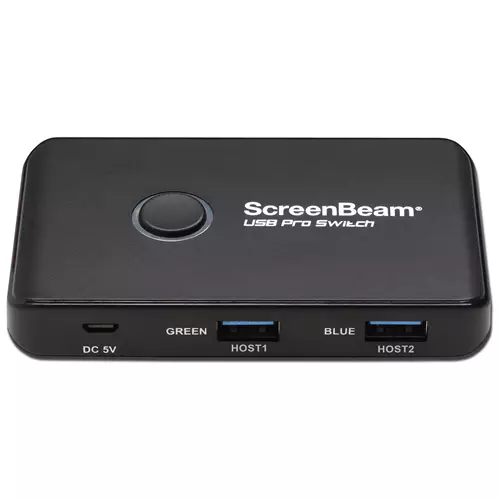
Photos - Other Office Equipment ScreenBeam USB Pro Switch for 1100P. Product type: Switch Product colour: Black Quantity per pack: 1 pc(s). Video port type:

Buy ScreenBeam USB Pro Switch for 1100P. Product type: Switch Product colour: Black Quantity per pack: 1 pc(s). Video port type:

When you make a purchase through links on our site, we may receive a affiliate commission.

ScreenBeam USB Pro Switch for 1100P Black 1 pc(s)

ScreenBeam USB Pro Switch for 1100P Black 1 pc(s) Automated and intelligent room resource switching so Microsoft Teams Rooms can seamlessly co-exist with BYOM and In-Room wireless presentations. Unlock the power of your UC meeting room!Pair the USB Pro Switch with a ScreenBeam 1100 Plus receiver to turn the existing UC meeting room into a fully fle... morexible meeting space with BYOM meetings. Imagine a Microsoft Teams Rooms (MTR) room now can support other meetings (e.g.. Zoom. WebEx and Meet). with the existing In-Room camera and audio. license-free and wirelessly.Microsoft Teams RoomsWorks with both Windows PC Teams Rooms (MTRoW) and Android appliance Teams Rooms (MTRoA). Tested with the following well known setups:- NUC + Logitech Tap + USB video bar- NUC + Logitech Tap + PTZ camera and DSP system- Logitech Rally Bar series + Logitech Tap- HP/Poly X-series + Poly TCIn-Room PCAdd to meeting rooms with dedicated PC for video conferencing enable users to share contents from their BYOD and utilize UC meeting existing on their devices.Wired BYODExpand the setup with wireless presentation and conferencing for ultra flexible BYOM.
Pcnova.co.uk
Delivery: in United Kingdom
Report
£101.16

ScreenBeam USB Pro Switch for 1100P Black 1 pc(s) SBUSBSW4EU

Automated and intelligent room resource switching so Microsoft Teams Rooms can seamlessly co-exist with BYOM and In-Room wireless presentations. Unlock the power of your UC meeting room!Pair the USB Pro Switch with a ScreenBeam 1100 Plus receiver to turn the existing UC meeting room into a fully flexible meeting space with BYOM meetings. Imagine a... moreMicrosoft Teams Rooms (MTR) room now can support other meetings (e.g.. Zoom. WebEx and Meet). with the existing In-Room camera and audio. license-free and wirelessly.Microsoft Teams RoomsWorks with both Windows PC Teams Rooms (MTRoW) and Android appliance Teams Rooms (MTRoA). Tested with the following well known setups:- NUC + Logitech Tap + USB video bar- NUC + Logitech Tap + PTZ camera and DSP system- Logitech Rally Bar series + Logitech Tap- HP/Poly X-series + Poly TCIn-Room PCAdd to meeting rooms with dedicated PC for video conferencing enable users to share contents from their BYOD and utilize UC meeting existing on their devices.Wired BYODExpand the setup with wireless presentation and conferencing for ultra flexible BYOM. ScreenBeam USB Pro Switch for 1100P Black 1 pc(s)
Gamingkit.co.uk
Delivery: in United Kingdom
Report
£101.16

ScreenBeam USB Pro Switch for 1100P Black 1 pc(s) SBUSBSW4EU

While UCC platforms such as Microsoft Teams Room (MTR) provide a simple experience for in-room participants to start Teams meetings they are limited in how well they bridge the gap between people across a hybrid work environment. Simple things such as wireless content sharing from a personal device during an MTR hosted meeting require in-room parti... morecipants to join the meeting just to share content.N/AN/AIf your meetings take place on UCC platforms other than Microsoft Teams your options to join are limited. If the room display is touch-enabled MTR limits presenters abilities to utilize those very productive features.N/AN/AUSB Pro Switch intelligently enhances UC room integrationN/AScreenBeam USB Pro Switch overcomes these challenges and enhances UC room integration when paired with a ScreenBeam 1100 Plus wireless display receiver. USB Pro Switch allows MTR to seamlessly co-exist with Bring Your Own Meeting (BYOM) and In-Room wireless presentations by intelligently sharing the room resources. ScreenBeam enables the room assets such as the camera microphone speaker and touchscreen display capabilities to be shared regardless of the room configuration.N/AN/ANot every meeting space is equipped with an MTR. So for those spaces ScreenBeam USB Pro Switch provides users the flexibility to choose to go wireless or wired for their BYOM session allowing guest presenters with locked down devices to still drive the meeting.N/AN/AEnables MTR BYOM and in-room wireless presentations without additional room resource devicesN/AEnhances MTR meetings by adding wireless content sharingN/ASupports annotation on touch displays during wireless content sharing sessionsN/AFor rooms without an MTR adds hardwire support for both HDMI displays and USB CamerasN/AN/AUnlock all your meeting room scenariosN/Awith ScreenBeamN/ABYOM Wireless or WiredN/AN/AFor rooms without a UC platform ScreenBeam USB Pro Switch provides support for either BYOM or wired connections:N/AN/A- User connects to ScreenBeam using SB Conference for both in-room wireless presentation and BYOM meetings on UC platform of choiceN/A- Optionally user can connect using cables on conference room table. ScreenBeam USB Pro Switch automatically switches camera to appropriate device. ScreenBeam 1100 Plus will default to wired connection.N/A- Additionally user can connect wirelessly for presentation and use USB cable to connect to the room cameraN/AN/ABYOM Plus MTR (shared camera only)N/AFor rooms configured with MTR but user wants to add flexibility of BYOM for non-MTR meetings:N/AN/A- User can host/join MTR meeting using in room controller. Then connect to the ScreenBeam 1100 Plus for content sharing.N/A- Optionally user can deploy ScreenBeam Conference to connect to ScreenBeam 1100 Plus for BYOM (non-MTR meeting) camera will auto switch to the ScreenBeam 1100 Plus. Camera defaults back to MTR when BYOM session ends.N/A- Additionally user can connect with ScreenBeam 1100 Plus for in-room wireless presentation for
Quzo.co.uk
Delivery: to United Kingdom
Report
£108.83

ScreenBeam 1100 Plus USB Pro Switch for BYOM & UC Conferencing

Scan.co.uk
Delivery: to United Kingdom
Report
£139.99
While UCC platforms such as Microsoft Teams Room (MTR) provide a simple experience for in-room participants to start Teams meetings they are limited in how well they bridge the gap between people across a hybrid work environment. Simple things such as wireless content sharing from a personal device during an MTR hosted meeting require in-room participants to join the meeting just to share content.N/AN/AIf your meetings take place on UCC platforms other than Microsoft Teams your options to join are limited. If the room display is touch-enabled MTR limits presenters abilities to utilize those very productive features.N/AN/AUSB Pro Switch intelligently enhances UC room integrationN/AScreenBeam USB Pro Switch overcomes these challenges and enhances UC room integration when paired with a ScreenBeam 1100 Plus wireless display receiver. USB Pro Switch allows MTR to seamlessly co-exist with Bring Your Own Meeting (BYOM) and In-Room wireless presentations by intelligently sharing the room resources. ScreenBeam enables the room assets such as the camera microphone speaker and touchscreen display capabilities to be shared regardless of the room configuration.N/AN/ANot every meeting space is equipped with an MTR. So for those spaces ScreenBeam USB Pro Switch provides users the flexibility to choose to go wireless or wired for their BYOM session allowing guest presenters with locked down devices to still drive the meeting.N/AN/AEnables MTR BYOM and in-room wireless presentations without additional room resource devicesN/AEnhances MTR meetings by adding wireless content sharingN/ASupports annotation on touch displays during wireless content sharing sessionsN/AFor rooms without an MTR adds hardwire support for both HDMI displays and USB CamerasN/AN/AUnlock all your meeting room scenariosN/Awith ScreenBeamN/ABYOM Wireless or WiredN/AN/AFor rooms without a UC platform ScreenBeam USB Pro Switch provides support for either BYOM or wired connections:N/AN/A- User connects to ScreenBeam using SB Conference for both in-room wireless presentation and BYOM meetings on UC platform of choiceN/A- Optionally user can connect using cables on conference room table. ScreenBeam USB Pro Switch automatically switches camera to appropriate device. ScreenBeam 1100 Plus will default to wired connection.N/A- Additionally user can connect wirelessly for presentation and use USB cable to connect to the room cameraN/AN/ABYOM Plus MTR (shared camera only)N/AFor rooms configured with MTR but user wants to add flexibility of BYOM for non-MTR meetings:N/AN/A- User can host/join MTR meeting using in room controller. Then connect to the ScreenBeam 1100 Plus for content sharing.N/A- Optionally user can deploy ScreenBeam Conference to connect to ScreenBeam 1100 Plus for BYOM (non-MTR meeting) camera will auto switch to the ScreenBeam 1100 Plus. Camera defaults back to MTR when BYOM session ends.N/A- Additionally user can connect with ScreenBeam 1100 Plus for in-room wireless presentation for
The product description is generated based on data from online stores. Before purchasing be sure to verify all information directly with the seller.

How to place an order?How to add store?
Remember that the online store is responsible for the accuracy of information regarding price, warranty, and delivery!