
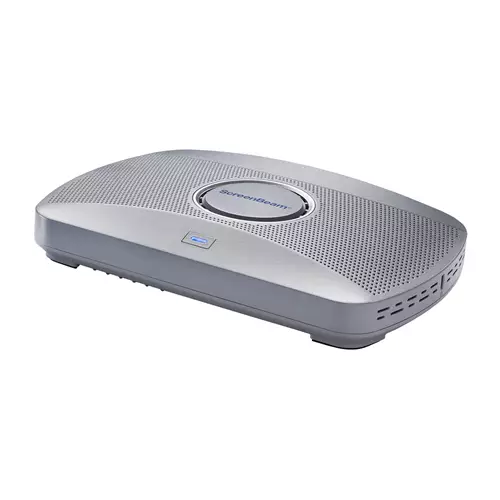
ScreenBeam Edu Gen2 inc 3 Years Administrative & Instructional Tools & 3 Year Warranty wireless presentation system
 | Compare prices 3 → When you make a purchase through links on our site, we may receive a affiliate commission.
|
Buy ScreenBeam Edu Gen2 inc 3 Years Administrative & Instructional Tools & 3 Year Warranty wireless presentation system
When you make a purchase through links on our site, we may receive a affiliate commission.
ScreenBeam Edu Gen2 inc 3 Years Administrative & Instructional Tools & 3 Year Warranty wireless presentation system | £531.54 |  | |||
ScreenBeam EDU GEN2 ADMIN & INSTRC T | £549.56 |  | |||
ScreenBeam EDU GEN2 ADMIN & INSTRC T SBWD1000EDUG2-BNDL3Y-EU | £549.56 |  | |||
ScreenBeam 1000 EDU Gen 2 + Instructional & Administrative Tools Bundle combines the award-winning ScreenBeam 1000 EDU Gen 2 wireless presentation platform with built-in instructional tools for interactive teaching and a 3-year subscription to ScreenBeam Administrative Tools Signage+ Alert+ and Message Manager.
The bundle builds on the core ScreenBeam 1000 EDU Gen 2 classroom presentation experience by adding instructional tools that support annotation whiteboarding and classroom interaction along with administrative tools that enable digital signage non-emergency messaging and emergency alerts. Together they create a complete instruction and communication platform for K12 education environments.
ScreenBeam 1000 EDU Gen 2 is purpose-built for K12 classrooms delivering secure app-free wireless display with native support for Miracast AirPlay and Google Cast. Designed to be intuitive for teachers and students it enables fast content sharing and interactive instruction without cables dongles or complex setup.
With Instructional and Administrative Tools classroom displays support both teaching and communication from interactive lessons to school-wide announcements and safety notifications without relying on personal devices or third-party systems.
ScreenBeam Instructional Tools Bundle
Instructional Tools (ScreenBeam Orchestrate)
ScreenBeam Instructional Tools support interactive teaching and collaborative learning in K12 classrooms.
Orchestrate (Classroom Management): Gives teachers real-time visibility into student screens and the ability to moderate and control student sharing to the classroom display
Active Learning: Gives teachers real-time visibility into student screens and the ability to moderate and control student sharing to the classroom display
App-less and dongle-less screen mirroring
Screen sharing from any device without the need to download an app or keep dongle nearby. ScreenBeam leads with OS-native Wi-Fi Miracast AirPlay and Google Cast for familiarity and mitigate user training.
Extended desktop
Windows and macOS users can mirror desktop or extend screen to ensure content privacy.
Touch display support
Windows users can markup content directly on room displays instantly capturing changes in Microsoft Office 365 applications.
Integrated Whiteboard
An integrated Whiteboard application enables a collaborative experience that launches directly from the interactive flat panel display without changing sources pushing buttons or re-connecting to the display.
Name Picker & Timer
Tools frequently used by teachers to help engage students randomly select students and time projects and tasks. These integrated applications are available for classrooms with IFP display.
Orchestrate (Lite)
Basic orchestration capabilities for Windows and Chromebooks. Teachers can easily and securely preview and approve student screen sharing for a moderated experience.
Multi-view
Teachers can display up to four
The bundle builds on the core ScreenBeam 1000 EDU Gen 2 classroom presentation experience by adding instructional tools that support annotation whiteboarding and classroom interaction along with administrative tools that enable digital signage non-emergency messaging and emergency alerts. Together they create a complete instruction and communication platform for K12 education environments.
ScreenBeam 1000 EDU Gen 2 is purpose-built for K12 classrooms delivering secure app-free wireless display with native support for Miracast AirPlay and Google Cast. Designed to be intuitive for teachers and students it enables fast content sharing and interactive instruction without cables dongles or complex setup.
With Instructional and Administrative Tools classroom displays support both teaching and communication from interactive lessons to school-wide announcements and safety notifications without relying on personal devices or third-party systems.
ScreenBeam Instructional Tools Bundle
Instructional Tools (ScreenBeam Orchestrate)
ScreenBeam Instructional Tools support interactive teaching and collaborative learning in K12 classrooms.
Orchestrate (Classroom Management): Gives teachers real-time visibility into student screens and the ability to moderate and control student sharing to the classroom display
Active Learning: Gives teachers real-time visibility into student screens and the ability to moderate and control student sharing to the classroom display
App-less and dongle-less screen mirroring
Screen sharing from any device without the need to download an app or keep dongle nearby. ScreenBeam leads with OS-native Wi-Fi Miracast AirPlay and Google Cast for familiarity and mitigate user training.
Extended desktop
Windows and macOS users can mirror desktop or extend screen to ensure content privacy.
Touch display support
Windows users can markup content directly on room displays instantly capturing changes in Microsoft Office 365 applications.
Integrated Whiteboard
An integrated Whiteboard application enables a collaborative experience that launches directly from the interactive flat panel display without changing sources pushing buttons or re-connecting to the display.
Name Picker & Timer
Tools frequently used by teachers to help engage students randomly select students and time projects and tasks. These integrated applications are available for classrooms with IFP display.
Orchestrate (Lite)
Basic orchestration capabilities for Windows and Chromebooks. Teachers can easily and securely preview and approve student screen sharing for a moderated experience.
Multi-view
Teachers can display up to four
The product description is generated based on data from online stores. Before purchasing be sure to verify all information directly with the seller.
HDMI vs. DisplayPort: Which Is Better for a Monitor?Detailed comparison of the two most popular video interfaces

How Gadgets React to Heat and How to Protect Them from OverheatingWe explain how different devices react to heat, how to prevent overheating, and what to do if it has already happened.
How to place an order?How to add store?
Remember that the online store is responsible for the accuracy of information regarding price, warranty, and delivery!
You may be interested in