Catalog   /   Computing   /   Components   /   Other Components   /   Lindy

Lindy USB Port Blocker - Pack of 4 Colour Code: Orange 40453
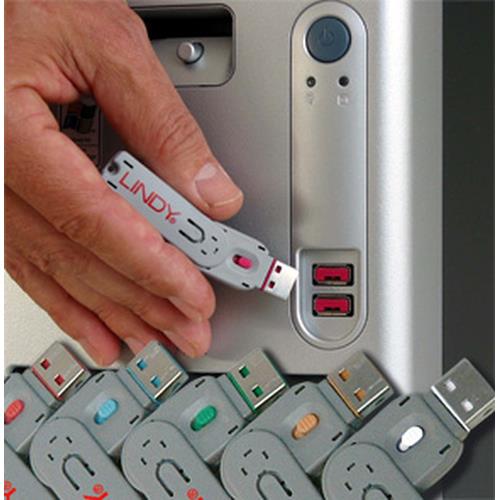
Photos - Other Components Lindy USB Port Blocker - Pack of 4 Colour Code: Orange 40453

Buy Lindy USB Port Blocker - Pack of 4 Colour Code: Orange 40453

When you make a purchase through links on our site, we may receive a affiliate commission.

Lindy USB Port Blocker - Pack of 4 Colour Code: Orange 40453

Physically prevent access to a USB Type A Port. Quick and simple to use. Single key and 4 Type A Blockers. Pack of 10 blocker... mores (without key) or individual keys are also available. 2 Year Warranty. USB Port Blockers are useful little devices that system administrators can use to physically prevent access to USB ports. USB Port Blockers allow locks to be inserted and removed from USB ports to stop unauthorised users from inserting pen drives, USB mass storage and mobile devices into shared workstations or devices with USB ports in public spaces.. To use, simply attach a lock to the key and insert it into the USB port. Release the sliding mechanism on the key to leave the lock in place. To remove, simply insert the key back into the lock and pull away.. Please note: this key is only compatible with the corresponding colour of port blocker. Features. Product type. Port blocker + key. Compatible ports/slots. USB Type-A. Product colour. Orange. Material. Acrylonitrile butadiene styrene (ABS). Number of port blocker keys. 1. Number of port blockers. 4. Package type. Polybag. Quantity per pack. 5 pc(s). Certification. REACH, California Proposition 65. Weight & dimensions. Width. 55 mm. Depth. 19 mm. Height. 12 mm. Weight. 10 g. Package width. 133 mm. Package height. 144 mm. Package weight. 16 g
Backtotheoffice.co.uk
Delivery: in United Kingdom
Report
£22.99

Lindy 40453

Usb Port Blockers Are Useful Little Devices That System Administrators Can Use To Physically Prevent Access To Usb Ports. Usb... morePort Blockers Allow Locks To Be Inserted And Removed From Usb Ports To Stop Unauthorised Users From Inserting Pen Drives, Usb Mass Storage And Mobile Devices Into Shared Workstations Or Devices With Usb Ports In Public Spaces. To Use, Simply Attach A Lock To The Key And Insert It Into The Usb Port. Release The Sliding Mechanism On The Key To Leave The Lock In Place. To Remove, Simply Insert The Key Back Into The Lock And Pull Away.Features:- Physically Prevent Access To A Usb Type A Port- Quick And Simple To Use- Single Key & 4 Type A Blockers- Pack Of 10 Blockers (Without Key) Or Individual Keys Are Also AvailableSpecifications:Connectors: - Usb Type APhysical Properties:- Dimensions (Approx.) 55x19x12mm (2.17x0.75x0.47in)- Housing Material – Abs- Net Weight – 0.01kg (0.02lb)Package Content: - 1 X Port Blocker Key- 4 X Port Blockers
Tradeinn.com
Delivery: in United Kingdom
Report
£24.99

Lindy USB Port Blocker - Pack of 4 Colour Code: Orange

Lindy USB Port Blocker - Pack of 4 Colour Code: Orange USB Port Blockers are useful little devices that system administrators... morecan use to physically prevent access to USB ports. USB Port Blockers allow locks to be inserted and removed from USB ports to stop unauthorised users from inserting pen drives. USB mass storage and mobile devices into shared workstations or devices with USB ports in public spaces.To use. simply attach a lock to the key and insert it into the USB port. Release the sliding mechanism on the key to leave the lock in place. To remove. simply insert the key back into the lock and pull away.Please note: this key is only compatible with the corresponding colour of port blocker
Pcnova.co.uk
Delivery: in United Kingdom
Report
£26.18

Lindy USB Port Blocker - Pack of 4 Colour Code: Orange 40453

USB Port Blockers are useful little devices that system administrators can use to physically prevent access to USB ports. USB... morePort Blockers allow locks to be inserted and removed from USB ports to stop unauthorised users from inserting pen drives. USB mass storage and mobile devices into shared workstations or devices with USB ports in public spaces.To use. simply attach a lock to the key and insert it into the USB port. Release the sliding mechanism on the key to leave the lock in place. To remove. simply insert the key back into the lock and pull away.Please note: this key is only compatible with the corresponding colour of port blocker Lindy USB Port Blocker - Pack of 4 Colour Code: Orange
Gamingkit.co.uk
Delivery: in United Kingdom
Report
£26.18

Lindy USB Port Blocker - Pack of 4 Colour Code: Orange 40453

USB Port Blockers are useful little devices that system administrators can use to physically prevent access to USB ports. USB... morePort Blockers allow locks to be inserted and removed from USB ports to stop unauthorised users from inserting pen drives USB mass storage and mobile devices into shared workstations or devices with USB ports in public spaces. To use simply attach a lock to the key and insert it into the USB port. Release the sliding mechanism on the key to leave the lock in place. To remove simply insert the key back into the lock and pull away. Please note: this key is only compatible with the corresponding colour of port blocker
Quzo.co.uk
Delivery: to United Kingdom
Report
£30.39

Lindy USB Port Blocker - Pack 4, Colour Code: Orange security access control system 40453

The simple and effective USB lock for blocking access to acomputer's USB port! With this neat little device, system administr... moreators can...
OnBuy.com
Delivery: in United Kingdom
Report
£36.04

Lindy USB Port Blocker - Pack of 4 Orange (40453) 40453

...
OnBuy.com
Delivery: in United Kingdom
Report
£31.30

Lindy USB Port Blocker - Pack of 4 Orange (40453) 40453

...
OnBuy.com
Delivery: in United Kingdom
Report
£31.54
USB Port Blockers are useful little devices that system administrators can use to physically prevent access to USB ports. USB Port Blockers allow locks to be inserted and removed from USB ports to stop unauthorised users from inserting pen drives USB mass storage and mobile devices into shared workstations or devices with USB ports in public spaces.

To use simply attach a lock to the key and insert it into the USB port. Release the sliding mechanism on the key to leave the lock in place. To remove simply insert the key back into the lock and pull away.

Please note: this key is only compatible with the corresponding colour of port blocker
The product description is generated based on data from online stores. Before purchasing be sure to verify all information directly with the seller.

How to place an order?How to add store?
Remember that the online store is responsible for the accuracy of information regarding price, warranty, and delivery!