
Canon RC-IP1000 camera Wired 6529C001
 | Compare prices 3 → When you make a purchase through links on our site, we may receive a affiliate commission.
|
Buy Canon RC-IP1000 camera Wired 6529C001
When you make a purchase through links on our site, we may receive a affiliate commission.
Canon RC-IP1000 camera remote control Wired | £4,707.04 |  | |||
Canon RC-IP1000 camera remote control Wired 6529C001 | £4,707.04 |  | |||
| £4,768.49 |  | ||||
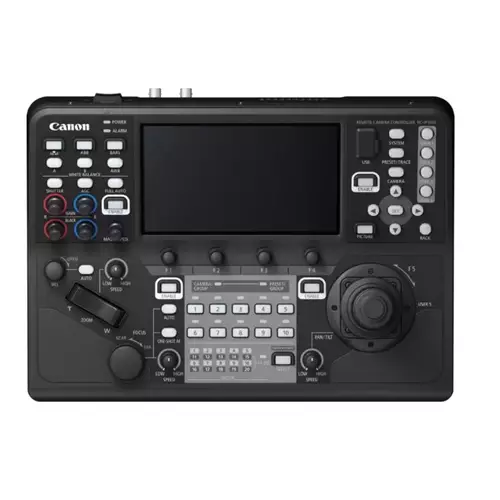
Control and monitor up to 200 cameras using this professional PTZ controller with a 7-inch multi-function touchscreen an ergonomic joystick and zoom rocker plus buttons and dials for precise control.
COMMAND. CONTROL. CREATE
Master your live broadcast feeds by operating and monitoring up to 200 cameras via IP. With unrivalled control and no requirement for a PC this professional PTZ controller boasts SDI and HDMI connectivity plus a 7-inch multi-function touchscreen customisable buttons dials and an ergonomic joystick for precise control.
Tactile precision professional control
Fine-tune PTZ camera movements using the ergonomically designed joystick designed to fit comfortably into the palm of your hand for intuitive twisting control. A customisable button on the top allows even greater versatility such as One Shot AF and Return to Home position.
Multiple physical buttons and dials
Control connected cameras thanks to 42 buttons and 14 dials that control functions such as Iris Gamma Knee and white balance. Backlit LEDs help general visibility while the professional zoom rocker ensures pinpoint accuracy when adjusting the zoom.
IP Video and Input Monitoring
Monitor and control Canon camera feeds quickly and easily on the 7-inch touchscreen via IP with up to nine being viewable at once in various layout options. Whatever camera is chosen the touchscreen will automatically switch to show that live feed. Alternatively output one full-screen feed to an external monitor via the 12G-SDI or HDMI port.
Easy set up without a PC
Use the RC-IP1000s camera search function to find and register new cameras via the LAN. RC-IP1000 can change all system settings of up to 200 connected cameras such as IP address ID and password. It can also perform initial setup of camera and controller without a PC.
Multi-camera control made easy
Group all cameras together or up to ten in one group. Implement presets for multiple PTZ cameras at once as well as control others from Canons PTZ and Cinema EOS1 ranges plus the XF605 Pro Camcorder.
Intuitive touchscreen
Access a wide range of settings via the touchscreen. Set Focus Points and settings within touch AF Face and Eye detection; control Manual Focus Point and adjust crop areas to enable two feeds to be sent out from one camera.
Professional inputs and connections
Incorporate the RC-IP1000 into existing infrastructures or use remotely thanks to a wide range of inputs including DC 12V XLR port five Serial RJ45 ports LAN/POE+ USB HDMI Out 12G-SDI in/out and two GPIO D-Sub 25pin channels. By using the GPIO/SDI connection with a video switcher the selection of camera on RC-IP1000 can perfectly link with the selection of camera on video switcher automatically.
Advanced Pre-Set and Trace control
Control another camera during a trace and set your other camera positions without having to wait until the trace/pre-set is finished. Register and manage presets and traces by naming them via the
COMMAND. CONTROL. CREATE
Master your live broadcast feeds by operating and monitoring up to 200 cameras via IP. With unrivalled control and no requirement for a PC this professional PTZ controller boasts SDI and HDMI connectivity plus a 7-inch multi-function touchscreen customisable buttons dials and an ergonomic joystick for precise control.
Tactile precision professional control
Fine-tune PTZ camera movements using the ergonomically designed joystick designed to fit comfortably into the palm of your hand for intuitive twisting control. A customisable button on the top allows even greater versatility such as One Shot AF and Return to Home position.
Multiple physical buttons and dials
Control connected cameras thanks to 42 buttons and 14 dials that control functions such as Iris Gamma Knee and white balance. Backlit LEDs help general visibility while the professional zoom rocker ensures pinpoint accuracy when adjusting the zoom.
IP Video and Input Monitoring
Monitor and control Canon camera feeds quickly and easily on the 7-inch touchscreen via IP with up to nine being viewable at once in various layout options. Whatever camera is chosen the touchscreen will automatically switch to show that live feed. Alternatively output one full-screen feed to an external monitor via the 12G-SDI or HDMI port.
Easy set up without a PC
Use the RC-IP1000s camera search function to find and register new cameras via the LAN. RC-IP1000 can change all system settings of up to 200 connected cameras such as IP address ID and password. It can also perform initial setup of camera and controller without a PC.
Multi-camera control made easy
Group all cameras together or up to ten in one group. Implement presets for multiple PTZ cameras at once as well as control others from Canons PTZ and Cinema EOS1 ranges plus the XF605 Pro Camcorder.
Intuitive touchscreen
Access a wide range of settings via the touchscreen. Set Focus Points and settings within touch AF Face and Eye detection; control Manual Focus Point and adjust crop areas to enable two feeds to be sent out from one camera.
Professional inputs and connections
Incorporate the RC-IP1000 into existing infrastructures or use remotely thanks to a wide range of inputs including DC 12V XLR port five Serial RJ45 ports LAN/POE+ USB HDMI Out 12G-SDI in/out and two GPIO D-Sub 25pin channels. By using the GPIO/SDI connection with a video switcher the selection of camera on RC-IP1000 can perfectly link with the selection of camera on video switcher automatically.
Advanced Pre-Set and Trace control
Control another camera during a trace and set your other camera positions without having to wait until the trace/pre-set is finished. Register and manage presets and traces by naming them via the
The product description is generated based on data from online stores. Before purchasing be sure to verify all information directly with the seller.

The Chi-Fi Phenomenon: How Chinese Companies Are Reshaping the World of Hi-Fi AudioFrom popular IEMs to serious DACs and speakers—we take a look at what Chinese Hi-Fi has to offer today.

Most Overrated and Underrated Modern TechWhich gadgets and tech are not worth spending money on, and which ones can pleasantly surprise you.
How to place an order?How to add store?
Remember that the online store is responsible for the accuracy of information regarding price, warranty, and delivery!
You may be interested in