
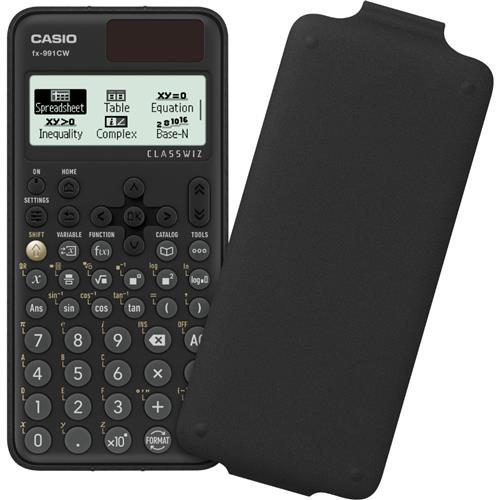
Casio FX-991CW calculator Pocket Scientific Black FX-991CW-W-UT
 |
Buy Casio FX-991CW calculator Pocket Scientific Black FX-991CW-W-UT
When you make a purchase through links on our site, we may receive a affiliate commission.
FX-991CW Scientific Calculator, 540 Functions and Natural Display | £26.97 |  | |||
Casio FX-991CW calculator Pocket Scientific Black FX-991CW-W-UT | £50.29 |  | |||
Casio Classwiz Advanced Scientific Calculator Dual Power FX-991CW-W-UT | £25.88 |  | |||
Casio ClassWiz Scientific Calculator FX-991CW, Black FX-991CW-W-UT | £32.71 |  | |||
| £34.22 |  | ||||
ClassWiz CW Series is designed teaching and studying for today. Its brand-new approachable UI and various features encourage students math learning.
Enjoy math learning with ClassWiz CW series!
Intuitive approachable new design
High-definition & 4-gradation display
With the 4-gradation display the current input location isdisplayed in a darker color.
Intuitive cursor operation
Simple cursor-based operations and a key layout that follows the natural flow of use.
Natural Textbook Display
List display function for thorough speedy learning
Intuitive easy-to-learn icon display
High-speed calculation
Fast calculation for smooth performance in class or during examinations.
Packed with features to encourage learning
Calculator Apps
Easily select a calculator app from the Home screen that is suitable for the type of calculation that you want to perform.
Spreadsheet
Useful for learning statistics recursive formulas and more.
Handles up to 5 columns x 45 rows (maximum of 170 data items).
Math Box
The following functions to support math learning: Dice Roll and Coin Toss for probability simulations.
Calculate
General calculations.
Statistics
Statistical and regression calculations.
Table
Generates a number table based on one or two functions.
Equation
Simultaneous equations higher-order equations and Solver (function to find the value of any variable contained in an input equation).
Online visualization service using QR codes
Easily generate QR codes of equations input into the calculator. Graphs and other graphics can be displayed on smartphones or tablets.
Variety of functions that are available in calculator apps to support students learning.
CATALOG
The CATALOG menu shows Store values to variables categories of commands functions and symbols according to the calculator app that you are currently using and the current status of the app (the displayed screen or current settings).
FUNCTION
You can store functions in both the f(x) and g(x) memory.
VARIABLE
You can store values to variables and use the variables in calculations.
Enjoy math learning with ClassWiz CW series!
Intuitive approachable new design
High-definition & 4-gradation display
With the 4-gradation display the current input location isdisplayed in a darker color.
Intuitive cursor operation
Simple cursor-based operations and a key layout that follows the natural flow of use.
Natural Textbook Display
List display function for thorough speedy learning
Intuitive easy-to-learn icon display
High-speed calculation
Fast calculation for smooth performance in class or during examinations.
Packed with features to encourage learning
Calculator Apps
Easily select a calculator app from the Home screen that is suitable for the type of calculation that you want to perform.
Spreadsheet
Useful for learning statistics recursive formulas and more.
Handles up to 5 columns x 45 rows (maximum of 170 data items).
Math Box
The following functions to support math learning: Dice Roll and Coin Toss for probability simulations.
Calculate
General calculations.
Statistics
Statistical and regression calculations.
Table
Generates a number table based on one or two functions.
Equation
Simultaneous equations higher-order equations and Solver (function to find the value of any variable contained in an input equation).
Online visualization service using QR codes
Easily generate QR codes of equations input into the calculator. Graphs and other graphics can be displayed on smartphones or tablets.
Variety of functions that are available in calculator apps to support students learning.
CATALOG
The CATALOG menu shows Store values to variables categories of commands functions and symbols according to the calculator app that you are currently using and the current status of the app (the displayed screen or current settings).
FUNCTION
You can store functions in both the f(x) and g(x) memory.
VARIABLE
You can store values to variables and use the variables in calculations.
The product description is generated based on data from online stores. Before purchasing be sure to verify all information directly with the seller.

PC Build for Halo: Campaign EvolvedThree PCs of varying performance levels that will let you feel 100% like you’re in Master Chief’s shoes.

Best Inverter UPS Systems Up to 1000WOptimal UPS systems for backup and safe power supply of boilers, computers, and other sensitive equipment.
How to place an order?How to add store?
Remember that the online store is responsible for the accuracy of information regarding price, warranty, and delivery!