
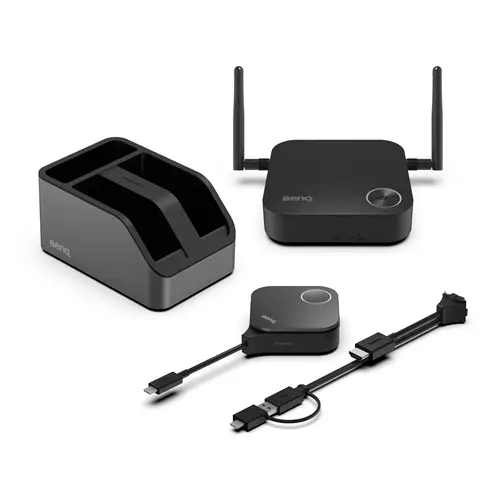
BenQ InstaShow WDC15 4K UHD Wireless Presentation System 9H.K0EBY.E0E
 | Compare prices 4 → When you make a purchase through links on our site, we may receive a affiliate commission.
|
Buy BenQ InstaShow WDC15 4K UHD Wireless Presentation System 9H.K0EBY.E0E
When you make a purchase through links on our site, we may receive a affiliate commission.
BENQ InstaShow WDC15 Wireless Presentation System | £790.30 |  | |||
BenQ InstaShow WDC15 4K UHD Wireless Presentation System 9H.K0EBY.E0E | £936.64 |  | |||
| £938.34 |  | ||||
BenQ InstaShow WDC15 4K UHD Wireless Presentation System | £939.47 |  | |||
Driver-Free Screen Mirroring for Huddle & Small Rooms
Launch Wireless Presentations Instantly
InstaShow enables instant plug-and-play wireless presentationsno apps drivers or network setup required. Presenterseven guestscan access professional-grade presentations with a tap.
No Driver Needed
No drivers neededjust plug in and share your screen instantly during meetings.
No App Download Required
No software or app requiredjust plug in and instantly share content during your meeting.
No Network Setup Required
No complex network setup or IT help needed. Receiver and button pair automaticallyjust plug and play to start presenting instantly.
Guest-Friendly Design
Guests can present instantly via HDMI or USB-Cno app or login required. Securely share from any laptop including MacBook and Chromebook keeping meetings on track.
3 Steps for One-Time Wireless Presentation Setup
Set up onceno need to rebuild for every meeting. Save time cut support and let presenters start instantly by plugging in.
Steps:
1. Connect display to Receiver via HDMI cable
2. Plug Button into presenter's laptop *Supports Windows MacBook or Chromebook systems.
3. Share content from presenter's laptop via Button
Seamless 4K UHD Transmission
Enjoy smooth 4K UHD transmission with full support for 4K HDCP and Touchback controldelivering professional interactive presentations every time.
Crisp 4K Transmission Without Lag
Showcase 4K content smoothly with no distortion or stutter delivering powerful visuals that convince decision-makers.
Direct Touch Control on Display
Control content right from the interactive displayno interruptions just smooth and natural interaction.
Smooth Streaming of Protected Content
App-free design boosts PC performance ensuring smooth lag-free HDCP content playback for seamless presentations.
Superior Encryption Security
Advanced encryption and CVSS 4.0 certification guarantee secure data transfer with no risk of leaks.
Zero Software or Network Setup
No software or internet needed minimising risks and keeping sensitive data safe from breaches and hacks.
WPA3 Security Protection
WPA3 encryption secures the receiver-button connection keeping every presentation safe secure and reliable.
HDCP Support
Supports HDCP-encrypted HDMI content letting presenters connect devices without security errors or blank screens.
CVSS 4.0 Certified Security
Certified to CVSS 4.0 by ISO27001 & ISO17025 labs for guaranteed information security.
Hassle-Free Maintenance
Swappable plugs speed up maintenance making device upkeep quicker and easier.
Versatile Connection Design
Quickly switch between HDMI and Type-C for easy maintenance and seamless device use.
Launch Wireless Presentations Instantly
InstaShow enables instant plug-and-play wireless presentationsno apps drivers or network setup required. Presenterseven guestscan access professional-grade presentations with a tap.
No Driver Needed
No drivers neededjust plug in and share your screen instantly during meetings.
No App Download Required
No software or app requiredjust plug in and instantly share content during your meeting.
No Network Setup Required
No complex network setup or IT help needed. Receiver and button pair automaticallyjust plug and play to start presenting instantly.
Guest-Friendly Design
Guests can present instantly via HDMI or USB-Cno app or login required. Securely share from any laptop including MacBook and Chromebook keeping meetings on track.
3 Steps for One-Time Wireless Presentation Setup
Set up onceno need to rebuild for every meeting. Save time cut support and let presenters start instantly by plugging in.
Steps:
1. Connect display to Receiver via HDMI cable
2. Plug Button into presenter's laptop *Supports Windows MacBook or Chromebook systems.
3. Share content from presenter's laptop via Button
Seamless 4K UHD Transmission
Enjoy smooth 4K UHD transmission with full support for 4K HDCP and Touchback controldelivering professional interactive presentations every time.
Crisp 4K Transmission Without Lag
Showcase 4K content smoothly with no distortion or stutter delivering powerful visuals that convince decision-makers.
Direct Touch Control on Display
Control content right from the interactive displayno interruptions just smooth and natural interaction.
Smooth Streaming of Protected Content
App-free design boosts PC performance ensuring smooth lag-free HDCP content playback for seamless presentations.
Superior Encryption Security
Advanced encryption and CVSS 4.0 certification guarantee secure data transfer with no risk of leaks.
Zero Software or Network Setup
No software or internet needed minimising risks and keeping sensitive data safe from breaches and hacks.
WPA3 Security Protection
WPA3 encryption secures the receiver-button connection keeping every presentation safe secure and reliable.
HDCP Support
Supports HDCP-encrypted HDMI content letting presenters connect devices without security errors or blank screens.
CVSS 4.0 Certified Security
Certified to CVSS 4.0 by ISO27001 & ISO17025 labs for guaranteed information security.
Hassle-Free Maintenance
Swappable plugs speed up maintenance making device upkeep quicker and easier.
Versatile Connection Design
Quickly switch between HDMI and Type-C for easy maintenance and seamless device use.
The product description is generated based on data from online stores. Before purchasing be sure to verify all information directly with the seller.

PC Build for Halo: Campaign EvolvedThree PCs of varying performance levels that will let you feel 100% like you’re in Master Chief’s shoes.

Best Inverter UPS Systems Up to 1000WOptimal UPS systems for backup and safe power supply of boilers, computers, and other sensitive equipment.
How to place an order?How to add store?
Remember that the online store is responsible for the accuracy of information regarding price, warranty, and delivery!