
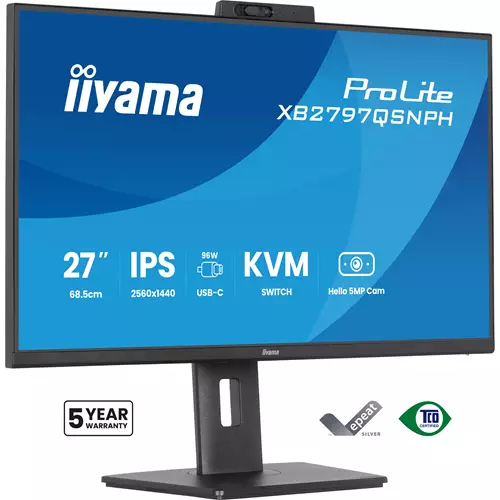
Iiyama ProLite XB2797QSNPH-B1 computer 68.6 cm 2560 x 1440 pixels Quad HD LED Black (27")
 |
Buy Iiyama ProLite XB2797QSNPH-B1 computer 68.6 cm 2560 x 1440 pixels Quad HD LED Black (27")
When you make a purchase through links on our site, we may receive a affiliate commission.
iiyama ProLite XB2797QSNPH 27 IPS QHD USB-C KVM Height-Adjustable Monitor Black XB2797QSNPHB1 | £208.97 |  | |||
iiyama ProLite XB2797QSNPH-B1 27" Quad HD IPS 75Hz 1ms USB-C Height Adjustable Monitor with Speakers and Webcam - Matte Blac | £210.00 |  | |||
iiyama ProLite XB2797QSNPH-B1 computer monitor 68.6 cm (27") 2560 | £222.34 |  | |||
| £222.34 |  | ||||
iiyama ProLite XB2797QSNPH-B1 computer monitor 68.6 cm (27") 2560 x 1440 pixels Quad HD LED Black | £226.99 |  | |||
iiyama ProLite XB2797QSNPH-B1 - LED monitor - 27" | £228.45 |  | |||
iiyama ProLite XB2797QSNPH-B1 computer monitor 68.6 cm (27") 2560 x 1440 pixels Quad HD LED Black | £232.47 |  | |||
iiyama XB2797QSNPH-B1 ProLite Monitor 27" IPS QHD USB-C XB2797QSNPH-B1 | £263.47 |  | |||
27 Black Ips Monitor Hdmi Display Port And Usb-CThe Prolite Xb2797qsnph Is A 27” Qhd Monitor Built For Professionals Who Want A Tidier Workspace Smoother Multitasking And Greater Comfort Throughout The Day. The Ips Panel Delivers Sharp Detail Accurate Colour And Wide Viewing Angles Making It Ideal For Spreadsheets Creative Work And Detailed Documents. A Displayport Output Also Enables A Quick Dual-Monitor Setup For Greater Screen Space And Higher Productivity.The Integrated Usb-C Dock With 96W Power Delivery Carries Video Audio Data And Power Through A Single Cable Helping Reduce Desk Clutter And Making Laptop Connection Fast And Simple. An Rj45 Port Provides A Stable Wired Network Connection Without Extra Adapters While The Built-In Kvm Switch Allows Control Of Two Computers With One Keyboard And Mouse For A More Seamless Workflow.For Modern Collaboration The Monitor Features A Built-In 5Mp Autofocus Webcam With Windows Hello For Secure Sign-In And Professional-Looking Video Calls. An Ergonomic Stand With 15Cm Height Adjustment Tilt Swivel And Pivot Helps Achieve A Comfortable Viewing Position While T?V Rheinland Eye Comfort Certification Supports Reduced Visual Fatigue During Long Working Days.Easy Multi-Device Control With KvmEasily Switch Between Multiple Computers Using One Monitor Keyboard And Mouse Making Multitasking Smooth And Efficient.Usb-C Dock For Tidy Desk & Easy ConnectivityConnect Everything With Just One Cable - Handle Video Data And Power While Keeping Your Desk Clean And Organized.Easy Access With Window Hello CamLog In Quickly And Securely With Facial Recognition While Enjoying Crystal-Clear Video Calls Thanks To The High-Resolution Autofocus Webcam.Expand Your View With QhdQhd 2560X1440 Resolution Offers Up To 77% More Screen Space Than Full Hd Giving You Plenty Of Room To Multitask Efficiently View More Content At Once And Work With Greater Precision Without Constantly Switching Between Windows.Adjustable Stand For Optimal ComfortFind Your Perfect Screen Position Easily And Maintain A Healthy Comfortable Posture All Day Long. Thanks To Its Fully Adjustable Stand You Can Effortlessly Adapt The Monitor To Your Needs. Raise Or Lower The Height Swivel Left Or Right Or Tilt The Screen To Reduce Glare And Find The Optimal Viewing Angle. Whether You'Re Working Designing Or Attending Long Video Calls This Flexibility Helps Reduce Neck And Back Strain Improving Both Comfort And Productivity Throughout Your Day.Feel The Difference With Certified Eye ComfortHardware-Based Low Blue Light Built Into The Panel Flicker-Free Technology And True-To-Life Colour Accuracy All Work Together To Support More Comfortable Viewing Throughout The Day. Backed By T?V Rheinland Eye Comfort Certification This Display Lets You Work Browse And Create For Longer With Greater Ease.FeaturesUsb-CYes Screen Size27 InchScreen Size Category25 - 27 InchesResolution2560 X 1440 Aspect Ratio16:9 Ips DisplayYes Response Time1 MsHdmi Ports Quantity1
The product description is generated based on data from online stores. Before purchasing be sure to verify all information directly with the seller.
HDMI vs. DisplayPort: Which Is Better for a Monitor?Detailed comparison of the two most popular video interfaces

Most Overrated and Underrated Modern TechWhich gadgets and tech are not worth spending money on, and which ones can pleasantly surprise you.
How to place an order?How to add store?
Remember that the online store is responsible for the accuracy of information regarding price, warranty, and delivery!
SimilarCompare using chart →

gaming, 31.5 ", 4K, 3840x2160 (16:9), WOLED, response 0.03 ms, 165 Hz, 330 Hz (Full HD), 10-bit (1.07B Colors), DCI-P3 99 %, HDMI, v 2.1, DisplayPort, USB-C (DP Alt Mode), Power Delivery, HUB: USB-A 3x5Gbps, KVM switch, AMD FreeSync Premium Pro, NVIDIA G-Sync Compatible, HDR, TÜV Rheinland

gaming, 31.5 ", 4K, 3840x2160 (16:9), IPS, response 0.5 ms, 160 Hz, 320 Hz (Full HD), 8-bit + FRC (1.07B Colors), sRGB 131 %, DCI-P3 99 %, HDMI, v 2.1, DisplayPort, HUB: USB-A 2x2.0, VESA Adaptive-Sync, HDR, TÜV Rheinland

gaming, 24.5 ", 1920x1080 (16:9), IPS, response 1 ms, 240 Hz, 16.7M Colors, sRGB 120 %, HDMI, DisplayPort, speakers, AMD FreeSync Premium, HDR, TÜV Rheinland

gaming, 31.5 ", 4K, 3840x2160 (16:9), QD-OLED, response 0.03 ms, 240 Hz, 10-bit (1.07B Colors), DCI-P3 99 %, HDMI, v 2.1, DisplayPort, USB-C (DP Alt Mode), Power Delivery, HUB: USB-A 2x5Gbps, KVM switch, speakers, AMD FreeSync Premium Pro, NVIDIA G-Sync Compatible, HDR
gaming, 26.5 ", 2560x1440 (16:9), QD-OLED, response 0.03 ms, 240 Hz, sRGB 147.6 %, DCI-P3 99.1 %, HDMI, DisplayPort, NVIDIA G-Sync Compatible, VESA Adaptive-Sync, HDR, TÜV Rheinland

gaming, 27 ", 2560x1440 (16:9), IPS, response 1 ms, 220 Hz, 10-bit (1.07B Colors), sRGB 133 %, DCI-P3 97 %, HDMI, v 2.1, DisplayPort, USB-C (DP Alt Mode), Power Delivery, AMD FreeSync Premium, NVIDIA G-Sync Compatible, VESA Adaptive-Sync, HDR, TÜV Rheinland

gaming, 27 ", 2560x1440 (16:9), QD-IPS, response 1 ms, 200 Hz, 1.07B Colors, sRGB 150 %, DCI-P3 99 %, HDMI, DisplayPort, USB-C (DP Alt Mode), Power Delivery, HUB: USB-A 2x5Gbps, KVM switch, NVIDIA G-Sync Compatible, VESA Adaptive-Sync, HDR, TÜV Rheinland
gaming, 27 ", 4K, 3840x2160 (16:9), IPS, response 1 ms, 160 Hz, 320 Hz (Full HD), 1.07B Colors, sRGB 125 %, DCI-P3 95 %, HDMI, v 2.1, DisplayPort, USB-C (DP Alt Mode), Power Delivery, HUB: USB-A 3x5Gbps, KVM switch, speakers, AMD FreeSync Premium, NVIDIA G-Sync Compatible, VESA Adaptive-Sync, HDR, TÜV Rheinland

gaming, 27 ", 2560x1440 (16:9), WOLED, response 0.03 ms, 240 Hz, 10-bit (1.07B Colors), DCI-P3 99 %, HDMI, v 2.1, DisplayPort, USB-C (DP Alt Mode), AMD FreeSync Premium, NVIDIA G-Sync Compatible, HDR, TÜV Rheinland
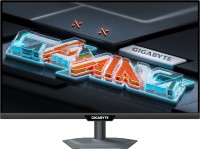
gaming, 27 ", 2560x1440 (16:9), IPS, response 1 ms, 300 Hz, 1.07B Colors, sRGB 132 %, DCI-P3 95 %, HDMI, v 2.1, DisplayPort, USB-C (DP Alt Mode), Power Delivery, HUB: USB-A 2x5Gbps, KVM switch, NVIDIA G-Sync Compatible, VESA Adaptive-Sync, HDR, TÜV Rheinland

gaming, 42.5 ", 4K, 3840x2160 (16:9), *VA, MPRT 0.3 ms, 144 Hz, 8-bit + FRC (1.07B Colors), HDMI, v 2.1, DisplayPort, HUB: USB-A 4x5Gbps, speakers, VESA Adaptive-Sync, HDR

gaming, 27 ", 4K, 3840x2160 (16:9), Mini LED IPS, response 1 ms, 160 Hz, 320 Hz (Full HD), 8-bit + FRC (1.07B Colors), sRGB 151.8 %, DCI-P3 98 %, HDMI, v 2.1, DisplayPort, HUB: USB-A 4x5Gbps, NVIDIA G-Sync Compatible, VESA Adaptive-Sync, HDR