
Roland V-02HD MK II video mixer WUXGA V-02HDMKII
 | Compare prices 3 → When you make a purchase through links on our site, we may receive a affiliate commission.
|
Buy Roland V-02HD MK II video mixer WUXGA V-02HDMKII
When you make a purchase through links on our site, we may receive a affiliate commission.
Roland V-02HD MK II video mixer WUXGA | £461.52 |  | |||
| £479.99 |  | ||||
Roland V-02HD MK II video mixer WUXGA V-02HDMKII | £552.96 |  | |||
STEP UP YOUR LIVESTREAMS
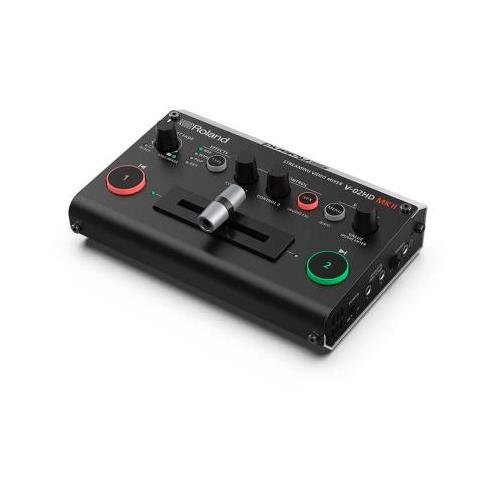
Ditch the webcam and step up your livestreams with the Roland V-02HD MK II Streaming Video Mixer. Compact affordable and simple to use this desktop device allows you to connect and switch two high-quality HDMI cameras and send them directly to your favorite streaming platform over USB-C. You can also mix in audio sources via dedicated inputs and HDMI apply video effects and transitions and more. With the V-02HD MK II you have the interface you need to bring higher production values to your live video productions.
SIMPLY SIMPLE
The V-02HD MK II is the world’s easiest two-camera livestreaming solution. With its intuitive layout large controls and T-bar fader it’s incredibly simple to operate even if you have no broadcasting experience.
Go live in three quick steps:
Plug in up to two sources via HDMI including cameras computers mobile devices and gaming consoles.
Connect the USB-C output to your computer.
Launch your streaming software and select the V-02HD MK II as the camera source.
STREAM WITH EVERY PLATFORM
The V-02HD MK II connects to the streaming computer you already own and the audience you already have. It’s instantly recognized as a camera source when you plug in via USB so it’s ready to go for Facebook YouTube Twitch and Zoom. It also integrates seamlessly with OBS Studio Streamlabs OBS StreamYard and Restream for more advanced workflows. High-quality streaming up to 1080p/60 FPS is supported and it’s possible to send two additional feeds to external HDMI devices via the Program Out and Preview Out if needed.
A STRESS-FREE SETUP
When you use the V-02HD MK II everything just works. Plug in your two HDMI sources and let Roland’s advanced tech handle all the details and say goodbye to computer driver conflicts crashes and other reliability issues that come with multiple USB webcams and HDMI-to-USB encoder adaptors.
HDMI CAMERAS FOR THE WIN
From talk shows and live demonstrations to artistic performances and beyond cameras that support HDMI output will elevate the image quality in your streams and drive more audience engagement. They have much better lenses than any webcam and often have zoom capability to frame your perfect shot. You can connect a variety of different camera types to the V-02HD MK II. Whichever solution you choose make sure it supports a clean HDMI output that’s free of any overlayed information.
Good—A smartphone or tablet with an HDMI adaptor offers a good option that’s compact and easy to set up anywhere.
Better—A point-and-shoot camera action camera or video camcorder with features like zoom and deeper exposure and focus control will take things even further.
Best—A DSLR or mirrorless camera is the ultimate solution offering the best image quality for a cinematic look interchangeable lenses and improved performance in low-light conditions.
UPGRADE YOUR SOUND TOO
The V-02HD MK II also includes a
Ditch the webcam and step up your livestreams with the Roland V-02HD MK II Streaming Video Mixer. Compact affordable and simple to use this desktop device allows you to connect and switch two high-quality HDMI cameras and send them directly to your favorite streaming platform over USB-C. You can also mix in audio sources via dedicated inputs and HDMI apply video effects and transitions and more. With the V-02HD MK II you have the interface you need to bring higher production values to your live video productions.
SIMPLY SIMPLE
The V-02HD MK II is the world’s easiest two-camera livestreaming solution. With its intuitive layout large controls and T-bar fader it’s incredibly simple to operate even if you have no broadcasting experience.
Go live in three quick steps:
Plug in up to two sources via HDMI including cameras computers mobile devices and gaming consoles.
Connect the USB-C output to your computer.
Launch your streaming software and select the V-02HD MK II as the camera source.
STREAM WITH EVERY PLATFORM
The V-02HD MK II connects to the streaming computer you already own and the audience you already have. It’s instantly recognized as a camera source when you plug in via USB so it’s ready to go for Facebook YouTube Twitch and Zoom. It also integrates seamlessly with OBS Studio Streamlabs OBS StreamYard and Restream for more advanced workflows. High-quality streaming up to 1080p/60 FPS is supported and it’s possible to send two additional feeds to external HDMI devices via the Program Out and Preview Out if needed.
A STRESS-FREE SETUP
When you use the V-02HD MK II everything just works. Plug in your two HDMI sources and let Roland’s advanced tech handle all the details and say goodbye to computer driver conflicts crashes and other reliability issues that come with multiple USB webcams and HDMI-to-USB encoder adaptors.
HDMI CAMERAS FOR THE WIN
From talk shows and live demonstrations to artistic performances and beyond cameras that support HDMI output will elevate the image quality in your streams and drive more audience engagement. They have much better lenses than any webcam and often have zoom capability to frame your perfect shot. You can connect a variety of different camera types to the V-02HD MK II. Whichever solution you choose make sure it supports a clean HDMI output that’s free of any overlayed information.
Good—A smartphone or tablet with an HDMI adaptor offers a good option that’s compact and easy to set up anywhere.
Better—A point-and-shoot camera action camera or video camcorder with features like zoom and deeper exposure and focus control will take things even further.
Best—A DSLR or mirrorless camera is the ultimate solution offering the best image quality for a cinematic look interchangeable lenses and improved performance in low-light conditions.
UPGRADE YOUR SOUND TOO
The V-02HD MK II also includes a
The product description is generated based on data from online stores. Before purchasing be sure to verify all information directly with the seller.
Best MacBook StandsNot only beautiful, but also convenient: choosing the right stand for your MacBook.

How to Choose Headphones for Kids: Hearing Protection, Comfort, and Everyday DurabilityGood children's headphones are chosen not by design, but by the volume limiting system.
How to place an order?How to add store?
Remember that the online store is responsible for the accuracy of information regarding price, warranty, and delivery!
You may be interested in