Brother QL-600B label Direct thermal 300 x 600 DPI 71 mm/sec Wired DK QL600BZU1
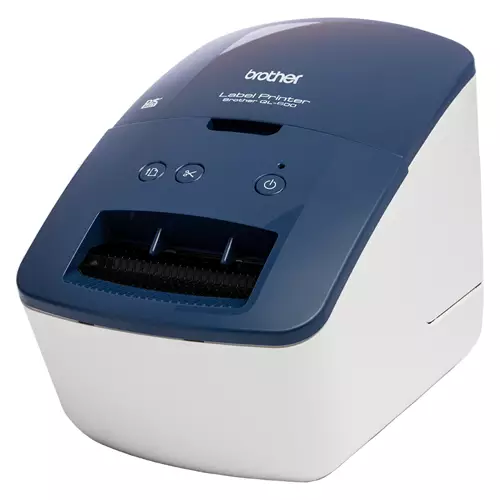 |
Buy Brother QL-600B label Direct thermal 300 x 600 DPI 71 mm/sec Wired DK QL600BZU1
When you make a purchase through links on our site, we may receive a affiliate commission.
BROTHER QL-600B Label Printer | £69.99 |  | |||
Brother QL-600B label printer Direct thermal 300 x 600 DPI 71 mm/sec W QL600BZU1 | £69.83 |  | |||
Brother QL-600B label printer Direct thermal 300 x 600 DPI 71 mm/sec Wired DK QL-600BZU1 | £76.99 |  | |||
Brother QL-600B label printer Direct thermal 300 x 600 DPI 71 mm/sec Wired DK QL600BZU1 | £78.21 |  | |||
Brother QL-600B Direct Thermal Label Printer (Not Wireless) QL600BZU1 | £67.90 |  | |||
QL-600B Postage and Address Label Printer
Ideal for small and home businesses who need to print occasional address and shipping labels file/folder identification labels or temporary signage. An integrated cutter gives you the freedom to print labels at the length you require.
The smart compact design of the QL-600B address label printer allows it to sit neatly on your desk connected to your PC or Mac's USB interface. Using P-touch Editor label design software (available as a free download) you can add text images barcodes frames and other items onto your labels before printing.
Use the integrated cutter together with one of the continuous DK label rolls to create labels up to one metre in length - ideal for signs and banners.
Or add to this a large range of various pre-sized die-cut label rolls and you have the ideal postage or shipping label printer that can do so much more.
Give your business a professional edge by printing high quality labels with crisp text images and barcodes. Everything you need is included in the box.
Address signage and general label printing for your home or office
The Brother QL-600B is a compact label printer that once connected to your computer lets you design and print labels on demand quickly and efficiently.
Choose the label size you need
Every QL-600B label printer comes with a 62mm width continuous length label roll in the box. Brother's unique continuous roll technology allows you to print any sized label you need from one roll. From address labels storage boxes and indoor signage you can complete all your labelling requirements without the need for multiple rolls.
Free label editing software for Windows PCs and Mac
Brother's easy to use free editing software P-touch Editor gives users the opportunity to fully customise their labels. Available on both Windows and MAC you can import existing graphic files use the enhanced symbols or clip-art files included to create logos or custom art.
Many different label sizes to choose from
As well as a range of continuous length rolls that can be cut to your exact size requirement there are also many popular sized die-cut labels available. These pre-sized labels have rounded corners and are quick and easy to peel ideal for when a larger number of labels need to be printed and applied.
Many different label sizes to choose from
As well as a range of continuous length rolls that can be cut to your exact size requirement there are also many popular sized die-cut labels available. These pre-sized labels have rounded corners and are quick and easy to peel ideal for when a larger number of labels need to be printed and applied.
Change label rolls quickly and easily
Unlike some other label printers on the market all Brother DK label rolls are supplied on a label spindle. All you have to do is drop-in your roll feed it into the printer then close the top cover. It takes just seconds and ensures the labels are installed correctly
Ideal for small and home businesses who need to print occasional address and shipping labels file/folder identification labels or temporary signage. An integrated cutter gives you the freedom to print labels at the length you require.
The smart compact design of the QL-600B address label printer allows it to sit neatly on your desk connected to your PC or Mac's USB interface. Using P-touch Editor label design software (available as a free download) you can add text images barcodes frames and other items onto your labels before printing.
Use the integrated cutter together with one of the continuous DK label rolls to create labels up to one metre in length - ideal for signs and banners.
Or add to this a large range of various pre-sized die-cut label rolls and you have the ideal postage or shipping label printer that can do so much more.
Give your business a professional edge by printing high quality labels with crisp text images and barcodes. Everything you need is included in the box.
Address signage and general label printing for your home or office
The Brother QL-600B is a compact label printer that once connected to your computer lets you design and print labels on demand quickly and efficiently.
Choose the label size you need
Every QL-600B label printer comes with a 62mm width continuous length label roll in the box. Brother's unique continuous roll technology allows you to print any sized label you need from one roll. From address labels storage boxes and indoor signage you can complete all your labelling requirements without the need for multiple rolls.
Free label editing software for Windows PCs and Mac
Brother's easy to use free editing software P-touch Editor gives users the opportunity to fully customise their labels. Available on both Windows and MAC you can import existing graphic files use the enhanced symbols or clip-art files included to create logos or custom art.
Many different label sizes to choose from
As well as a range of continuous length rolls that can be cut to your exact size requirement there are also many popular sized die-cut labels available. These pre-sized labels have rounded corners and are quick and easy to peel ideal for when a larger number of labels need to be printed and applied.
Many different label sizes to choose from
As well as a range of continuous length rolls that can be cut to your exact size requirement there are also many popular sized die-cut labels available. These pre-sized labels have rounded corners and are quick and easy to peel ideal for when a larger number of labels need to be printed and applied.
Change label rolls quickly and easily
Unlike some other label printers on the market all Brother DK label rolls are supplied on a label spindle. All you have to do is drop-in your roll feed it into the printer then close the top cover. It takes just seconds and ensures the labels are installed correctly
The product description is generated based on data from online stores. Before purchasing be sure to verify all information directly with the seller.

Most Overrated and Underrated Modern TechWhich gadgets and tech are not worth spending money on, and which ones can pleasantly surprise you.
Best Color Laser Printers for Home and Small OfficeUniversal "workhorses" for printing black-and-white documents and color prints.
How to place an order?How to add store?
Remember that the online store is responsible for the accuracy of information regarding price, warranty, and delivery!
We recommendCompare using chart →