
Kondor Blue Cage with Cine Mount/ Raven Black KB-DJILC-CM-BK
 | Compare prices 3 → When you make a purchase through links on our site, we may receive a affiliate commission.
|
Buy Kondor Blue Cage with Cine Mount/ Raven Black KB-DJILC-CM-BK
When you make a purchase through links on our site, we may receive a affiliate commission.
Kondor Blue Cage with Cine Mount/ Raven Black | £178.98 |  | |||
Kondor Blue Cage with Cine Mount/ Raven Black KB-DJILC-CM-BK | £178.98 |  | |||
| £207.31 |  | ||||
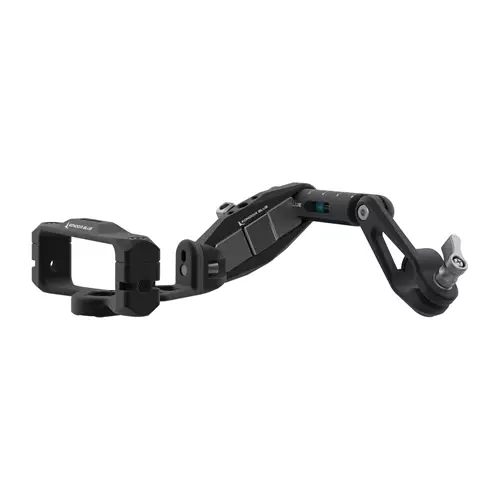
Cage & Cine Mount for DJI Focus Pro LiDAR - Raven Black
• Anti-Twist mounts on every side
• Removable Mini 15mm Rod with rubber o-ring for pivoting mounting setups
• Integrated KONDOR BLUE Mini Lock Male Plate for quick-release mounting options
• Captive mounting hardware throughout
• DJI LiDAR Cage: 86mm W x 39mm T x 60mm D
• Cage Weight: 56g/1.9 oz
The DJI Focus Pro LiDAR system has been received as one of the best innovations in budget cinema in years. The tech is accurate compact and relatively affordable but it’s extremely challenging to mount in an ideal location. The DJI LiDAR Cage & Cine Mount aims to solve this problem.
The cage is minimal yet effective at creating a rigid structure around the LiDAR unit and providing anti-twist mounts on every side. The integrated KONDOR Blue Mini Lock Male Plate is also a fast effective mounting solution for a quick release. The plate even features To-and-Through mounting options (“through” options would need to be attached before installing the LiDAR unit). The included removable Mini 15mm Rod with rubber o-ring for pivoting mounting setups works great with a range of 15mm rod clamps Magic Arms or the Cine Mount kit.
The Cine Mount Kit includes a 15mm Rod that is 100mm long with an integrated 15mm Rod Clamp and bubble line level. The 60mm spaced rod block was specifically designed for this application for single knob adjustments. The combined setup allows users to quickly center the DJI Focus Pro LiDAR unit above or below the lens and pivot the height to get it as close to the lens as possible.
Just as the DJI LiDAR unit will be the go-to standard for focus assist the KONDOR Blue LiDAR Cage & Cine Mount Kit will be the essential complimentary pairing. For questions on specific mounting scenarios don’t hesitate to contact the KONDOR BLUE Cinema Support Staff.
• Anti-Twist mounts on every side
• Removable Mini 15mm Rod with rubber o-ring for pivoting mounting setups
• Integrated KONDOR BLUE Mini Lock Male Plate for quick-release mounting options
• Captive mounting hardware throughout
• DJI LiDAR Cage: 86mm W x 39mm T x 60mm D
• Cage Weight: 56g/1.9 oz
The DJI Focus Pro LiDAR system has been received as one of the best innovations in budget cinema in years. The tech is accurate compact and relatively affordable but it’s extremely challenging to mount in an ideal location. The DJI LiDAR Cage & Cine Mount aims to solve this problem.
The cage is minimal yet effective at creating a rigid structure around the LiDAR unit and providing anti-twist mounts on every side. The integrated KONDOR Blue Mini Lock Male Plate is also a fast effective mounting solution for a quick release. The plate even features To-and-Through mounting options (“through” options would need to be attached before installing the LiDAR unit). The included removable Mini 15mm Rod with rubber o-ring for pivoting mounting setups works great with a range of 15mm rod clamps Magic Arms or the Cine Mount kit.
The Cine Mount Kit includes a 15mm Rod that is 100mm long with an integrated 15mm Rod Clamp and bubble line level. The 60mm spaced rod block was specifically designed for this application for single knob adjustments. The combined setup allows users to quickly center the DJI Focus Pro LiDAR unit above or below the lens and pivot the height to get it as close to the lens as possible.
Just as the DJI LiDAR unit will be the go-to standard for focus assist the KONDOR Blue LiDAR Cage & Cine Mount Kit will be the essential complimentary pairing. For questions on specific mounting scenarios don’t hesitate to contact the KONDOR BLUE Cinema Support Staff.
The product description is generated based on data from online stores. Before purchasing be sure to verify all information directly with the seller.
HDMI vs. DisplayPort: Which Is Better for a Monitor?Detailed comparison of the two most popular video interfaces

How Gadgets React to Heat and How to Protect Them from OverheatingWe explain how different devices react to heat, how to prevent overheating, and what to do if it has already happened.
How to place an order?How to add store?
Remember that the online store is responsible for the accuracy of information regarding price, warranty, and delivery!
You may be interested in