
Magewell USB Capture HDMI Gen 2 320600000
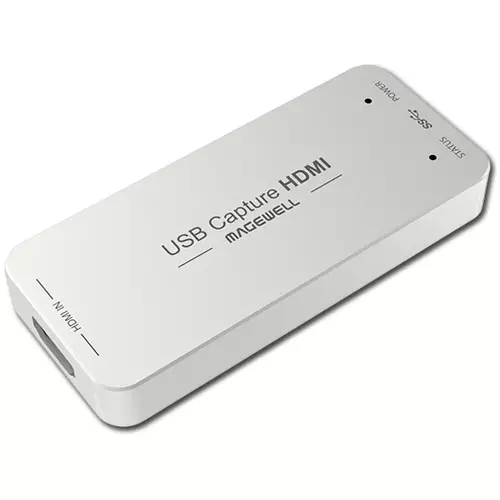 | Compare prices 2 → When you make a purchase through links on our site, we may receive a affiliate commission.
|
Buy Magewell USB Capture HDMI Gen 2 320600000
When you make a purchase through links on our site, we may receive a affiliate commission.
MAGEWELL USB Capture HDMI Gen 2 | £241.78 |  | |||
Magewell USB Capture HDMI Gen 2 320600000 | £281.70 |  | |||
Capture Format Setting
Set the capture resolution frame rate and color space. If the capture format is different with the input format the FPGA in the capture device will automatically do up/down scaling causing 0 CPU usage. This function is especially useful when scaling by software causes much CPU burden.
Audio Volume Control
The Utility V3 can control the volume of the audio input (recording) and output (playback) of the USB capture (Plus) devices. The functions differ with models. If the system volume is changed the parameter on the Utility V3 will also change accordingly. Users can click on the icon to quickly mute/unmute a playback/recording device.
Mirror and Flip
This function can reverse the captured image horizontally or vertically making sure the viewer see the image in the right direction. Eg. When users use Facetime they can easily mirror the image with the Utility V3.
EDID Editing and Importing
Users can edit and load the EDID of the capture device to support a specific input format which is not supported by default. Eg. USB Capture HDMI 4K Plus will be able to input at 2560x1440p144 with this function.
Firmware Update
When Internet access is available Utility V3 automatically checks the firmware version of the capture device and the latest version on the Magewell server. When a higher version is available Utility V3 will remind users of the update. Users can check the release notes and decide whether they need to update the firmware or not depending on their needs.
Export Diagnose Report
When asking for technical support users dont need to manually gather device information. Just one click and the Utility V3 will export most of the technical information required by the Magewell support team.
Set the capture resolution frame rate and color space. If the capture format is different with the input format the FPGA in the capture device will automatically do up/down scaling causing 0 CPU usage. This function is especially useful when scaling by software causes much CPU burden.
Audio Volume Control
The Utility V3 can control the volume of the audio input (recording) and output (playback) of the USB capture (Plus) devices. The functions differ with models. If the system volume is changed the parameter on the Utility V3 will also change accordingly. Users can click on the icon to quickly mute/unmute a playback/recording device.
Mirror and Flip
This function can reverse the captured image horizontally or vertically making sure the viewer see the image in the right direction. Eg. When users use Facetime they can easily mirror the image with the Utility V3.
EDID Editing and Importing
Users can edit and load the EDID of the capture device to support a specific input format which is not supported by default. Eg. USB Capture HDMI 4K Plus will be able to input at 2560x1440p144 with this function.
Firmware Update
When Internet access is available Utility V3 automatically checks the firmware version of the capture device and the latest version on the Magewell server. When a higher version is available Utility V3 will remind users of the update. Users can check the release notes and decide whether they need to update the firmware or not depending on their needs.
Export Diagnose Report
When asking for technical support users dont need to manually gather device information. Just one click and the Utility V3 will export most of the technical information required by the Magewell support team.
The product description is generated based on data from online stores. Before purchasing be sure to verify all information directly with the seller.

Best Inverter UPS Systems Up to 1000WOptimal UPS systems for backup and safe power supply of boilers, computers, and other sensitive equipment.
Best 16 GB DDR4 RAM KitsRAM kits for multitasking and gaming performance in previous-generation builds.
How to place an order?How to add store?
Remember that the online store is responsible for the accuracy of information regarding price, warranty, and delivery!
You may be interested in