When you make a purchase through links on our site, we may receive a affiliate commission.
MOZA Racing E-Stop Switch RS063
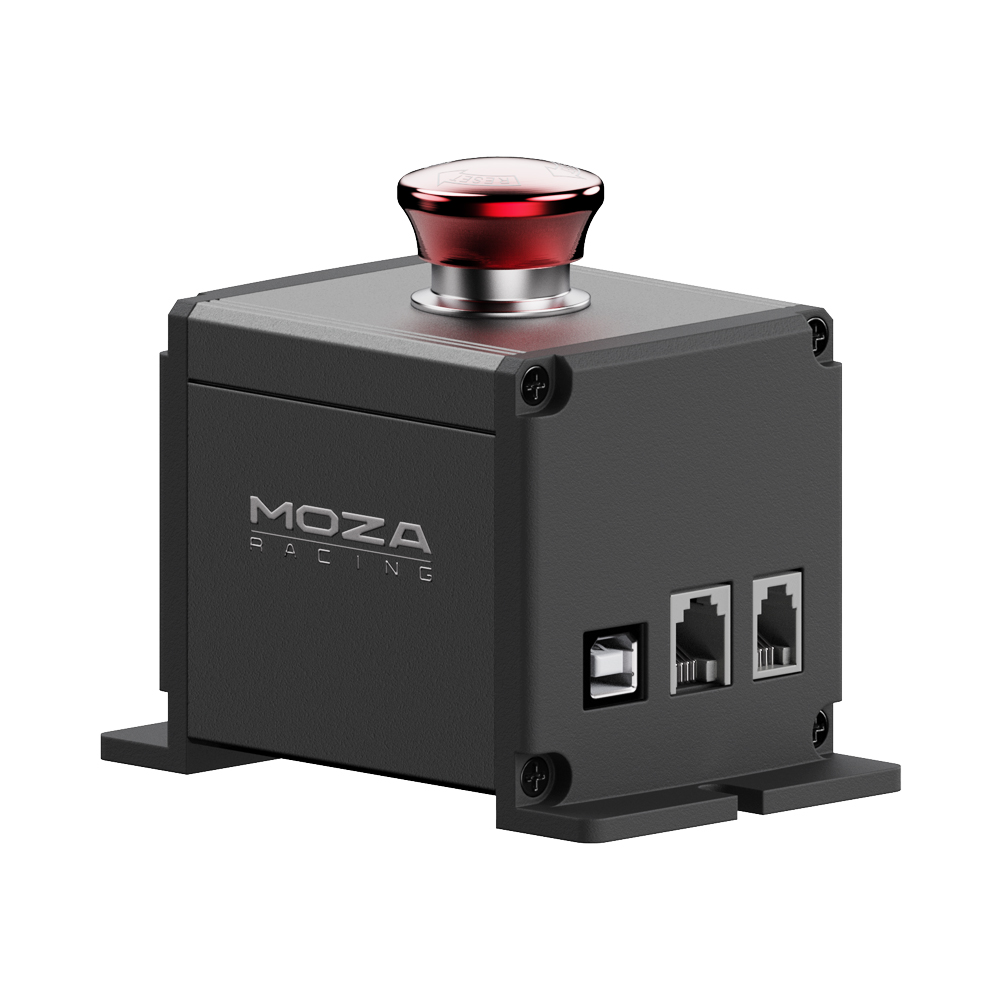
MOZA E-stop Switch The MOZA E-stop Switch provides safety assurance, allowing you to enjoy racing and flight simulations wit... moreh peace of mind. Personalized Protection with Multiple Modes The MOZA E-stop Switch offers adaptable protection modes tailored to the type of simulator you’re using, ensuring enhanced safety and control. For Racing Simulation Equipment: Mode 1: Connect the MOZA E-stop Switch directly to the PC via a USB cable. Pressing the switch only deactivates the force feedback, which is immediately restored upon release. Mode 2: Connect the MOZA E-stop Switch to the DASH on the base using an RJ11 cable (6 contact pins). Pressing the switch only deactivates the force feedback, which is immediately restored upon release. Mode 3: Connect the MOZA E-stop Switch to the E-STOP port on the base using an RJ9 cable (4 contact pins). Pressing the switch completely cuts off power, and after release, the base needs to be powered on again by pressing the power button on the base. Some games may require restarting to restore force feedback. For Flight Simulation Equipment: The MOZA E-stop Switch can be connected directly to the PC via a USB cable. Pressing the switch deactivates force feedback, and it is restored immediately upon release. Aluminum Alloy Button and Casing The MOZA E-stop Switch is crafted from aluminum alloy combining durability with style and functionality.
Moza Racing E-Stop Switch MOZA E-stop SwitchImmerse yourself in the thrill of racing games with peace of mind using the MOZA... moreE-stop Switch.Personalized Protection with Multiple ModesChoose from three connection and protection modes:Mode 1:Connect the MOZA E-stop Switch directly to the PC via a USB cable. Pressing the switch only deactivates the force feedback. which is immediately restored upon release.Mode 2:Connect the MOZA E-stop Switch to the DASH on the base using an RJ11 cable (6 contact pins). Pressing the switch only deactivates the force feedback. which is immediately restored upon release.Mode 3:Connect the MOZA E-stop Switch to the E-STOP port on the base using an RJ9 cable (4 contact pins). Pressing the switch completely cuts off power. and after release. the base needs to be powered on again by pressing the power button on the base. Some games may require restarting to restore force feedback.Aluminum Alloy Button and CasingThe MOZA E-stop Switch is crafted from aluminum alloy combining durability with style and functionality.
MOZA E-stop SwitchImmerse yourself in the thrill of racing games with peace of mind using the MOZA E-stop Switch.Personalized... moreProtection with Multiple ModesChoose from three connection and protection modes:Mode 1:Connect the MOZA E-stop Switch directly to the PC via a USB cable. Pressing the switch only deactivates the force feedback. which is immediately restored upon release.Mode 2:Connect the MOZA E-stop Switch to the DASH on the base using an RJ11 cable (6 contact pins). Pressing the switch only deactivates the force feedback. which is immediately restored upon release.Mode 3:Connect the MOZA E-stop Switch to the E-STOP port on the base using an RJ9 cable (4 contact pins). Pressing the switch completely cuts off power. and after release. the base needs to be powered on again by pressing the power button on the base. Some games may require restarting to restore force feedback.Aluminum Alloy Button and CasingThe MOZA E-stop Switch is crafted from aluminum alloy combining durability with style and functionality. Moza Racing E-Stop Switch
Compatible with MOZA simulators, offering multiple protection modes for safety and control. Versatile connectivity. Tailor yo... moreur experience with three modes. It is built to last. Plug, play, and race with peace of mind. MOZA E-stop Switch. Immerse yourself in the thrill of racing games with peace of mind using the MOZA E-stop Switch.. Personalized Protection with Multiple Modes. Choose from three connection and protection modes:. Mode 1:. Connect the MOZA E-stop Switch directly to the PC via a USB cable. Pressing the switch only deactivates the force feedback, which is immediately restored upon release.. Mode 2:. Connect the MOZA E-stop Switch to the DASH on the base using an RJ11 cable (6 contact pins). Pressing the switch only deactivates the force feedback, which is immediately restored upon release.. Mode 3:. Connect the MOZA E-stop Switch to the E-STOP port on the base using an RJ9 cable (4 contact pins). Pressing the switch completely cuts off power, and after release, the base needs to be powered on again by pressing the power button on the base. Some games may require restarting to restore force feedback.. Aluminum Alloy Button and Casing. The MOZA E-stop Switch is crafted from aluminum alloy combining durability with style and functionality.. Features. Material. Aluminium. Product colour. Black. Product type. Button. Gaming platforms supported. PC
MOZA E-stop Switch. Immerse yourself in the thrill of racing games with peace of mind using the MOZA E-stop Switch. Personali... morezed Protection with Multiple Modes. Choose from three connection and protection modes:. Mode 1:. Connect the MOZA E-stop Switch directly to the PC via a USB cable.Pressing the switch only deactivates the force feedback, which is immediately restored upon release.Mode 2:. Connect the MOZA E-stop Switch to the DASH on the base using an RJ11 cable (6 contact pins).Pressing the switch only deactivates the force feedback, which is immediately restored upon release.Mode 3:. Connect the MOZA E-stop Switch to the E-STOP port on the base using an RJ9 cable (4 contact pins).Pressing the switch completely cuts off power, and after release, the base needs to be powered on again by pressing the power button on the base.Some games may require restarting to restore force feedback. Aluminum Alloy Button and Casing. The MOZA E-stop Switch is crafted from aluminum alloy combining durability with style and functionality. Moza Racing E-Stop Switch.Gaming platforms supported:PC, Product type:Button, Product colour:Black.Compatible with MOZA simulators, offering multiple protection modes for safety and control.Versatile connectivity.Tailor your experience with three modes.It is built to last.Plug, play, and race with peace of mind.
MOZA Racing MOZA E-Stop Switch For Sim Racing (RS063) RS063
Bring your virtual vehicle safely to a stop with the MOZA Racing E-Stop Switch. This new and improved stop switch has three m... moreodes to utilise. With its robust aluminium alloy construction, this button will stand firm in any emergency. MOZA E-Stop Switch at a Glance: Emergency stop switch for racing sims Three modes available to use Versatile connectivity Robust aluminium alloy construction Emergency Stop The MOZA Racing E-Stop Switch will enhance the realism of your racing set-up, facilitating the ability to emergency stop. Its aluminium alloy construction is robust, able to withstand any emergency. There are three protection modes to utilise, dictated by how you connect the MOZA Racing E-Stop Switch: Mode One is available when connected to your PC via USB. This will deactivate the force feedback when you press the button. Feedback will return upon release. Mode Two is available when you connect to a MOZA Dash using an RJ11 cable (6 contact pins). Pressing the switch will deactivate the force feedback. This will restore upon release. Mode Three is available when connected to a MOZA wheelbase via an RJ9 cable (4 contact pins). Pressing the switch in this mode will completely cut off power to the base. Once released, you will need to power up the base again. Some games may also need restarting to bring back the force feedback.
MOZA E-stop Switch The MOZA E-stop Switch provides safety assurance, allowing you to enjoy racing and flight simulations with peace of mind. Personalized Protection with Multiple Modes The MOZA E-stop Switch offers adaptable protection modes tailored to the type of simulator you’re using, ensuring enhanced safety and control. For Racing Simulation Equipment: Mode 1: Connect the MOZA E-stop Switch directly to the PC via a USB cable. Pressing the switch only deactivates the force feedback, which is immediately restored upon release. Mode 2: Connect the MOZA E-stop Switch to the DASH on the base using an RJ11 cable (6 contact pins). Pressing the switch only deactivates the force feedback, which is immediately restored upon release. Mode 3: Connect the MOZA E-stop Switch to the E-STOP port on the base using an RJ9 cable (4 contact pins). Pressing the switch completely cuts off power, and after release, the base needs to be powered on again by pressing the power button on the base. Some games may require restarting to restore force feedback. For Flight Simulation Equipment: The MOZA E-stop Switch can be connected directly to the PC via a USB cable. Pressing the switch deactivates force feedback, and it is restored immediately upon release. Aluminum Alloy Button and Casing The MOZA E-stop Switch is crafted from aluminum alloy combining durability with style and functionality.
The product description is generated based on data from online stores. Before purchasing be sure to verify all information directly with the seller.