
Blackmagic Design DaVinci Resolve Micro Color Panel (EN) DV/RES/AAAPNLMIC/EN
 | Compare prices 4 → When you make a purchase through links on our site, we may receive a affiliate commission.
|
Buy Blackmagic Design DaVinci Resolve Micro Color Panel (EN) DV/RES/AAAPNLMIC/EN
When you make a purchase through links on our site, we may receive a affiliate commission.
Blackmagic Design DaVinci Resolve Micro Color Panel (EN) | £453.85 |  | |||
Blackmagic Design DaVinci Resolve Micro Color Panel (EN) DV/RES/AAAPNLMIC/EN | £453.85 |  | |||
| £525.79 |  | ||||
Blackmagic Design BM-DV/RES/AAAPNLMIC/EN | £534.49 |  | |||
Blackmagic DaVinci Resolve Micro Color Panel (EN)
DAVINCI RESOLVE COLOR PANELS
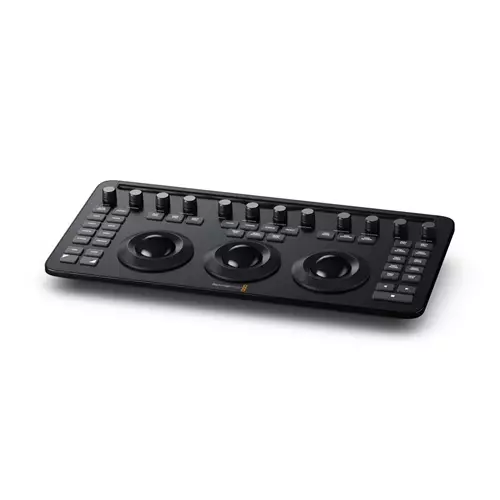
DaVinci Resolve color panels let you adjust multiple parameters at once so you can create unique looks that are impossible with a mouse and keyboard. The incredibly small DaVinci Resolve Micro Color Panel is great for new colourists just getting started or anyone that needs a portable panel. It features 3 high quality trackballs knobs for primary grading controls and buttons for accessing additional tools. The DaVinci Resolve Mini Panel features additional controls and screens for accessing virtually all palettes and tools. For the ultimate control the DaVinci Resolve Advanced Panel gives high end professional colourists access to every single feature and command mapped to a specific button.
THREE PANELS TO CHOOSE FROM
With three panels to choose from it’s easy to find one that perfectly fits your job and project scope. If you're just getting started the DaVinci Resolve Micro Color Panel is incredibly compact while featuring dozens of professional colour controls. It fits perfectly next to a keyboard and is great for on set grading with a laptop. The DaVinci Resolve Mini Panel is ideal for freelance artists that need a fully featured portable panel that can be set up at home or moved between jobs. The DaVinci Resolve Advanced Panel is designed for professional colour suites on feature film television and commercial projects. All 3 panels have similar layouts making it easy to move up when you’re ready.
DAVINCI RESOLVE MICRO COLOR PANEL
Powerful color panel gives you all the control you need to create cinematic images. Includes controls for refined colour grading including adding windows. Connects via Bluetooth or USB-C.
PROFESSIONAL TRACKBALLS
The trackballs let you adjust the colours in an image based on lift gamma and gain tonal ranges. Unlike a mouse and keyboard you can manipulate multiple trackballs simultaneously to create unique effects. The smooth gliding rings around the trackballs let you set master levels and establish dynamic contrast. Keys above each trackball reset the colour adjustment level adjustment or both. Three keys at the top of the DaVinci Resolve Mini and Micro Color Panels let you switch between primary and log wheel modes activate offset temperature and tint controls and turn on your full screen viewer output. The DaVinci Resolve Advanced Panel has a fourth master gain trackball to adjust the entire image.
PRIMARY ADJUSTMENT CONTROLS
Primary adjustment controls affect the luminance and chrominance of your entire image using a variety of tools that target specific tonal and hue ranges. These tools represent the most common adjustments required to produce dynamic imagery making them a popular choice for photographers graphic designers and colourists working on a tight deadline. The DaVinci Resolve Micro Color Panel and Mini Panel include 12 primary colour correction control knobs that make it easy to quickly
DAVINCI RESOLVE COLOR PANELS
DaVinci Resolve color panels let you adjust multiple parameters at once so you can create unique looks that are impossible with a mouse and keyboard. The incredibly small DaVinci Resolve Micro Color Panel is great for new colourists just getting started or anyone that needs a portable panel. It features 3 high quality trackballs knobs for primary grading controls and buttons for accessing additional tools. The DaVinci Resolve Mini Panel features additional controls and screens for accessing virtually all palettes and tools. For the ultimate control the DaVinci Resolve Advanced Panel gives high end professional colourists access to every single feature and command mapped to a specific button.
THREE PANELS TO CHOOSE FROM
With three panels to choose from it’s easy to find one that perfectly fits your job and project scope. If you're just getting started the DaVinci Resolve Micro Color Panel is incredibly compact while featuring dozens of professional colour controls. It fits perfectly next to a keyboard and is great for on set grading with a laptop. The DaVinci Resolve Mini Panel is ideal for freelance artists that need a fully featured portable panel that can be set up at home or moved between jobs. The DaVinci Resolve Advanced Panel is designed for professional colour suites on feature film television and commercial projects. All 3 panels have similar layouts making it easy to move up when you’re ready.
DAVINCI RESOLVE MICRO COLOR PANEL
Powerful color panel gives you all the control you need to create cinematic images. Includes controls for refined colour grading including adding windows. Connects via Bluetooth or USB-C.
PROFESSIONAL TRACKBALLS
The trackballs let you adjust the colours in an image based on lift gamma and gain tonal ranges. Unlike a mouse and keyboard you can manipulate multiple trackballs simultaneously to create unique effects. The smooth gliding rings around the trackballs let you set master levels and establish dynamic contrast. Keys above each trackball reset the colour adjustment level adjustment or both. Three keys at the top of the DaVinci Resolve Mini and Micro Color Panels let you switch between primary and log wheel modes activate offset temperature and tint controls and turn on your full screen viewer output. The DaVinci Resolve Advanced Panel has a fourth master gain trackball to adjust the entire image.
PRIMARY ADJUSTMENT CONTROLS
Primary adjustment controls affect the luminance and chrominance of your entire image using a variety of tools that target specific tonal and hue ranges. These tools represent the most common adjustments required to produce dynamic imagery making them a popular choice for photographers graphic designers and colourists working on a tight deadline. The DaVinci Resolve Micro Color Panel and Mini Panel include 12 primary colour correction control knobs that make it easy to quickly
The product description is generated based on data from online stores. Before purchasing be sure to verify all information directly with the seller.
The Chi-Fi Phenomenon: How Chinese Companies Are Reshaping the World of Hi-Fi AudioFrom popular IEMs to serious DACs and speakers—we take a look at what Chinese Hi-Fi has to offer today.
Alternatives to Classic TWS EarbudsEarbuds, open-back headphones, and other alternatives to in-ear “plugs”.
How to place an order?How to add store?
Remember that the online store is responsible for the accuracy of information regarding price, warranty, and delivery!
You may be interested in