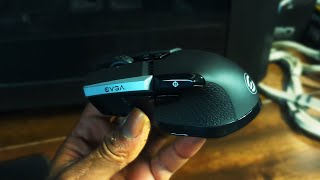
EVGA X20 (903-T1-20BK-KR)
 | Outdated Product A spectacular and highly accurate asymmetrical gaming mouse with two connection options (high-speed radio channel or a detachable cable included), programmable buttons, built-in memory, a complex of EVGA 3-Dimension Array Tech sensors, reliable mechanical microswitches with a resource of up to 60 million clicks and spectacular RGB LED backlighting. It is positioned as a product of the mid-price category of 2022, aimed at both hardcore gamers and eSports players, as well as ordinary computer gamers. The key difference between the EVGA X20 mouse and other gaming manipulators is the presence of two additional LOD sensors, which make it possible to adjust the lift-off height as accurately as possible (up to 3 mm), which provides better control over the positioning of the cursor during sharp an...d sweeping movements. The original shape of the body of this model provides a slight tilt of the palm to the right and is suitable only for right-handers. The scroll wheel is rubberized and covered with a tactile pattern. The PixArt 3335 optical sensor is capable of providing ultra-high positioning accuracy, working correctly at high accelerations up to 40G and movement speeds up to 10.1 m/sec. Thanks to the use of proprietary EVGA Unleash RGB software, it is possible to reassign buttons, record and use macros, fine-tune sensitivity and polling speed (up to 8000 Hz). The battery power is enough for 60 hours of operation without backlighting (24 hours with active backlighting). |



EVGA X20 | |||||||||||||||||||||||||||||||||||||||||||||||||||||||||||||||||||||||||||
|
| ||||||||||||||||||||||||||||||||||||||||||||||||||||||||||||||||||||||||||


A spectacular and highly accurate asymmetrical gaming mouse with two connection options (high-speed radio channel or a detachable cable included), programmable buttons, built-in memory, a complex of EVGA 3-Dimension Array Tech sensors, reliable mechanical microswitches with a resource of up to 60 million clicks and spectacular RGB LED backlighting. It is positioned as a product of the mid-price category of 2022, aimed at both hardcore gamers and eSports players, as well as ordinary computer gamers.
The key difference between the EVGA X20 mouse and other gaming manipulators is the presence of two additional LOD sensors, which make it possible to adjust the lift-off height as accurately as possible (up to 3 mm), which provides better control over the positioning of the cursor during sharp and sweeping movements. The original shape of the body of this model provides a slight tilt of the palm to the right and is suitable only for right-handers.
The scroll wheel is rubberized and covered with a tactile pattern. The PixArt 3335 optical sensor is capable of providing ultra-high positioning accuracy, working correctly at high accelerations up to 40G and movement speeds up to 10.1 m/sec. Thanks to the use of proprietary EVGA Unleash RGB software, it is possible to reassign buttons, record and use macros, fine-tune sensitivity and polling speed (up to 8000 Hz). The battery power is enough for 60 hours of operation without backlighting (24 hours with active backlighting).
Always clarify the specifications and configuration of the product with the online store manager before purchasing.
Catalog EVGA 2026 - new arrivals, bestsellers, and the most relevant models EVGA.















Maybe I just got a bouquet of surprises and the other mice are fine, but I do not recommend them for purchase. If you are interested in mice with similar functionality, I think it's worth getting something more expensive from trusted manufacturers. I didn't even try to return it under warranty, I've already glued my feet on (if I had known what would happen, I wouldn't have glued them), and I'm too lazy to try to restore such junk, better to buy a new one. Good shape, comfortable to hold in hand. 1. When connecting the radio module via a cable, rather than directly to the motherboard, the settings in the app are not saved. 2. The plastic feet here are [censored] of the highest degree; I glued aluminum ones from an old mouse on top of them. 3. Height adjustment of the laser trigger is claimed. The result: this adjustment does who knows what, but not the height, and by default, there is a fairly high trigger, which causes the cursor to fly across half the screen when lifting the mouse and placing it back on the mat, depending on the DPI. 4. The DPI here is very strange. Where other mice have 1000, here it is around 1600. 5. It ran out of battery, you put it on charge, charge it, and it may happen (not always, but sometimes) that the mouse blinks red as if it is discharged and refuses to work; restarting the mouse helps. 6. After about 3-4 months of use, the rubber cover on the wheel stretched and spun without the wheel. 7. I'm not sure if this is a mouse problem; maybe my fingers are crooked, but the 4D wheel triggers crookedly. You press, seemingly in the center, and hit to the left. 8. And the coolest part: after about 5 months of use, the wheel started living its own life. You turn it forward, bam, and it spins back one or two times. You turn it back, bam, and it spins forward one or two times.  Artem Lischevich: use EVGA X20 few months Artem Lischevich: use EVGA X20 few months |