Catalog   /   Computing   /   Input Devices   /   Mice   /   Rapoo

Rapoo M300 Silent

Photos - Mouse Rapoo M300 Silent
Photos 6
Rapoo M300 Silent
Colour
Product typemouse
ConnectionBluetooth/radio
Bluetooth versionv4.0 / + 3.0 /
Multi-Device
Sensoroptical
Typenotebook
Sensor and control
Sensor resolution600 – 1600 DPI
Number of buttons5
Side buttons
DPI-button
Scroll wheels1
Additional features
quiet click
Connection and power supply
Power source1xAA
Battery life9 months
General
In boxUSB-A dongle
Size (LxWxH)104x66x37 mm
Weight83 g
Official Websiterapoo-eu.com
Added to E-CatalogJanuary 2019

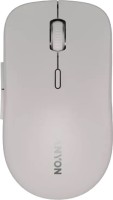
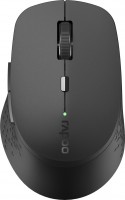
The compact mouse with right-handed ergonomics is positioned as an inexpensive multi-switchable wireless mouse. The model supports connection both via Bluetooth version 3.0 and 4.0, and via a radio channel with a frequency of 2.4 Hz (using a USB transmitter). Rapoo M300 Silent can be paired with three devices at the same time, including laptops, PCs, tablets, smart TVs, switching correctly to work with them.

The maximum resolution of the sensor is 1600 DPI, and using a separate button on the body, you can set three other available values: 1300/1000/600 DPI. The total number of manipulator keys in addition to the scroll wheel is five. The manufacturer claims quiet operation of the switches. The model is powered by a single AA-type battery, the charge of which will last for up to 9 months.

The information in the model description is for reference purposes.
Always clarify the specifications and configuration of the product with the online store manager before purchasing.
Catalog Rapoo 2026 - new arrivals, bestsellers, and the most relevant models Rapoo.


Buy Rapoo M300 Silent

All prices 6 →
When you make a purchase through links on our site, we may receive a affiliate commission.

Rapoo M300 Silent Wireless Mouse, Bluetooth and Wireless (2.4 GHz), Multi-Mode, 1600 DPI Silent Buttons, Light Grey

Colour Name: lightgrey Product Description Rapoo M300 Silent Wireless Mouse, Bluetooth and Wireless (2.4 GHz), Multi-Mode, 16... more00 DPI Silent Buttons,
OnBuy.com
Delivery: in United Kingdom
Report
£12.95

Rapoo M300 Silent souris Ambidextre RF sans fil Bluetooth Optique 1600 DPI 18048

Amazon.co.uk
Delivery: in United Kingdom
Report
£14.99

Rapoo M300 Silent Wireless Mouse Bluetooth and Wireless 24 GHz Multi-Mode 1600 DPI Silent Buttons lightgrey 18047

Amazon.co.uk
Delivery: in United Kingdom
Report
£14.75

Rapoo 18049

Features:Reliable multi-mode wireless connection:- Connect via Bluetooth 3.0, 4.0, and 2.4 GHz- Connect to multiple devices-... moreSwitch among connected devices in one click- Adjustable 1600 high-resolution DPI sensor- Silent click- Up to 9 months battery life Frequently Asked Questions: M300 Silent:Pair your first device:- Turn on the mouse.- Keep pressing the Bluetooth button for at least 3 seconds to pair. The status LED flashes in red slowly. The mouse is discoverable for 2 minutes.- Search for Rapoo mouse and click Connect. When the mouse and your device are paired, the light turns off.- Pair your second device:- Press the Bluetooth button to switch to another channel.- Follow Steps 2 and 3 of Pair your first device to connect your second device.How to connect M300 to a MacBook/ PC/ Laptop via 2.4 GHz wireless transmission with a USB dongle?- Take out the receiver from the mouse- Place the receiver into a PC or laptop USB port.How to connect M300 to an iPad or an iPhone:- Turn on the mouse.- Press the device button to select a channel.- Status LED blinks fast.- Press the Bluetooth button for 3 seconds.- Status LED blinks slower.- Go to the Bluetooth panel on your device.- Search for Rapoo mouse and click Connect.- If paired, the status LED turns off.- For easy step-by-step visual instructions please scroll down this page and watch the video tutorial Connecting a Rapoo Multi-mode Wireless mouse.- Turn on the mouse.- Press the device button to select a channel.- Status LED blinks fast.- Press the Bluetooth button for 3 seconds.- Status LED blinks slower.- Go to the Bluetooth panel on your device.- Search for Rapoo mouse and click Connect.- If paired, the status LED turns off.- For easy step-by-step visual instructions please scroll down this page and watch the video tutorial Connecting a Rapoo Multi-mode Wireless mouse.How to switch use among multiple devices with the M300:- Turn on your mouse.- Connect it with your working devices via Bluetooth or the USB receiver as explained in the FAQs above.- Press the Bluetooth button to switch among up to 3 paired devices. The mouse connects up to 2 devices via Bluetooth and 1 via the 2.4 GHz receiver.How to repair the 2.4 GHz wireless connection:- After you unplug and replug the USB receiver, within 30 seconds, turn off the mouse and then turn it on with the left key pressed.I have lost/broken the USB receiver (dongle). Can I receive a new USB-receiver:It is not possible to provide a replacement receiver for this product.- This is because during production the product and the Nano USB receiver (dongle) are assigned a unique code, so the product can only communicate with the bundled original receiver. This production process is also performed for security reasons.I just bought it and cannot find the USB receiver. Where is it:- The USB receiver is stored inside the battery compartment of the mouse. The special receiver storage compartment is located there so you can always store the dongle safely when not in
Tradeinn.com
Delivery: in United Kingdom
Report
£15.00

Rapoo Rapoo M300G Silent Wireless Mouse 2400 DPI Multi-mode Bluetooth Mouse Portable Optical Mice Ergonomic Design Support 2

Rapoo M300G Silent Wireless Mouse 2400 DPI Multi-mode Bluetooth Mouse Portable Optical Mice Ergonomic Design Support 2 Devices
Aliexpress.com
Delivery: to United Kingdom
Report
£22.12

Rapoo M300 Silent souris Ambidextre RF sans fil Bluetooth Optique 1600 DPI 18049

Amazon.co.uk
Delivery: in United Kingdom
Report
£25.39
Model overview based on user reviews  
The Rapoo M300 Silent mouse offers a blend of features that cater to both comfort and functionality. Users appreciate its quiet keys and the ability to connect up to three devices simultaneously, making it versatile for multi-device setups. The mouse is praised for its excellent sensor performance and affordable price. However, some users have experienced issues with the USB connection, noting that it can be challenging to connect via Bluetooth and that the radio connection may stop working. Additionally, there are concerns about the durability of the back cover, as it may have a slight play and can break during battery replacement. Despite these drawbacks, many users are satisfied with its autonomy and overall performance, finding it a reliable choice for everyday use.
Pros

Cons

Satisfied with the purchase of this mouse.
6 May 2020 
I bought this mouse more than 4 months ago and have no regrets! For those who are interested, you can see a detailed review and experience of using this mouse - https://youtu.be/3PiNH4RSEKk
price, quiet keys, autonomy, software, you can connect 3 devices at the same time, excellent sensor work, and it also does not glow (good).
only 2 keys are quiet, there are nuances when working from a usb transmitter (see review), a small play in the back cover.
swidlovuse Rapoo M300 Silent few months
A bear is strong, you can't break it with your hands, but it's better not to crack nuts with it.
22 January 2022 
Better not to buy
comfortable
Stopped working via radio (USB). Connects via Bluetooth with some difficulty, but it works. During battery replacement, the cover fastening clip broke.
use Rapoo M300 Silent more than year
Add Review