D-Link DWA-192
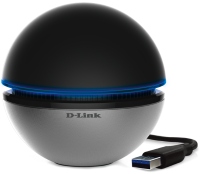 | Outdated Product A Wi-Fi adapter in the image and likeness of a futuristic ball that allows you to upgrade a desktop PC or laptop to the speed of a Wi-Fi 5 standard wireless network. The model is connected to a computer via a USB connector. To do this, the device package includes a corresponding wire about 90 cm long. The maximum data exchange rate for the device is 450 Mbps when operating at a frequency of 2.4 GHz and 1300 Mbps at a carrier frequency of 5 GHz. There are 3 antennas in the design of the model, all of them are placed inside the Wi-Fi adapter case. D-Link DWA-192 supports the AC Smartbeam function, which uses beamforming technology in the direction of client devices (a kind of analogue of Beamforming). The feature works exclusively at a frequency of 5 GHz. The device provides high-quality bro...adcasting of streaming video broadcasts and guarantees a stable connection for online games. Note that the model is almost the only wireless adapter of the AC1900 standard - its counterparts usually belong to lower classes. The Wi-Fi adapter was designed specifically for desktop users with a fast router that supports the 5 GHz frequency band. |


A Wi-Fi adapter in the image and likeness of a futuristic ball that allows you to upgrade a desktop PC or laptop to the speed of a Wi-Fi 5 standard wireless network. The model is connected to a computer via a USB connector. To do this, the device package includes a corresponding wire about 90 cm long. The maximum data exchange rate for the device is 450 Mbps when operating at a frequency of 2.4 GHz and 1300 Mbps at a carrier frequency of 5 GHz.
There are 3 antennas in the design of the model, all of them are placed inside the Wi-Fi adapter case. D-Link DWA-192 supports the AC Smartbeam function, which uses beamforming technology in the direction of client devices (a kind of analogue of Beamforming). The feature works exclusively at a frequency of 5 GHz. The device provides high-quality broadcasting of streaming video broadcasts and guarantees a stable connection for online games. Note that the model is almost the only wireless adapter of the AC1900 standard - its counterparts usually belong to lower classes. The Wi-Fi adapter was designed specifically for desktop users with a fast router that supports the 5 GHz frequency band.
|
| ||||||||||||||||||||||||||||||||||||||||||||||||||||||||||||

Always clarify the specifications and configuration of the product with the online store manager before purchasing.
Catalog D-Link 2026 - new arrivals, bestsellers, and the most relevant models D-Link.
I have been using it for six months on my PC. Design, as silly as it may sound, the ability to turn off the device's backlight, that's all. It does NOT perform its primary function, periodically shuts down, and usually does so at the most inconvenient times, causing some programs to crash. However, if you need it for internet browsing, this won't hinder you in any way. It's terrible for gaming. It heats up quite a lot, which is also disappointing. |